
The ability to learn AI coding is no longer optional for professionals who want to stay competitive. Whether you're automating spreadsheet macros, building simple scripts, or debugging complex functions, AI tools like ChatGPT and Claude can help you write code faster and with fewer errors. This guide shows you exactly how to use AI for coding tasks, with ready-to-use prompts and real-world examples that deliver immediate results.
Understanding AI Coding Assistance
When you learn AI coding, you're not learning to replace traditional programming knowledge. You're learning to leverage AI as a collaborative partner that accelerates your workflow.
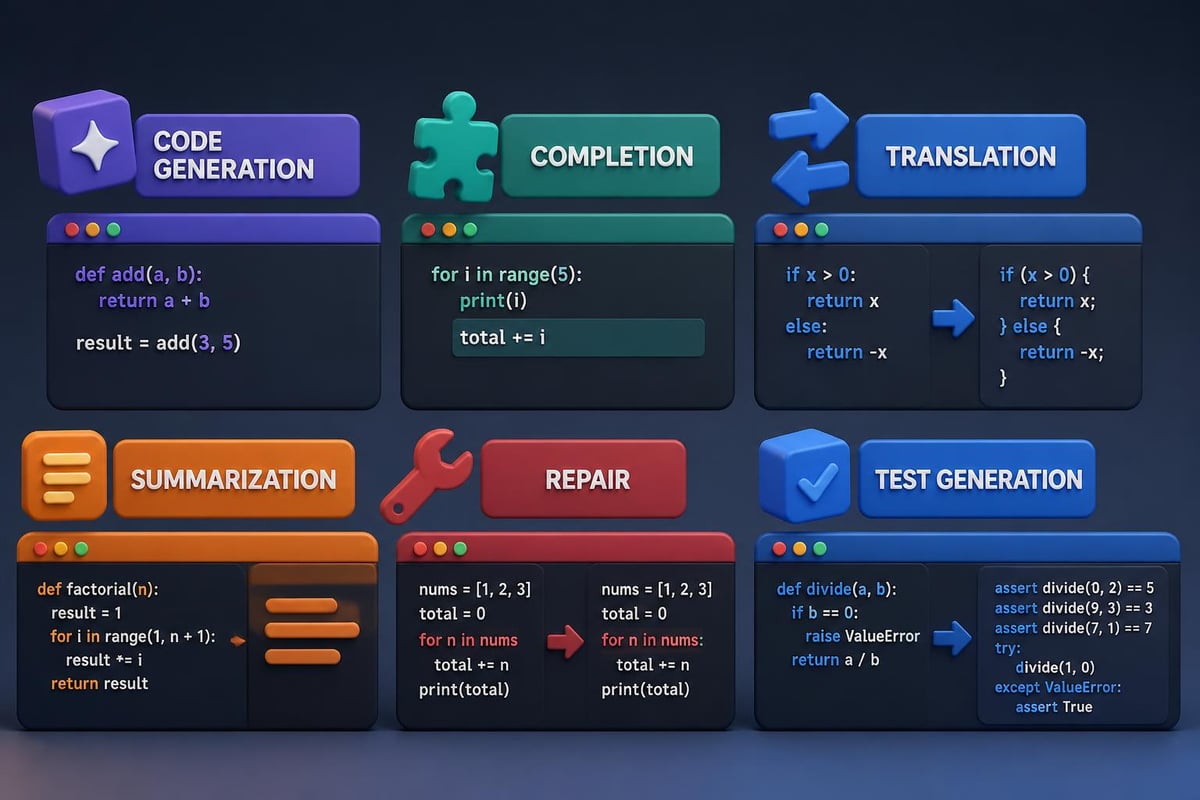
AI coding tools provide six distinct types of assistance: code generation, code completion, code translation, code summarization, code repair, and test generation. According to research on large language models in coding, these capabilities form a comprehensive workflow that professional developers now rely on daily.
Here's what AI excels at:
- Writing boilerplate code from plain English descriptions
- Debugging errors with context-aware suggestions
- Translating code between programming languages
- Explaining complex code snippets in simple terms
- Generating test cases and documentation
The key is knowing which prompts to use and how to structure your requests for optimal results.
Setting Up Your AI Coding Environment
Before you learn AI coding techniques, you need the right setup. The good news is that you can start immediately with tools you probably already have access to.
Choosing Your AI Tool
ChatGPT and Claude are the most accessible options for coding assistance in 2026. Both handle multiple programming languages and can work with everything from Python scripts to SQL queries.
| Feature | ChatGPT | Claude |
|---|---|---|
| Code generation | Excellent | Excellent |
| Long file handling | Good | Superior |
| Context retention | 8K-32K tokens | 100K+ tokens |
| Best for | Quick scripts, debugging | Large codebases, refactoring |
For most coding tasks, either tool works well. Claude handles longer code files better, while ChatGPT often provides faster responses for simple scripts.
Creating Your First Coding Prompt
The quality of your code output depends entirely on how you structure your prompt. Vague requests produce vague code. Specific prompts with context produce production-ready results.
Essential elements of effective coding prompts:
- Programming language (be explicit)
- Specific task (what the code should do)
- Input/output format (what goes in, what comes out)
- Constraints (libraries to use or avoid, performance requirements)
- Error handling (how to manage edge cases)
Writing Your First AI-Generated Code
Let's walk through a practical example that demonstrates how to learn AI coding by actually doing it. We'll create a Python script that processes CSV files.
The Basic Generation Prompt
Start with a clear, structured prompt that leaves no ambiguity:
Write a Python script that:
- Reads a CSV file named "sales_data.csv"
- Calculates the total sales by product category
- Exports results to a new CSV called "category_totals.csv"
- Includes error handling for missing files
- Uses pandas library
- Adds comments explaining each section
This prompt specifies the language, task, input/output files, error handling, required library, and documentation needs.
Real Output Example
When you use the prompt above, AI generates complete, working code:
import pandas as pd
import sys

def calculate_category_totals(input_file, output_file):
    """
    Calculate total sales by product category from CSV data.

    Args:
        input_file: Path to input CSV file
        output_file: Path to output CSV file
    """
    try:
        # Read the sales data
        df = pd.read_csv(input_file)

        # Verify required columns exist
        if 'category' not in df.columns or 'sales' not in df.columns:
            raise ValueError("CSV must contain 'category' and 'sales' columns")

        # Calculate totals by category
        category_totals = df.groupby('category')['sales'].sum().reset_index()
        category_totals.columns = ['Category', 'Total Sales']

        # Export to new CSV
        category_totals.to_csv(output_file, index=False)
        print(f"Successfully exported results to {output_file}")

    except FileNotFoundError:
        print(f"Error: {input_file} not found")
        sys.exit(1)
    except Exception as e:
        print(f"Error processing file: {str(e)}")
        sys.exit(1)

if __name__ == "__main__":
    calculate_category_totals("sales_data.csv", "category_totals.csv")
This code is immediately usable. Copy it, save it as a .py file, and run it with your data.
Debugging Code with AI Assistance
Learning to debug with AI is just as important as learning to generate code. When you hit an error, AI can identify the problem and suggest fixes faster than traditional debugging methods.
The Debug Prompt Template
When code breaks, use this proven prompt structure:
I'm getting this error in Python:
[paste exact error message]

Here's my code:
[paste relevant code section]

Context: I'm trying to [explain what the code should do]

Please:
1. Explain what's causing the error
2. Provide the corrected code
3. Suggest how to prevent this error in the future
This three-part request gives you understanding, a fix, and prevention knowledge.
Common debugging scenarios AI handles well:
- Syntax errors (missing colons, parentheses, indentation)
- Type mismatches (string vs. integer operations)
- Logic errors (incorrect loop conditions)
- Import errors (missing or incorrect libraries)
- API integration issues (authentication, endpoints)
AWS’s AI training for developers includes extensive resources on using AI for debugging and error resolution in production environments.
Advanced AI Coding Techniques
Once you learn AI coding basics, you can tackle more sophisticated tasks. These advanced techniques separate professionals who dabble with AI from those who integrate it into their daily workflow.
Code Translation Between Languages
Need to convert JavaScript to Python? AI handles translation with context awareness:
Translate this JavaScript function to Python:

[paste JavaScript code]

Requirements:
- Maintain the same logic and output
- Use Python naming conventions (snake_case)
- Include type hints
- Add docstrings
Refactoring for Performance
AI can analyze existing code and suggest optimizations:
Refactor this Python code for better performance:

[paste code]

Focus on:
- Reducing time complexity
- Minimizing memory usage
- Removing redundant operations
- Maintaining readability

Explain each optimization you make.
| Task Type | Prompt Complexity | Time Saved vs Manual | Accuracy Level |
|---|---|---|---|
| Simple scripts | Low | 70-80% | 95%+ |
| API integration | Medium | 50-60% | 85-90% |
| Algorithm optimization | High | 30-40% | 75-85% |
| Legacy code refactoring | High | 40-50% | 80-85% |
The comprehensive AI roadmap offers detailed courses on advanced coding assistance techniques and best practices.
Building Real-World Applications
To truly learn AI coding, you need to build complete applications, not just isolated scripts. Here's how to approach larger projects.
Breaking Down Complex Projects
AI works best with focused, specific tasks. Break your project into modules and tackle each one separately.
For a web scraping application:
- First prompt: Write the HTTP request handler
- Second prompt: Create the HTML parser
- Third prompt: Build the data cleaning function
- Fourth prompt: Design the export mechanism
- Fifth prompt: Add error handling and logging
Each component gets its own detailed prompt. Then you integrate them yourself or ask AI to help with integration.
Iterative Development Process
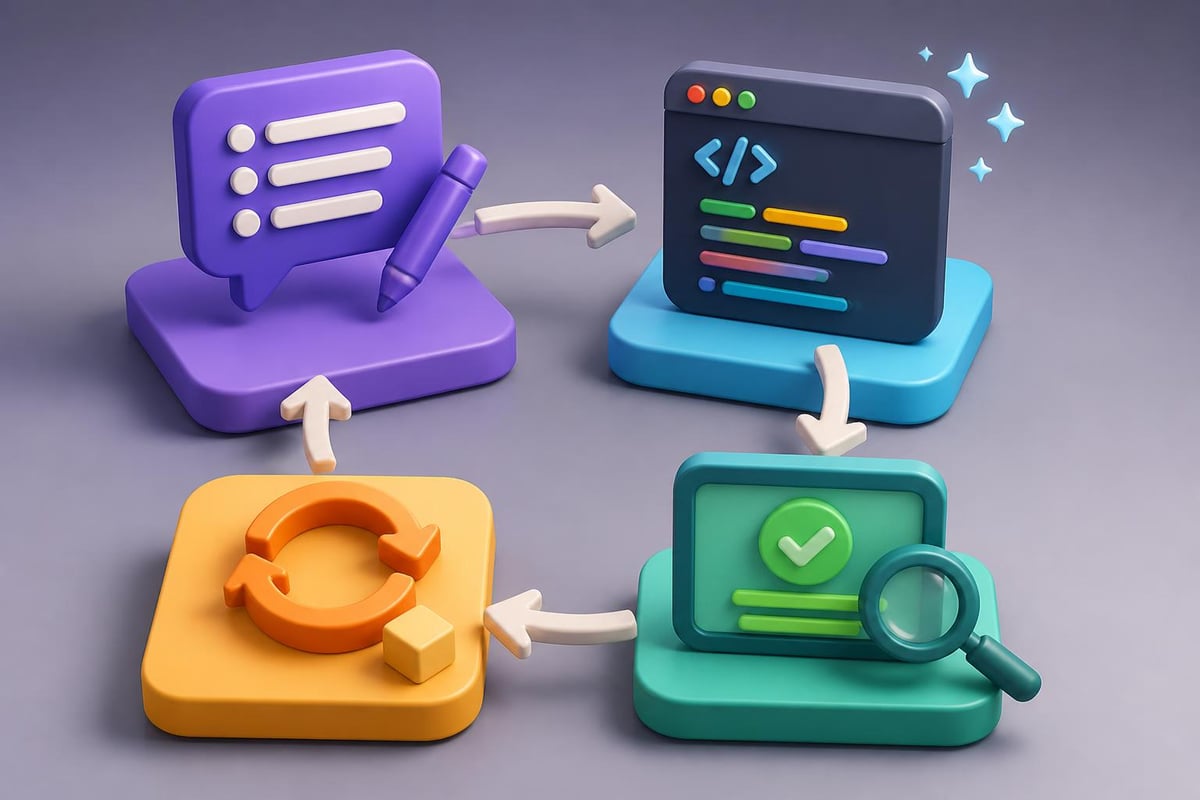
Professional AI coding follows a cycle:
- Generate initial code from your prompt
- Test with real data to find edge cases
- Refine the prompt with specific issues
- Regenerate code with improvements
- Repeat until production-ready
This iterative approach is exactly how Microsoft Developer’s AI lessons teach professional integration of AI into development workflows.
For those serious about mastering AI coding and automation skills, Mammoth Club – AI Certification & Training provides comprehensive courses that go beyond basic prompts. With access to 3,000+ courses and hands-on practice, you'll develop job-ready skills in using ChatGPT, Claude, and other AI tools for real programming challenges.

Automating Repetitive Coding Tasks
The ultimate goal when you learn AI coding is automation. Stop writing the same patterns repeatedly and let AI handle the boilerplate.
Creating Code Templates
Generate reusable templates for common tasks:
Create a Python class template for REST API clients that includes:
- Authentication handling
- Rate limiting
- Error retry logic
- Response parsing
- Logging
- Type hints throughout

Make it generic so I can customize for any API.
The result becomes your starting point for every API integration project.
Database Query Generation
AI excels at SQL generation from natural language:
Write a SQL query that:
- Joins customers, orders, and products tables
- Filters for orders in the last 30 days
- Calculates total revenue by customer
- Orders by revenue descending
- Limits to top 50 customers
- Uses PostgreSQL syntax
This prompt produces a complex JOIN query with aggregation in seconds.
Common automation tasks AI handles:
- Data validation scripts
- File processing pipelines
- Report generation
- Email automation
- Database migrations
- Testing frameworks

Handling Security and Best Practices
As you learn AI coding, never skip security considerations. AI generates functional code, but you're responsible for ensuring it's secure.
Security-Focused Prompts
Always include security requirements in your prompts:
Write a Python function that authenticates users with the following requirements:
- Uses bcrypt for password hashing
- Implements input validation to prevent SQL injection
- Adds rate limiting to prevent brute force attacks
- Logs failed attempts
- Never stores passwords in plain text
- Returns specific error types (don't reveal whether username or password was wrong)

Include comments explaining each security measure.
This prompt explicitly requests security features rather than assuming AI will include them.
Code Review with AI
Use AI to review code for vulnerabilities:
Review this code for security vulnerabilities:

[paste code]

Check for:
- SQL injection risks
- XSS vulnerabilities
- Authentication weaknesses
- Data exposure issues
- Input validation gaps

Explain each issue and provide secure alternatives.
Professional developers who learn AI coding treat it as a collaborator, not a replacement for security knowledge. The practical AI tutorials offered by platforms focused on real-world applications emphasize this balanced approach.
Integrating AI Coding into Your Workflow
Success with AI coding depends on seamless integration into your existing development process.
Daily Workflow Integration
Morning routine:
- Use AI to generate boilerplate for new features
- Review and customize the output
- Write tests (or have AI generate test cases)
During development:
- Debug errors as they occur with AI assistance
- Refactor code sections for clarity
- Generate documentation from existing code
Before commits:
- Have AI review changes for bugs
- Generate commit messages from diffs
- Update documentation automatically
Team Collaboration
When working with teams, establish AI coding standards:
- Prompt sharing: Document successful prompts for common tasks
- Code review: Always review AI-generated code before merging
- Testing requirements: AI code needs the same test coverage as manual code
- Documentation: Note which code sections were AI-assisted
Learning Resources and Next Steps
To continue advancing your AI coding skills, focus on structured learning paths that build on fundamentals.
Recommended Learning Progression
Week 1-2: Basics
- Simple script generation
- Error debugging
- Code explanation requests
Week 3-4: Intermediate
- Multi-file projects
- API integrations
- Database operations
Week 5-8: Advanced
- Architecture design with AI input
- Performance optimization
- Security hardening
Week 9+: Specialization
- Domain-specific applications
- Custom AI coding workflows
- Team integration strategies
The CodeNet dataset provides insight into how AI systems learn to code across 55 programming languages, offering valuable context for understanding AI coding capabilities and limitations.
Building Your Prompt Library
As you learn AI coding, save your best prompts. Create a personal library organized by:
- Programming language
- Task type (generation, debugging, optimization)
- Complexity level
- Success rate
This library becomes increasingly valuable as you encounter similar problems. You're building institutional knowledge that compounds over time.
Community Learning Approaches
Research on community-based AI learning emphasizes that learning AI coding is most effective when grounded in real-world practice and peer collaboration. Join communities where developers share prompts, discuss challenges, and review each other's AI-assisted code.
Measuring Your AI Coding Progress
Track concrete metrics to see improvement:
| Metric | Baseline | Target | How to Measure |
|---|---|---|---|
| Time to working prototype | Manual baseline | 50% reduction | Track from idea to testable code |
| Debugging time | Pre-AI average | 60% reduction | Time from error to resolution |
| Code quality | Manual review score | Maintain or improve | Peer reviews, automated linting |
| Documentation coverage | Current % | 90%+ | Automated doc coverage tools |
Don't just measure speed. Quality matters more than velocity. AI should help you write better code faster, not just faster code.
Learning AI coding transforms how you approach programming challenges, turning hours of manual work into minutes of strategic prompting. The key is treating AI as a powerful collaborator while maintaining your role as the architect and reviewer of the final product. Whether you're automating data processing, building web applications, or debugging complex systems, AI coding assistance delivers measurable time savings and quality improvements. Ready to put these techniques into practice? Prompt Hero.Ai offers step-by-step tutorials, copy-paste prompts, and real examples designed specifically for professionals who want to leverage AI tools like ChatGPT and Claude to solve actual business problems efficiently.