
An AI prompt engineering course teaches you to write structured instructions that make tools like ChatGPT and Claude produce accurate, usable output on the first or second try. A good one covers prompt structure, proven techniques, testing, and hands-on practice with your own work, and most professionals can learn the core skills in a few focused weeks of regular practice. This guide explains what to look for, what the curriculum should include, and how to practice so the skill transfers to your job.
What Is Prompt Engineering, and Who Needs It?
Prompt engineering is the practice of designing instructions for an AI model so it returns the output you actually need. It is less about clever phrasing and more about supplying the right context, constraints, and format.
Anyone who uses AI for repeat work benefits: marketers drafting campaigns, analysts summarizing reports, operations managers writing process documentation, consultants building client deliverables. If you have ever re-run a prompt four times to get something usable, you have felt the gap this skill closes.
You do not need to code. Most professional use happens in a chat window, and the skill is closer to writing a good brief for a capable but literal colleague. Coding becomes relevant only when you connect prompts to software, which is a separate path from everyday business use.
What Should an AI Prompt Engineering Course Cover?
A solid course moves from fundamentals to techniques to evaluation, and it makes you practice at each step. These are the topics worth looking for:
- How language models behave. Understanding that models predict likely text, have context limits, and can produce confident errors changes how you write prompts.
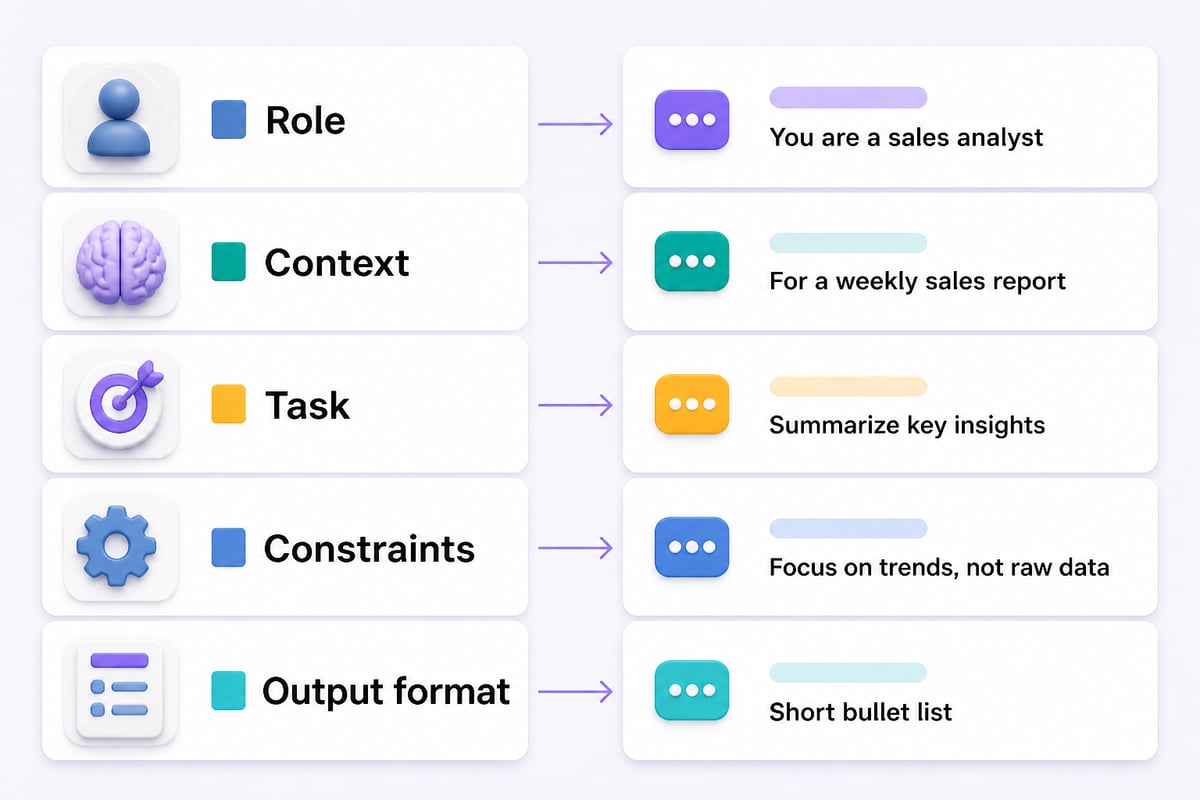
- Prompt anatomy. Role, context, task, constraints, and output format as separate, deliberate parts.
- Core techniques. Few-shot examples, step-by-step reasoning, task decomposition, and structured output.
- Iteration and testing. Comparing versions of a prompt against the same inputs.
- Tool differences. How ChatGPT, Claude, and Gemini respond differently to the same instruction.
- Responsible use. Handling confidential data, checking facts, and disclosing AI assistance where required.
- Applied projects. Building prompts for tasks you actually perform.
Courses that spend most of their time on a list of "magic phrases" are weak. Models change, and phrases age quickly. Principles and testing habits last.
The Core Skills You Will Practice
Strong prompts share a repeatable structure, and learning to apply it consistently is the center of any course. Google Cloud’s prompt design guidance recommends clear instructions, few-shot examples, role assignment, contextual information, structured prompts, and breaking complex tasks into smaller ones. Those six ideas cover most of what separates a mediocre prompt from a dependable one.
Clear Instructions and Context
State the task, the audience, and the success criteria. "Summarize this report" leaves the model guessing. "Summarize this quarterly sales report for a regional director in five bullets, focusing on changes against last quarter" gives it a target.
Few-Shot Examples
Showing two or three examples of the output you want often beats describing it. If you need customer replies in a specific tone, paste two approved replies and ask for a third in the same style.
Roles and Structure
Assigning a role ("act as a financial analyst reviewing a budget") narrows the register and vocabulary. Structuring the prompt with labeled sections makes long instructions easier for the model to follow and easier for you to edit.
Task Decomposition
Complex jobs work better as a chain of smaller prompts. Instead of "write a market analysis," ask for the competitor list, then the comparison criteria, then the draft, reviewing each step before moving on. Microsoft’s prompt engineering documentation also covers techniques such as few-shot learning, task decomposition, output structure, and grounding context, which makes it a useful reference to read alongside any course.
How a Prompt Gets Better: The Iteration Loop
Prompting is an iterative process, not a one-shot writing task. Google Cloud describes prompt engineering as an iterative, test-driven process, and says rigorous testing and evaluation remain crucial for optimizing model performance. In practice, that means a loop you can run in minutes.
- Write a first version using the structure above.
- Run it on three to five realistic inputs, not just one convenient example.
- Mark what failed: wrong tone, missing details, invented facts, ignored format.
- Change one thing at a time, such as adding an example or tightening a constraint.
- Re-run on the same inputs and compare.
- Save the winning version with a note about what it is for.
The "same inputs" step is what most beginners skip, and it is what makes improvement measurable. If you change the prompt and the test case together, you cannot tell which change helped.
Why Testing Matters More Than Clever Wording
Model outputs vary between runs and between model versions, so a prompt that works today needs to be checked again later. OpenAI’s prompt engineering guide states that outputs are non-deterministic and recommends building tests and evaluation suites to monitor prompt behavior as prompts and model versions change. It also recommends pinning production applications to specific model snapshots to help ensure consistent behavior.
For a professional who is not building software, the lesson translates simply. Keep a small test set for any prompt your team relies on: three to five representative inputs and a note on what a good answer looks like. When a tool updates or results drift, re-run the set before you trust the prompt again.
Hypothetical example: a team lead could use one prompt to turn meeting transcripts into action-item lists, saving past transcripts with the approved lists to re-run after a model update.

How to Choose a Prompt Engineering Course
The right course matches your tools, your schedule, and the kind of work you do. Compare options on these points:
| Factor | What to look for | Warning sign |
|---|---|---|
| Hands-on practice | Exercises using real tasks, with feedback | Video-only lessons with no practice |
| Tool coverage | ChatGPT, Claude, and at least one other model | Teaches one tool's interface only |
| Evaluation | Covers testing and comparing prompts | Stops at "write a good prompt" |
| Currency | Recently updated content | Screenshots and features from older model generations |
| Relevance | Examples from business functions | Only toy examples like poems or trivia |
| Credential | Certificate that states what you completed | Vague "master" claims with no syllabus |
Check the syllabus before paying. A transparent course lists its modules, its projects, and how long each takes. If you want a structured credential alongside self-study, Mammoth Club's AI certification and training gives access to a large library of courses and practice questions on using tools like ChatGPT and Claude for task automation and productivity.

Free Resources vs. Paid Courses
Free documentation can teach the fundamentals, and a paid course adds structure, feedback, and accountability. Neither is strictly better.
Free resources work well when you:
- Are comfortable setting your own learning plan
- Want to read vendor guidance directly, such as Google AI Studio’s prompting strategies guide, which advises experimenting and refining for your specific use case
- Need a quick refresher on one technique
A paid or structured course helps when you:
- Need a sequence so you do not skip foundations
- Want projects reviewed or graded
- Need a certificate for a performance review or job application
- Learn better with a deadline
A reasonable hybrid: follow a structured course for the first two weeks, then use free documentation and your own work tasks to deepen specific skills.
A Four-Week Learning Plan for Busy Professionals
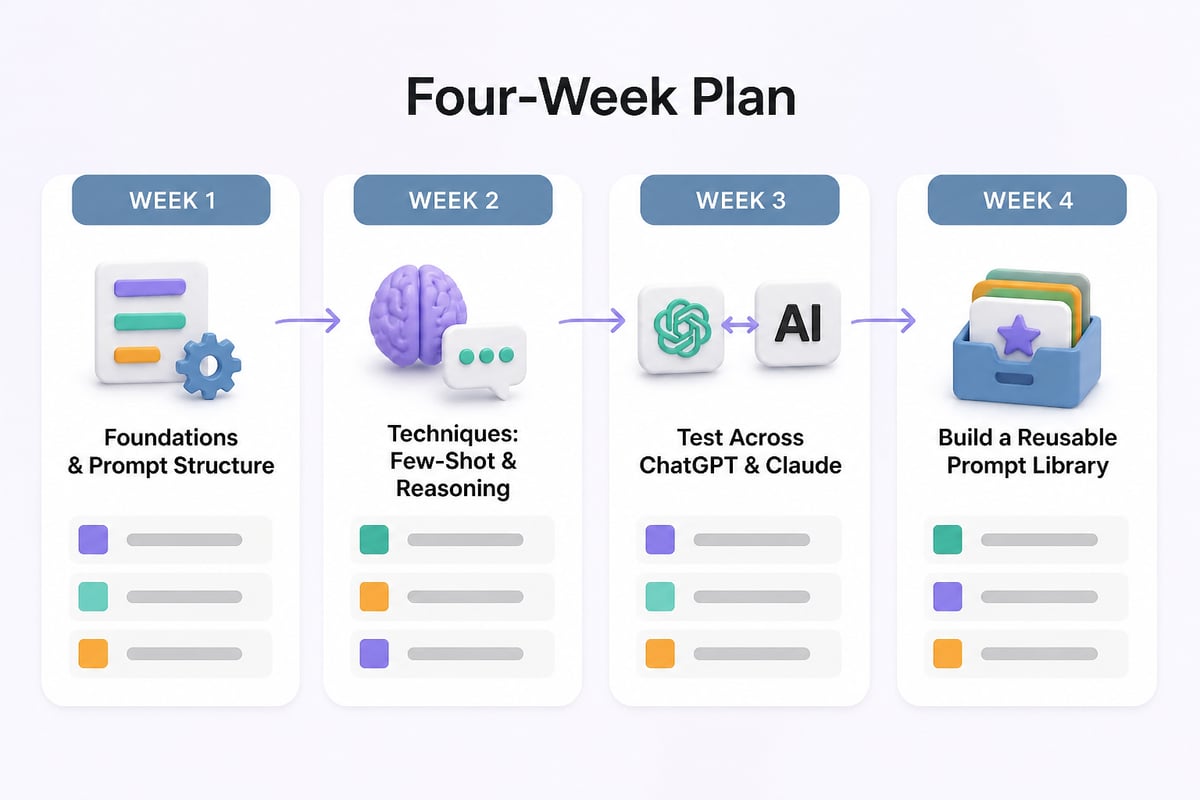
A few weeks of regular practice can build solid working skill. The plan below is a suggestion, not a standard, so adjust it to your workload.
Week 1: Foundations. Learn how models handle context and where they fail. Rewrite five of your current prompts using the role, context, task, constraints, and format structure.
Week 2: Techniques. Practice few-shot examples and step-by-step reasoning on one recurring task, such as drafting client emails or summarizing documents.
Week 3: Testing. Build a test set for your two most-used prompts. Run each across tools and note the differences between ChatGPT and Claude outputs.
Week 4: Library building. Turn your best prompts into reusable templates with placeholders for the parts that change. Document when to use each one.
Building a Personal Prompt Library That Lasts
A prompt library is the practical output of any course, and it is the part that keeps paying off after the course ends. Most professionals repeat the same ten or fifteen tasks. Capturing a tested prompt for each one saves time every week.
Store each entry with these fields:
- Task name and when to use it
- The prompt template, with brackets marking the parts to fill in
- A sample input and a good output, so you can recognize success
- The tool and date last tested
- Known weaknesses, such as "invents figures if the source lacks them"
Review the library every few months. Retire prompts you no longer use, and re-test the important ones after major tool updates. For ready-made starting points, the AI prompting examples collection shows how prompts for common business tasks are put together, and the ChatGPT prompt engineering page covers techniques specific to that tool.
Common Mistakes a Course Should Help You Avoid
Most weak results trace back to a small set of habits:
- Vague goals. Asking for "a good summary" without defining audience or length.
- Missing source material. Asking the model to recall facts instead of pasting the text it should work from. This is how invented details creep in.
- Overloaded prompts. Packing five unrelated tasks into one request.
- Skipping review. Treating output as final. AI drafts need a human check, especially for numbers, names, and claims.
- Pasting sensitive data. Sharing confidential client or employee information into tools without approval from your organization.
- Never saving what works. Rewriting the same prompt from memory every time.
Each of these is fixable with habits, not talent. A course earns its price if it makes these habits automatic.
Frequently Asked Questions
How long does it take to learn prompt engineering?
Working professionals can pick up the fundamentals quickly and build confident, repeatable skill with regular practice over several weeks. Deep expertise comes from applying the techniques to your own tasks over time.
Do I need coding experience?
No. Everyday business prompting happens in a chat interface and relies on clear writing. Programming matters only if you plan to connect prompts to applications, and that path often involves Python. If it interests you, a Python for AI course is a natural next step.
Is prompt engineering still worth learning as models improve?
Yes, though the emphasis shifts. Models handle sloppy instructions better than they used to, but clear context, good examples, and testing still determine whether output is reliable enough for work. The durable parts of the skill are structuring a task and checking results, not memorizing phrases.
What is the difference between a prompt and prompt engineering?
A prompt is a single instruction you send to a model. Prompt engineering is the process of designing, testing, and refining prompts so they perform consistently across many inputs.
Will a certificate help my career?
It can document that you completed structured training, which some employers value. It carries more weight when paired with examples of work you improved using AI, such as a prompt library or a documented time saving.
Which AI tool should I practice with?
Start with the one your organization permits, then test the same prompts in a second tool. Comparing ChatGPT and Claude on identical tasks teaches you what is model-specific and what is a general principle. The prompt engineering with ChatGPT tutorial is a good place to see these differences in practice.
Your next step is simple: pick one task you repeat every week, write a structured prompt for it, and test it on three real inputs before you trust it. When you want step-by-step tutorials with copy-and-paste prompts and worked examples built for professionals, Prompt Hero.Ai is a practical place to continue. If you also want a certification path, Mammoth Club offers structured AI courses you can work through alongside your own practice. Start with the tutorials, build your prompt library, and add structure as your needs grow.