
What does ChatGPT do for professionals? It drafts, rewrites, summarizes, explains, translates, analyzes data, and helps you reason through problems, all from plain-language instructions. This guide walks through each use in the order most professionals adopt them, with prompts you can paste, limits to respect, and the privacy checks that belong in any workplace rollout.
What Does ChatGPT Do, Exactly?
ChatGPT is a conversational AI assistant that predicts useful text based on your instructions and the context you supply, which lets it write, transform, and analyze language on demand. It is a chatbot built on a large language model, and chatbots like it are AI systems, specifically generative AI that produces new text rather than retrieving prewritten answers.
Three behaviors explain most of its value:
- It transforms text. Rewrite for tone, shorten, expand, translate, or reformat.
- It structures thinking. Turn a messy brain dump into an outline, a decision matrix, or a project plan.
- It simulates a collaborator. Ask it to play a skeptical client, a hiring manager, or an editor, and it responds accordingly.
What it does not do is know your business by default. It has no access to your files, customers, or internal numbers unless you provide them or connect a tool. Output quality tracks input quality, which is why prompt technique matters more than the model you pick.
What Can You Do With ChatGPT at Work Every Day?
Most professionals get the fastest return from five task types: drafting, summarizing, analysis, research support, and planning. Each is repeatable, easy to check, and low risk when you review the output.
| Task type | Example request | Time saved on |
|---|---|---|
| Drafting | First draft of a client follow-up email | Blank-page start |
| Summarizing | Condense a 20-page report into five bullets | Reading and note-taking |
| Analysis | Spot trends in pasted survey comments | Sorting and tagging |
| Research support | Explain a regulation in plain language | Background learning |
| Planning | Build a 30-60-90 day plan | Structuring and formatting |
The pattern behind all five is the same: you stay responsible for judgment, and ChatGPT handles the first pass.
How Do You Write a Prompt That Gets a Usable Answer?
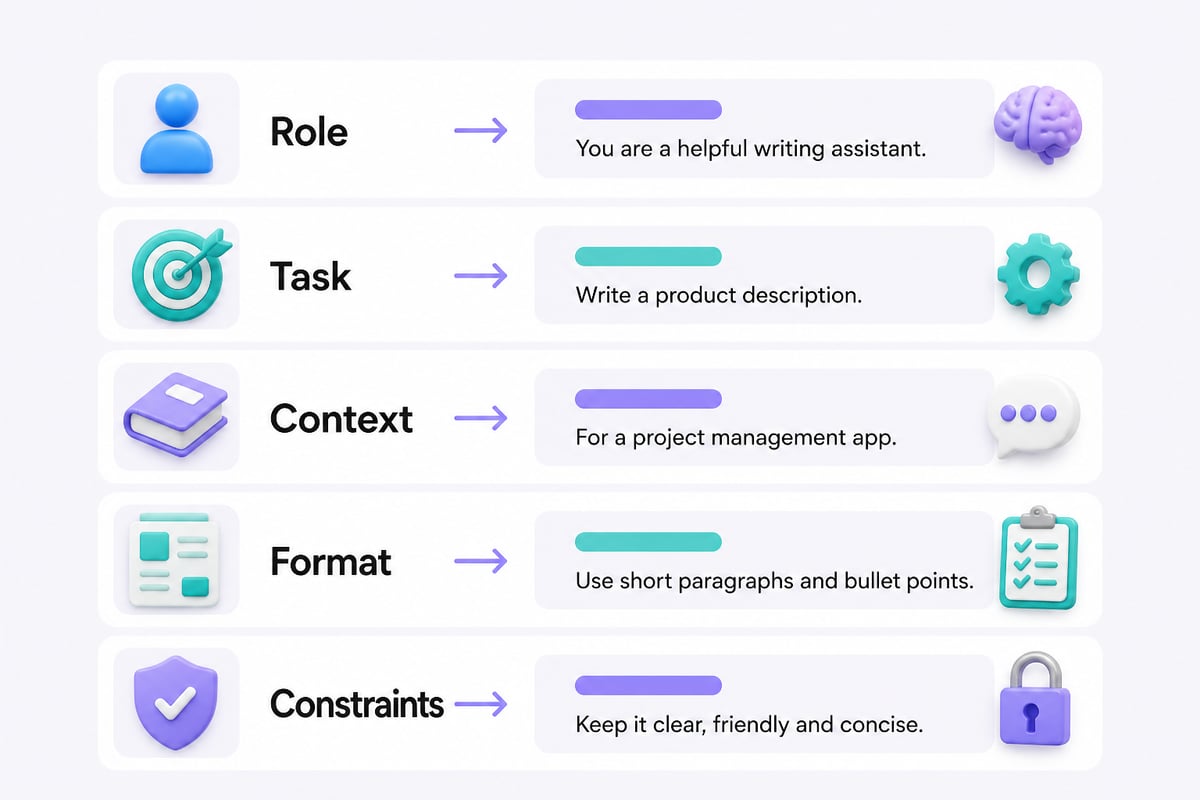
A usable prompt states the role, the task, the context, the format, and the constraints, in that order. Vague requests produce generic answers; specific requests produce drafts you can ship after light editing.
Use this five-part structure:
- Role: "Act as a senior B2B content strategist."
- Task: "Write a follow-up email after a product demo."
- Context: "The prospect is a CFO worried about implementation time. We promised a pilot plan."
- Format: "Under 150 words, three short paragraphs, one clear call to action."
- Constraints: "No buzzwords. Do not promise a delivery date."
Here is a copy-and-paste template you can adapt:
Act as [role]. Your task is to [task]. Context: [who the audience is, what happened, what matters]. Output format: [length, structure, tone]. Avoid: [phrases, claims, topics]. Before answering, ask me up to three clarifying questions if anything is unclear.
That last line matters. Inviting questions catches missing context before the model guesses. For deeper technique, the ChatGPT prompt engineering guide covers iteration patterns, few-shot examples, and ways to fix a prompt that keeps missing.
How Does ChatGPT Help With Writing and Editing?
ChatGPT works best as an editor and first-draft partner, not as a replacement author. Give it your rough notes and a clear audience, and it returns structured prose you can sharpen with your own knowledge.
Practical writing uses include:
- Turning meeting notes into a clean recap with action items and owners
- Rewriting a dense technical paragraph for a non-technical executive
- Producing three subject-line variations for an outreach email
- Adjusting tone from formal to conversational without changing the facts
- Checking a draft against a brand voice description you paste in
A reliable editing prompt: "Here is my draft. Identify the three weakest paragraphs, explain why each is weak, and rewrite only those. Keep my voice and do not add claims I did not make." Telling it what not to change protects your accuracy.
One habit pays off quickly. Paste two or three examples of writing you like, then ask the model to describe the style before it writes. The description becomes a reusable style guide you can include in later prompts.
How Can You Use It for Data, Research, and Decision Support?
ChatGPT can organize and interpret information you give it, and it can explain unfamiliar topics, but it should not be your only source for facts. Treat it as a fast analyst who sometimes states things with unearned confidence.
For analysis, paste anonymized data or text and ask for specific outputs:
- "Group these 40 customer comments into themes and count how many fall under each."
- "List the assumptions behind this forecast and flag the weakest one."
- "Compare these two vendor proposals on cost, risk, and support, in a table."
For research, use it to build understanding, then verify. Ask for a plain-language explanation of a concept, a list of questions to ask a specialist, or a map of arguments for and against a position. When it cites a statistic, source, or case, check the original before repeating it. Language models can produce plausible but wrong details, so verification is a required step, not an optional one.
For decisions, ask it to argue against your preferred option. "Give me the strongest case against this plan, and tell me what evidence would change your mind" surfaces blind spots faster than asking for approval.
Can You Build Workflows and Automations With It?
Yes, ChatGPT can sit at the center of repeatable workflows, and adoption of automation at work is already widespread. Microsoft's 2025 Work Trend Index reported that half of respondents said their organization was using AI agents to automate workstreams or business processes for entire teams or functions. The study drew on tens of thousands of employees and executives across dozens of territories, so the signal is broad rather than anecdotal.
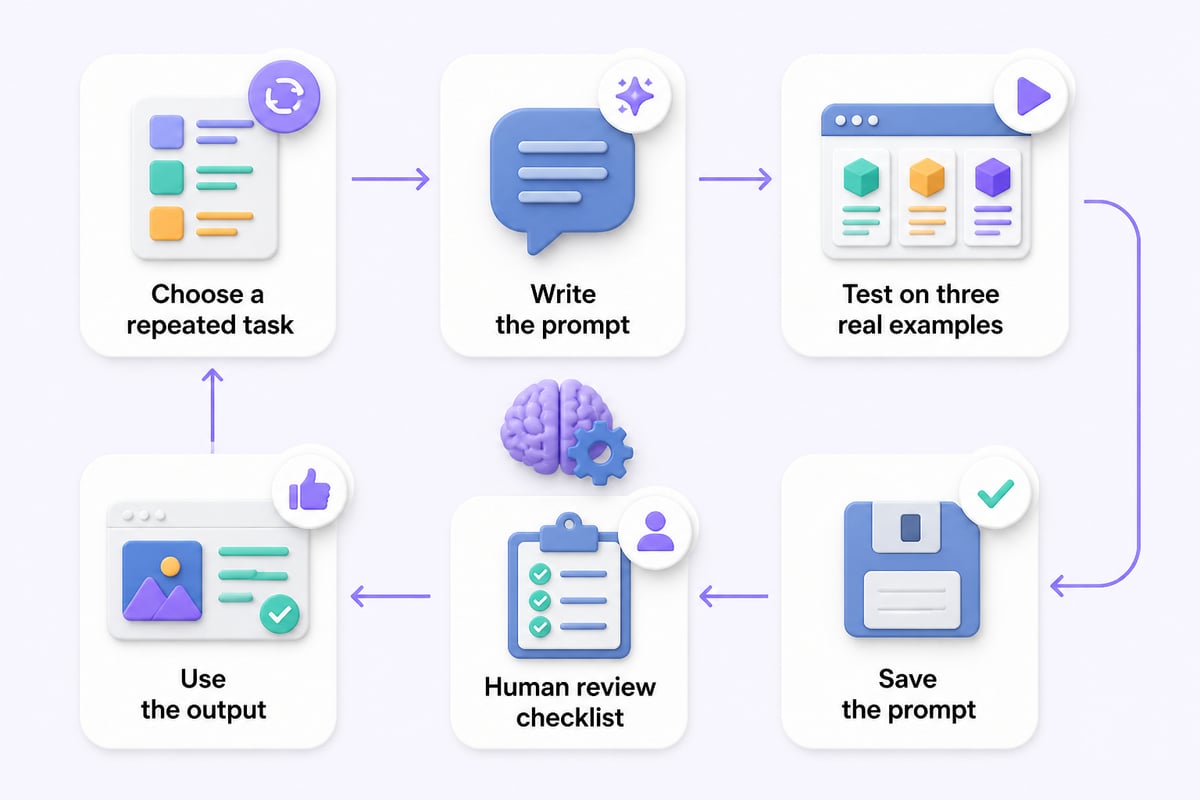
You do not need an agent platform to start. A manual workflow built from saved prompts already captures most of the value:
- Pick one task you repeat weekly, such as a status report or lead-qualification summary.
- Write the prompt once, test it on three real examples, and fix the failures.
- Save the final version with a short name and a note on what input it needs.
- Add a review checklist: facts verified, tone checked, nothing confidential included.
- Only then consider connecting it to other tools.
A sample workflow for a sales team: paste call notes, run the saved prompt, and get a CRM-ready summary with objections, next steps, and a drafted follow-up. The human reviews and sends. If you want to go further into building with code, the ChatGPT engineer overview explains how developers extend it.
How Do You Use ChatGPT for Free?
You can use ChatGPT for free by creating an account on OpenAI's website or app and using the free tier, which has usage limits and may offer a reduced set of features compared with paid plans. Check the current plan details inside the product, since limits and included features change over time.
For professionals, the free tier is enough to test whether a task is worth automating. Run your five-part prompt on a real piece of work, compare the result with how long the task takes you now, and only then decide whether a paid plan or a team workspace is justified. Free access is also a safe place to practice, as long as you follow the privacy rules in the next section and never paste confidential material.

Is It Safe to Use With Business Information?
It is safe for business use only when you control what you share and understand how your plan handles data. Consumer accounts and business workspaces treat data differently, so check which one you are in before pasting anything sensitive.
Start with these official explanations:
- OpenAI's data controls FAQ covers model-improvement preferences, chat history, exports, and how settings differ between personal and managed workspaces.
- The data usage FAQ explains how consumer and business data may be used, temporary chats, memory, and the default treatment of business-workspace data.
A practical policy for any team:
- Never paste passwords, client personal data, unreleased financials, or anything under NDA into a personal account.
- Anonymize names and figures when you only need the structure of a problem.
- Verify every factual claim, number, and citation before it leaves your desk.
- Disclose AI assistance where your industry, employer, or client contract requires it.
For organizations, a formal framework helps. NIST published its Generative AI Profile as a voluntary companion to its AI Risk Management Framework, giving teams a structure for identifying and managing generative-AI risks. It is guidance, not a legal requirement, but it gives security and compliance teams a shared vocabulary.
On the related question of downloading: install the app only from the official OpenAI website or your device's official app store, check the publisher name, and avoid third-party "ChatGPT" apps that ask for unusual permissions or payment outside the store.
What Are the Limits and Failure Modes?
ChatGPT fails in predictable ways, and knowing them lets you catch errors before they cost you credibility. The four most common are fabricated details, outdated knowledge, shallow reasoning on multi-step problems, and overconfident tone.
| Failure mode | What it looks like | How to reduce it |
|---|---|---|
| Fabrication | Invented quotes, sources, or figures | Ask for sources, then verify each one |
| Stale information | Missing recent events or rule changes | Paste current text or use a search-enabled mode |
| Weak multi-step logic | Arithmetic or sequencing errors | Ask it to show work; recheck calculations yourself |
| Overconfidence | Certain tone on uncertain claims | Ask it to rate confidence and list assumptions |
It also lacks lived context. It cannot read the politics of your organization, the history with a client, or the unwritten rules of your industry. Those inputs come from you, and a two-sentence context block in your prompt often improves the answer more than any clever phrasing.
Is it helpful for mental health? It can offer general information or a space to organize thoughts, but it is not a clinician, cannot diagnose, and should not replace professional care. If you or someone on your team is struggling, a licensed professional or an employee assistance program is the right route.
How Do You Measure Whether It Is Saving You Time?
Measure it by comparing the same task before and after, not by feel. A simple log over two weeks gives you honest numbers and shows where it helps and where it only feels productive.
Track four things for each task:
- Minutes spent without AI (your honest estimate or past average)
- Minutes spent with AI, including review and corrections
- Quality check: did the result need heavy rewriting?
- Error count: factual or tone mistakes caught during review
Tasks with high repetition, a clear format, and easy verification, such as meeting recaps and first-draft emails, usually win. Tasks needing deep originality or precise facts often save less than expected. Keep the winners, retire the rest, and refine the prompts for borderline cases.
If you want structured practice beyond trial and error, Mammoth Club offers AI certification and training, covering how to use AI tools like ChatGPT and Claude to automate tasks and build job-ready skills.

Where Should You Start This Week?
Start with one low-risk, repeatable task and build outward from there. A realistic first week looks like this:
- Day 1: Choose one recurring task, such as a weekly summary, and write a five-part prompt for it.
- Day 2: Test it on three real examples with sensitive details removed, and note every correction you make.
- Day 3: Revise the prompt to prevent those corrections, then save it.
- Day 4: Add a review checklist covering facts, tone, and confidentiality.
- Day 5: Share the prompt and checklist with a colleague and compare results.
Browse the ChatGPT category for tutorials with prompts matched to specific business tasks, so you start from tested wording instead of a blank box.
FAQ
Are chatbots considered AI?
Yes. A chatbot that generates its own responses, as ChatGPT does, is a form of artificial intelligence. Simpler chatbots that follow fixed scripts are rule-based software, which is a narrower and less flexible kind of automation.
Do I need technical skills to use ChatGPT for work?
No. You type instructions in plain language, so clear writing matters more than coding. Technical skills help only if you want to connect it to other software or build custom tools.
Should I tell clients or my employer that I use ChatGPT?
Follow your employer's policy and any client contract terms first. Where no rule exists, disclosing AI assistance on substantial deliverables is a sound way to protect trust, and you remain accountable for the accuracy of the final work either way.
Take one task you repeat every week, write a five-part prompt for it, and test it on three real examples today. When you want ready-made, tested prompts with step-by-step instructions, the Mammoth Club training library gives you structured practice, and Prompt Hero.Ai offers practical tutorials with copy-and-paste prompts and real examples built for professionals who want better results from ChatGPT, Claude, and other AI tools.