
Python has become the dominant language for artificial intelligence development, and for good reason. When you learn AI in Python, you gain access to powerful libraries, active communities, and tools that make complex algorithms accessible to anyone willing to put in the work. This guide walks you through the practical steps to build AI models, complete with code you can use immediately in your projects.
Why Python Dominates AI Development
Python's simplicity and readability make it the ideal entry point for AI development. Unlike languages that require extensive boilerplate code, Python lets you focus on solving problems rather than wrestling with syntax.
The ecosystem matters just as much as the language itself. Libraries like TensorFlow, PyTorch, and Scikit-learn handle the heavy computational lifting while you write clean, maintainable code. These tools integrate seamlessly, allowing you to move from data preprocessing to model deployment without switching environments.
Key advantages of Python for AI:
- Extensive library support for machine learning and deep learning
- Active community providing solutions and updates
- Integration with data analysis tools like Pandas and NumPy
- Cross-platform compatibility for deployment
- Readable syntax that reduces development time
When you learn AI in Python, you're also learning the same tools used at Google, Meta, and OpenAI. The basics of machine learning with TensorFlow provide a foundation that scales from simple experiments to production systems.
Setting Up Your Python AI Environment
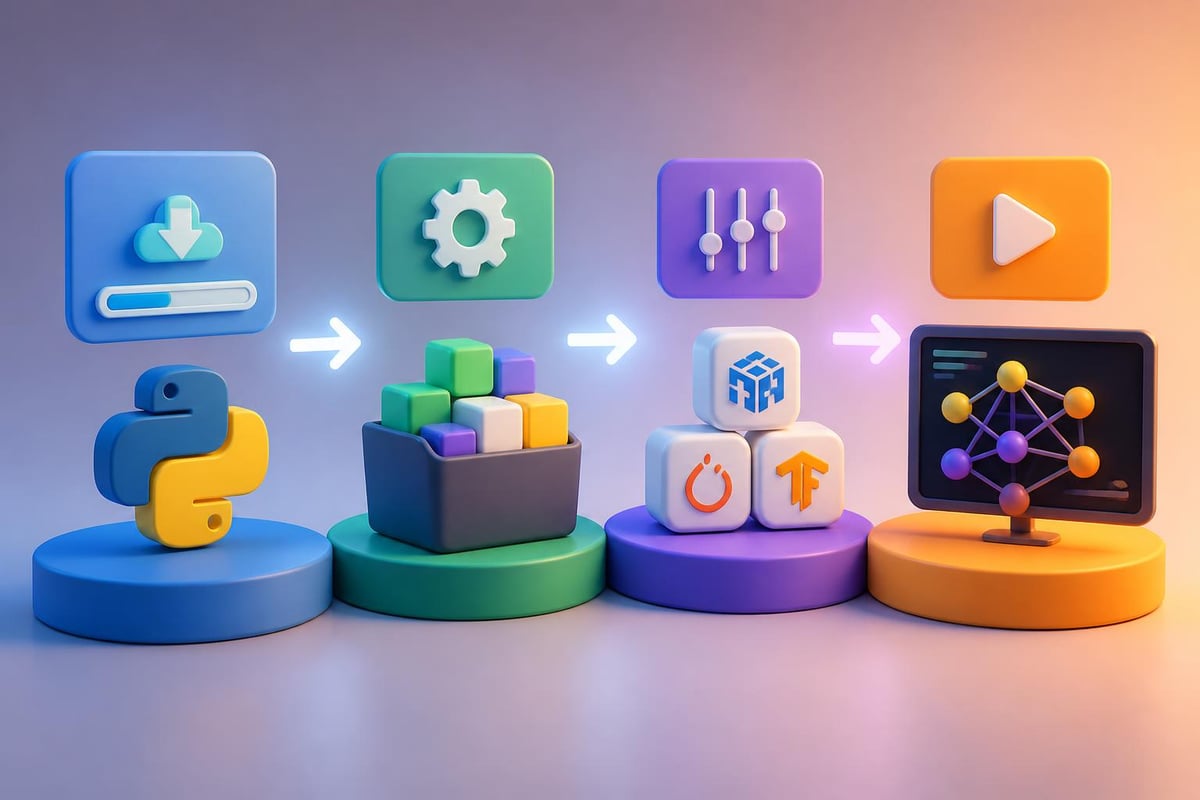
Before writing your first line of code, you need a properly configured development environment. This setup takes 15 minutes but saves hours of troubleshooting later.
Installation Steps
- Download Python 3.9 or newer from python.org
- Install pip (usually included with Python)
- Create a virtual environment to isolate project dependencies
- Install essential libraries using pip
python -m venv ai_env
source ai_env/bin/activate  # On Windows: ai_envScriptsactivate
pip install numpy pandas scikit-learn tensorflow matplotlib jupyter
Virtual environments prevent version conflicts between projects. Each project gets its own isolated space with specific library versions, making your code reproducible and shareable.
Choosing the Right Libraries
| Library | Primary Use | Best For |
|---|---|---|
| Scikit-learn | Traditional ML algorithms | Classification, regression, clustering |
| TensorFlow | Deep learning | Neural networks, image recognition |
| PyTorch | Deep learning research | Custom architectures, experimentation |
| Pandas | Data manipulation | Cleaning and preparing datasets |
| NumPy | Numerical computing | Array operations, mathematical functions |
The comprehensive collection of machine learning methods in Scikit-learn covers most beginner-to-intermediate use cases. Start here before moving to deep learning frameworks.
Building Your First AI Model
Let's create a real classification model that predicts customer churn. This example uses actual techniques deployed in production environments.
Data Preparation
Every AI project starts with data. For this tutorial, we'll use a customer dataset with features like usage frequency, support tickets, and subscription length.
import pandas as pd
from sklearn.model_selection import train_test_split
from sklearn.preprocessing import StandardScaler

# Load your data
data = pd.read_csv('customer_data.csv')

# Separate features and target
X = data[['usage_hours', 'support_tickets', 'months_subscribed', 'feature_usage']]
y = data['churned']

# Split into training and testing sets
X_train, X_test, y_train, y_test = train_test_split(X, y, test_size=0.2, random_state=42)

# Scale features for better model performance
scaler = StandardScaler()
X_train_scaled = scaler.fit_transform(X_train)
X_test_scaled = scaler.transform(X_test)
Scaling ensures that features with larger ranges don't dominate the model. A customer with 500 usage hours shouldn't overshadow one with 5 support tickets just because of the number scale.
Training the Model
With prepared data, training takes just a few lines of code:
from sklearn.ensemble import RandomForestClassifier
from sklearn.metrics import accuracy_score, classification_report

# Create and train the model
model = RandomForestClassifier(n_estimators=100, random_state=42)
model.fit(X_train_scaled, y_train)

# Make predictions
predictions = model.predict(X_test_scaled)

# Evaluate performance
accuracy = accuracy_score(y_test, predictions)
print(f"Model Accuracy: {accuracy:.2%}")
print(classification_report(y_test, predictions))
Example Output:
Model Accuracy: 87.3%
              precision    recall  f1-score   support

           0       0.89      0.94      0.91       450
           1       0.83      0.72      0.77       200

    accuracy                           0.87       650
This model correctly identifies 87% of customers who will churn, letting businesses take proactive retention actions. The precision and recall metrics show how well it performs for each class.
For professionals looking to deepen their AI expertise beyond basic tutorials, Mammoth Club offers comprehensive AI certification courses with hands-on projects and expert instruction. The program includes over 3,000 courses covering everything from fundamentals to advanced deployment strategies, providing the structured learning path that self-study often lacks.

Working with Neural Networks
When you learn AI in Python beyond traditional algorithms, neural networks open up possibilities for image recognition, natural language processing, and complex pattern detection.
Building a Simple Neural Network
TensorFlow and Keras make neural network development accessible:
import tensorflow as tf
from tensorflow import keras
from tensorflow.keras import layers

# Define the model architecture
model = keras.Sequential([
    layers.Dense(64, activation='relu', input_shape=(4,)),
    layers.Dropout(0.3),
    layers.Dense(32, activation='relu'),
    layers.Dropout(0.3),
    layers.Dense(1, activation='sigmoid')
])

# Compile the model
model.compile(
    optimizer='adam',
    loss='binary_crossentropy',
    metrics=['accuracy']
)

# Train the model
history = model.fit(
    X_train_scaled,
    y_train,
    epochs=50,
    batch_size=32,
    validation_split=0.2,
    verbose=0
)

# Evaluate
test_loss, test_accuracy = model.evaluate(X_test_scaled, y_test)
print(f"Test Accuracy: {test_accuracy:.2%}")
This architecture includes dropout layers to prevent overfitting, a common problem where models memorize training data instead of learning generalizable patterns.

Understanding Model Architecture
Each layer serves a specific purpose:
- Input layer: Receives your feature data
- Hidden layers: Extract increasingly complex patterns
- Dropout layers: Randomly disable neurons during training to improve generalization
- Output layer: Produces predictions
The activation functions (relu, sigmoid) introduce non-linearity, allowing networks to learn complex relationships. Without them, a deep neural network would behave like a simple linear regression.
Practical AI Applications for Business
When you learn AI in Python, the real value comes from solving actual business problems. Here are three common use cases with implementation approaches.
Customer Segmentation
Group customers based on behavior patterns to personalize marketing:
from sklearn.cluster import KMeans
import matplotlib.pyplot as plt

# Prepare customer features
customer_features = data[['total_purchases', 'avg_order_value', 'days_since_last_purchase']]

# Find optimal number of clusters
inertias = []
for k in range(2, 11):
    kmeans = KMeans(n_clusters=k, random_state=42)
    kmeans.fit(customer_features)
    inertias.append(kmeans.inertia_)

# Train final model with chosen k
kmeans = KMeans(n_clusters=4, random_state=42)
segments = kmeans.fit_predict(customer_features)

# Add segment labels to customer data
data['segment'] = segments
This unsupervised learning approach discovers natural groupings without predefined labels. You might find high-value customers, at-risk customers, occasional buyers, and inactive users-each requiring different engagement strategies.
Sentiment Analysis
Analyze customer feedback to identify satisfaction trends:
from sklearn.feature_extraction.text import TfidfVectorizer
from sklearn.naive_bayes import MultinomialNB

# Prepare text data
reviews = data['review_text']
sentiments = data['sentiment']  # positive, neutral, negative

# Convert text to numerical features
vectorizer = TfidfVectorizer(max_features=1000, stop_words='english')
X_text = vectorizer.fit_transform(reviews)

# Train classifier
sentiment_model = MultinomialNB()
sentiment_model.fit(X_text, sentiments)

# Predict new review
new_review = ["The product quality exceeded my expectations"]
new_features = vectorizer.transform(new_review)
prediction = sentiment_model.predict(new_features)
print(f"Sentiment: {prediction[0]}")
Output:
Sentiment: positive
This model processes text reviews and classifies sentiment automatically, saving hours of manual analysis. The machine learning learning path from Real Python covers text classification in greater detail.
Demand Forecasting
Predict future sales to optimize inventory:
from sklearn.ensemble import GradientBoostingRegressor
import numpy as np

# Create time-based features
data['day_of_week'] = data['date'].dt.dayofweek
data['month'] = data['date'].dt.month
data['is_weekend'] = (data['day_of_week'] >= 5).astype(int)

# Features and target
X = data[['day_of_week', 'month', 'is_weekend', 'previous_week_sales', 'promotions_active']]
y = data['sales']

# Train forecasting model
forecaster = GradientBoostingRegressor(n_estimators=100, learning_rate=0.1)
forecaster.fit(X_train, y_train)

# Predict next week
predictions = forecaster.predict(X_future)
Time series forecasting combines historical patterns with external factors like promotions and seasonality. Accurate predictions reduce both stockouts and excess inventory costs.
Advanced Techniques Worth Exploring
Once you've mastered the fundamentals, several advanced areas can significantly expand your capabilities when you learn AI in Python.
Transfer Learning
Instead of training models from scratch, transfer learning uses pre-trained models as starting points. This approach is particularly powerful for image recognition and natural language processing.
from tensorflow.keras.applications import ResNet50
from tensorflow.keras.layers import Dense, GlobalAveragePooling2D
from tensorflow.keras.models import Model

# Load pre-trained model (without top classification layer)
base_model = ResNet50(weights='imagenet', include_top=False, input_shape=(224, 224, 3))

# Freeze base model weights
base_model.trainable = False

# Add custom classification layers
x = base_model.output
x = GlobalAveragePooling2D()(x)
x = Dense(256, activation='relu')(x)
predictions = Dense(10, activation='softmax')(x)

# Create final model
model = Model(inputs=base_model.input, outputs=predictions)
This technique lets you build accurate image classifiers with thousands (not millions) of training examples. The base model already understands edges, textures, and shapes from ImageNet training.
Hyperparameter Optimization
Model performance depends heavily on configuration choices. Automated optimization finds the best settings:
| Hyperparameter | Impact | Typical Range |
|---|---|---|
| Learning rate | Training speed and stability | 0.0001 – 0.1 |
| Batch size | Memory usage and convergence | 16 – 128 |
| Number of layers | Model capacity | 2 – 10 |
| Neurons per layer | Pattern complexity | 32 – 512 |
| Dropout rate | Overfitting prevention | 0.1 – 0.5 |
from sklearn.model_selection import GridSearchCV

# Define parameter grid
param_grid = {
    'n_estimators': [50, 100, 200],
    'max_depth': [5, 10, 15, None],
    'min_samples_split': [2, 5, 10]
}

# Search for best combination
grid_search = GridSearchCV(
    RandomForestClassifier(random_state=42),
    param_grid,
    cv=5,
    scoring='accuracy'
)

grid_search.fit(X_train_scaled, y_train)
print(f"Best parameters: {grid_search.best_params_}")
print(f"Best score: {grid_search.best_score_:.2%}")
This automated search tests different combinations and identifies the configuration that maximizes performance on your specific dataset.
Handling Real-World Data Challenges
Clean datasets exist in tutorials, not production environments. These techniques help you deal with messy reality.
Missing Data Strategies
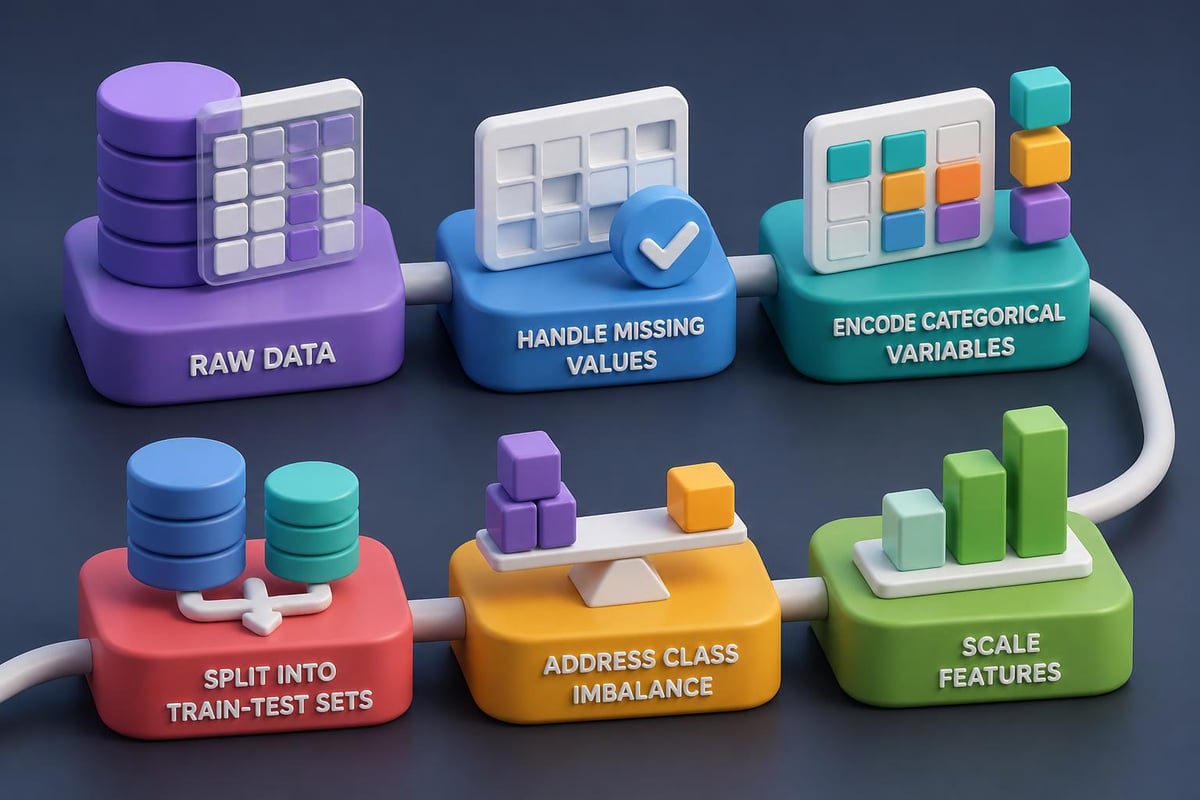
- Remove rows with missing values (only if you have abundant data)
- Impute with statistical measures (mean, median, mode)
- Predict missing values using other features
- Create indicator features that flag missingness
from sklearn.impute import SimpleImputer

# Strategy 1: Remove missing
data_clean = data.dropna()

# Strategy 2: Impute with mean
imputer = SimpleImputer(strategy='mean')
X_imputed = imputer.fit_transform(X)

# Strategy 3: Forward fill (for time series)
data_filled = data.fillna(method='ffill')
Choose your strategy based on the percentage missing and the importance of the feature. Removing 50% of your data to eliminate missing values usually hurts more than intelligent imputation.
Imbalanced Classes
When 95% of transactions aren't fraudulent, a model that predicts "not fraud" for everything achieves 95% accuracy while being completely useless. The imbalanced-learn toolbox provides solutions:
- Oversampling: Create synthetic examples of minority class
- Undersampling: Reduce majority class examples
- Class weights: Penalize misclassifying minority class more heavily
- Ensemble methods: Combine multiple models trained on balanced subsets
from imblearn.over_sampling import SMOTE

# Generate synthetic minority samples
smote = SMOTE(random_state=42)
X_balanced, y_balanced = smote.fit_resample(X_train, y_train)

# Train on balanced data
model.fit(X_balanced, y_balanced)
SMOTE (Synthetic Minority Over-sampling Technique) creates realistic synthetic examples by interpolating between existing minority class samples.
Model Deployment and Monitoring
A trained model provides no value until it makes predictions on new data. Deployment puts your AI to work.
Creating a Prediction API
Flask turns your Python model into a web service:
from flask import Flask, request, jsonify
import pickle

app = Flask(__name__)

# Load trained model
with open('churn_model.pkl', 'rb') as f:
    model = pickle.load(f)

@app.route('/predict', methods=['POST'])
def predict():
    # Get data from request
    data = request.json
    features = [[
        data['usage_hours'],
        data['support_tickets'],
        data['months_subscribed'],
        data['feature_usage']
    ]]

    # Make prediction
    prediction = model.predict(features)[0]
    probability = model.predict_proba(features)[0][1]

    return jsonify({
        'will_churn': bool(prediction),
        'churn_probability': float(probability)
    })

if __name__ == '__main__':
    app.run(port=5000)
This API accepts customer data via HTTP requests and returns churn predictions. It integrates with existing systems, dashboards, or automated workflows.
Monitoring Model Performance
Models degrade over time as patterns shift. Track these metrics:
- Prediction accuracy on recent data
- Feature distribution drift (are inputs changing?)
- Prediction distribution (are outputs changing?)
- Business metrics (are recommendations driving results?)
Set up automated alerts when metrics fall below thresholds. Retrain models quarterly or when performance drops significantly.
Learning Resources and Next Steps
When you learn AI in Python, continuous learning separates hobbyists from professionals. The field evolves rapidly, with new techniques emerging monthly.
Recommended Learning Path
Month 1-2: Foundations
- Python programming basics via The Hitchhiker’s Guide to Python
- NumPy and Pandas for data manipulation
- Basic statistics and linear algebra
Month 3-4: Traditional Machine Learning
- Scikit-learn algorithms
- Model evaluation and selection
- Feature engineering techniques
Month 5-6: Deep Learning
- Neural network fundamentals
- TensorFlow or PyTorch
- Deep Learning with Python by François Chollet
Month 7+: Specialization
- Computer vision, NLP, or reinforcement learning
- Advanced architectures and techniques
- Production deployment and MLOps
Practice Projects That Build Skills
Beginner:
- Predict housing prices using linear regression
- Classify iris flowers (classic dataset)
- Analyze customer purchase patterns
Intermediate:
- Build recommendation system for products
- Create sentiment analyzer for social media
- Forecast stock prices (understand limitations)
Advanced:
- Develop custom chatbot with RAG architecture
- Build image segmentation for medical imaging
- Create reinforcement learning game agent
The AI and machine learning tutorials at PromptHero.ai provide practical, copy-paste examples for real business applications.
Staying Current
Subscribe to these resources:
- Papers with Code: Latest research with implementations
- Towards Data Science: Practical tutorials and case studies
- ArXiv Sanity: Curated machine learning papers
- Python Weekly: General Python updates including AI libraries
Join communities where you can ask questions and share projects. The AI field rewards those who build in public and learn from others.
Common Pitfalls to Avoid
Every developer makes these mistakes when they first learn AI in Python. Awareness helps you skip them.
Overfitting: Your model memorizes training data instead of learning patterns. Solutions include cross-validation, regularization, dropout, and more training data.
Data leakage: Test data information leaks into training, creating unrealistically high accuracy. Always split data before any preprocessing.
Ignoring baseline models: Start simple. A basic logistic regression often performs surprisingly well and provides a benchmark for complex models.
Premature optimization: Don't spend days tuning hyperparameters when you need more or better data. Focus on the highest-impact improvements first.
Neglecting data quality: "Garbage in, garbage out" remains true. Spend more time on data cleaning and feature engineering than model architecture.
Testing Your Understanding
Can you answer these questions?
- When should you use classification vs. regression?
- What's the difference between training, validation, and test sets?
- How do you know if your model is overfitting?
- When is a simple model better than a complex one?
- What metrics matter for your specific business problem?
If any question seems unclear, revisit that concept before moving forward. Engineering principles for AI development emphasizes building on solid fundamentals.
Integrating AI Into Your Workflow
The goal isn't just to learn AI in Python-it's to use it productively. Integration transforms theoretical knowledge into business value.
Automation Opportunities
- Data preparation: Write scripts that clean and transform new data automatically
- Model retraining: Schedule periodic updates with fresh data
- Report generation: Automatically create visualizations and summaries
- Alert systems: Trigger notifications when predictions cross thresholds
import schedule
import time

def retrain_model():
    # Load new data
    new_data = fetch_recent_data()

    # Preprocess
    X_new, y_new = prepare_features(new_data)

    # Retrain
    model.fit(X_new, y_new)

    # Save updated model
    save_model(model, 'model_latest.pkl')

    print(f"Model retrained on {len(new_data)} samples")

# Schedule weekly retraining
schedule.every().monday.at("02:00").do(retrain_model)

while True:
    schedule.run_pending()
    time.sleep(3600)
Automation ensures models stay current without manual intervention. Set it up once, then focus on higher-value work.
Collaboration and Version Control
Treat ML code like software development:
- Use Git for version control
- Document experiments with results and configurations
- Create reproducible environments with requirements.txt
- Write tests for data processing functions
- Share notebooks with clear explanations
Version control for models and datasets requires special tools like DVC (Data Version Control) or MLflow. These track which model version used which data and configuration.
Learning AI in Python opens doors to solving complex problems, automating tedious tasks, and creating intelligent systems that deliver real business value. The journey from basic scripts to production models requires consistent practice, hands-on projects, and continuous learning as the field evolves. Ready to take your AI skills to the next level with structured, expert-led training? Explore the practical tutorials, step-by-step guides, and ready-to-use prompts at Prompt Hero.Ai to transform your understanding into working solutions that drive results.