
Python has become the default language for artificial intelligence development, powering everything from chatbots to recommendation systems. If you want to learn AI with Python in 2026, you need a practical approach that moves beyond theory and delivers real results. This tutorial walks you through the essential steps, libraries, and techniques to start building AI applications today.
Why Python Dominates AI Development
Python's simplicity and powerful ecosystem make it the top choice for AI work. The language offers readable syntax that lets you focus on solving problems rather than wrestling with code structure.
The real advantage comes from Python's libraries. When you learn AI with Python, you gain access to tools like scikit-learn, TensorFlow, and PyTorch that handle the heavy lifting. These frameworks provide pre-built functions for data processing, model training, and deployment.
Speed of Development vs Performance
Python prioritizes development speed over raw execution speed. You can prototype an AI model in hours instead of days. For production systems requiring maximum performance, you can optimize specific components or use Python to orchestrate faster languages.
Key advantages for AI development:
- Extensive library ecosystem covering every AI task
- Large community providing tutorials and troubleshooting
- Integration with data science tools and workflows
- Rapid prototyping capabilities
- Cross-platform compatibility
Setting Up Your Python AI Environment
Start with a clean Python installation. Download Python 3.11 or later from the official website. Avoid using your system Python to prevent conflicts.
Install Essential Libraries
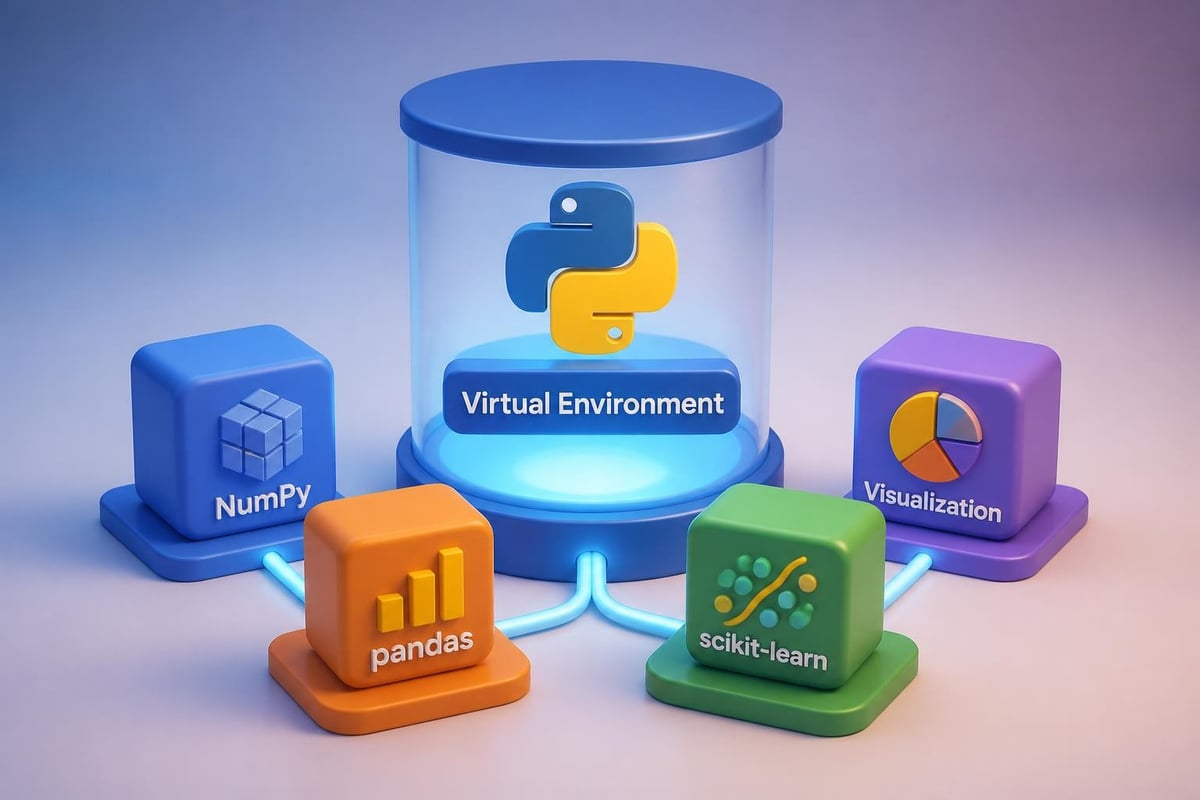
Create a virtual environment to isolate your AI projects. Open your terminal and run these commands:
python -m venv ai_env
source ai_env/bin/activate  # On Windows: ai_envScriptsactivate
pip install numpy pandas scikit-learn matplotlib
These four libraries form your foundation. NumPy handles numerical operations, pandas manages data, scikit-learn provides machine learning algorithms, and matplotlib creates visualizations.
For deep learning projects, add TensorFlow or PyTorch:
pip install tensorflow
# OR
pip install torch torchvision
Building Your First AI Model: Text Classification
Text classification demonstrates core AI concepts with practical applications. You'll build a spam detector that classifies messages as spam or legitimate.
Step 1: Prepare Your Data
Load a dataset of labeled messages. For this example, we'll use a simple CSV format:
import pandas as pd
from sklearn.model_selection import train_test_split

# Load data
data = pd.read_csv('messages.csv')
X = data['text']  # Message content
y = data['label']  # Spam or not spam

# Split into training and testing sets
X_train, X_test, y_train, y_test = train_test_split(X, y, test_size=0.2, random_state=42)
This code separates 80% of your data for training and reserves 20% for testing. The random_state parameter ensures reproducible results.
Step 2: Convert Text to Numbers
Machine learning models process numbers, not text. Use TF-IDF (Term Frequency-Inverse Document Frequency) to convert messages into numerical features:
from sklearn.feature_extraction.text import TfidfVectorizer

vectorizer = TfidfVectorizer(max_features=1000)
X_train_vectorized = vectorizer.fit_transform(X_train)
X_test_vectorized = vectorizer.transform(X_test)
This creates a vocabulary of the 1000 most important words and represents each message as a vector of numbers.
Step 3: Train Your Model
The Naive Bayes classifier works well for text classification. When you learn AI with Python, you'll appreciate how scikit-learn simplifies this process. Understanding machine learning fundamentals using TensorFlow provides deeper insight into what happens during training:
from sklearn.naive_bayes import MultinomialNB
from sklearn.metrics import accuracy_score, classification_report

# Create and train model
model = MultinomialNB()
model.fit(X_train_vectorized, y_train)

# Make predictions
predictions = model.predict(X_test_vectorized)

# Evaluate performance
accuracy = accuracy_score(y_test, predictions)
print(f"Accuracy: {accuracy:.2%}")
print(classification_report(y_test, predictions))
Example Output:
Accuracy: 96.40%
              precision    recall  f1-score   support

         ham       0.97      0.99      0.98       965
        spam       0.94      0.85      0.89       150

    accuracy                           0.96      1115
This model correctly classifies 96% of messages. The precision and recall metrics show it performs slightly better on legitimate messages than spam.
Working with Pre-Trained Language Models
Pre-trained models let you leverage cutting-edge AI without training from scratch. The transformers library provides access to models like GPT, BERT, and others.
Loading and Using a Model
from transformers import pipeline

# Load sentiment analysis pipeline
classifier = pipeline('sentiment-analysis')

# Analyze text
result = classifier("This product exceeded my expectations!")
print(result)
Example Output:
[{'label': 'POSITIVE', 'score': 0.9998}]
The model identifies positive sentiment with 99.98% confidence. You can adapt this approach for tasks like question answering, translation, or summarization.
| Task | Pipeline Name | Use Case |
|---|---|---|
| Sentiment Analysis | 'sentiment-analysis' | Customer feedback analysis |
| Text Generation | 'text-generation' | Content creation, chatbots |
| Question Answering | 'question-answering' | Knowledge base queries |
| Translation | 'translation_xx_to_yy' | Multilingual applications |
| Summarization | 'summarization' | Document processing |
Practical AI Application: Customer Support Automation
Let's build a system that categorizes support tickets and generates initial responses. This combines classification with text generation.
Step 1: Categorize Incoming Tickets
from transformers import pipeline

# Load zero-shot classification
classifier = pipeline('zero-shot-classification')

# Define categories
categories = ['billing issue', 'technical problem', 'account access', 'feature request']

# Classify ticket
ticket = "I can't log into my account after resetting my password"
result = classifier(ticket, categories)

print(f"Category: {result['labels'][0]}")
print(f"Confidence: {result['scores'][0]:.2%}")
Example Output:
Category: account access
Confidence: 94.32%
Step 2: Generate Response Templates
Once categorized, use a template system with AI-enhanced personalization:
import openai

def generate_response(category, ticket_text):
    prompt = f"""Generate a professional customer support response for this {category} ticket:

Ticket: {ticket_text}

Response should:
- Acknowledge the specific issue
- Provide 2-3 troubleshooting steps
- Offer to escalate if needed
- Maintain a helpful, empathetic tone"""

    response = openai.ChatCompletion.create(
        model="gpt-4",
        messages=[{"role": "user", "content": prompt}]
    )

    return response.choices[0].message.content

ticket = "I can't log into my account after resetting my password"
response = generate_response("account access", ticket)
print(response)
Example Output:
Thank you for contacting support. I understand you're having trouble logging in after your password reset. Let's resolve this together.

Please try these steps:

1. Clear your browser cache and cookies, then attempt to log in again
2. Verify you're using the temporary password sent to your registered email
3. Check that Caps Lock is off and you're entering the password exactly as shown

If these steps don't resolve the issue, I'll escalate your ticket to our technical team for immediate assistance. We typically respond to escalations within 2 hours.

Is there anything else I can help you with today?

When you learn AI with Python and apply it to real business problems, you'll find numerous opportunities for automation. Professional development platforms like Mammoth Club offer structured courses that cover these practical applications in depth, with hands-on projects that build job-ready skills.

Data Preprocessing Techniques
Real-world data requires cleaning before you can train models. Python's pandas library excels at this task.
Handling Missing Values
import pandas as pd
import numpy as np

# Load data with missing values
df = pd.read_csv('customer_data.csv')

# Check for missing values
print(df.isnull().sum())

# Fill missing numerical values with median
df['age'].fillna(df['age'].median(), inplace=True)

# Fill missing categorical values with mode
df['category'].fillna(df['category'].mode()[0], inplace=True)

# Drop rows with too many missing values
df.dropna(thresh=len(df.columns) - 2, inplace=True)
Encoding Categorical Variables
Machine learning models need numerical input. Convert categories to numbers:
from sklearn.preprocessing import LabelEncoder, OneHotEncoder

# Label encoding for ordinal data
label_encoder = LabelEncoder()
df['priority'] = label_encoder.fit_transform(df['priority'])

# One-hot encoding for nominal data
df_encoded = pd.get_dummies(df, columns=['department', 'region'])
Comparison of encoding methods:
| Method | Best For | Pros | Cons |
|---|---|---|---|
| Label Encoding | Ordinal categories (low/medium/high) | Memory efficient, simple | Implies ordering |
| One-Hot Encoding | Nominal categories (colors, departments) | No false relationships | High dimensionality |
| Target Encoding | High-cardinality features | Reduces dimensions | Risk of overfitting |
Building an AI-Powered Data Analysis Tool
Create a script that automatically analyzes sales data and generates insights. This demonstrates how to learn AI with Python for business intelligence.
Complete Analysis Pipeline
import pandas as pd
import numpy as np
from sklearn.linear_model import LinearRegression
import matplotlib.pyplot as plt

def analyze_sales_trends(data_file):
    # Load and prepare data
    df = pd.read_csv(data_file)
    df['date'] = pd.to_datetime(df['date'])
    df['days_since_start'] = (df['date'] - df['date'].min()).dt.days

    # Train prediction model
    X = df[['days_since_start']].values
    y = df['revenue'].values

    model = LinearRegression()
    model.fit(X, y)

    # Generate predictions
    future_days = np.array([[df['days_since_start'].max() + 30]])
    predicted_revenue = model.predict(future_days)[0]

    # Calculate key metrics
    total_revenue = df['revenue'].sum()
    avg_daily_revenue = df['revenue'].mean()
    growth_rate = model.coef_[0]

    # Generate insights
    insights = f"""
Sales Analysis Report:
- Total Revenue: ${total_revenue:,.2f}
- Average Daily Revenue: ${avg_daily_revenue:,.2f}
- Daily Growth Rate: ${growth_rate:,.2f}
- 30-Day Forecast: ${predicted_revenue:,.2f}

Trend: {'Growing' if growth_rate > 0 else 'Declining'}
"""

    return insights

print(analyze_sales_trends('sales_2026.csv'))
This script loads sales data, trains a regression model, and generates actionable insights. The approach applies to inventory forecasting, customer churn prediction, and other business scenarios.
Advanced Techniques: Neural Networks
Neural networks handle complex patterns that traditional algorithms miss. When you learn AI with Python at an advanced level, you'll work with frameworks like TensorFlow.
Building a Simple Neural Network
import tensorflow as tf
from tensorflow import keras
import numpy as np

# Prepare data
X_train = np.random.random((1000, 10))
y_train = np.random.randint(0, 2, (1000, 1))

# Define model architecture
model = keras.Sequential([
    keras.layers.Dense(64, activation='relu', input_shape=(10,)),
    keras.layers.Dropout(0.3),
    keras.layers.Dense(32, activation='relu'),
    keras.layers.Dropout(0.3),
    keras.layers.Dense(1, activation='sigmoid')
])

# Compile model
model.compile(
    optimizer='adam',
    loss='binary_crossentropy',
    metrics=['accuracy']
)

# Train model
history = model.fit(
    X_train, y_train,
    epochs=20,
    batch_size=32,
    validation_split=0.2,
    verbose=0
)

print(f"Final accuracy: {history.history['accuracy'][-1]:.2%}")
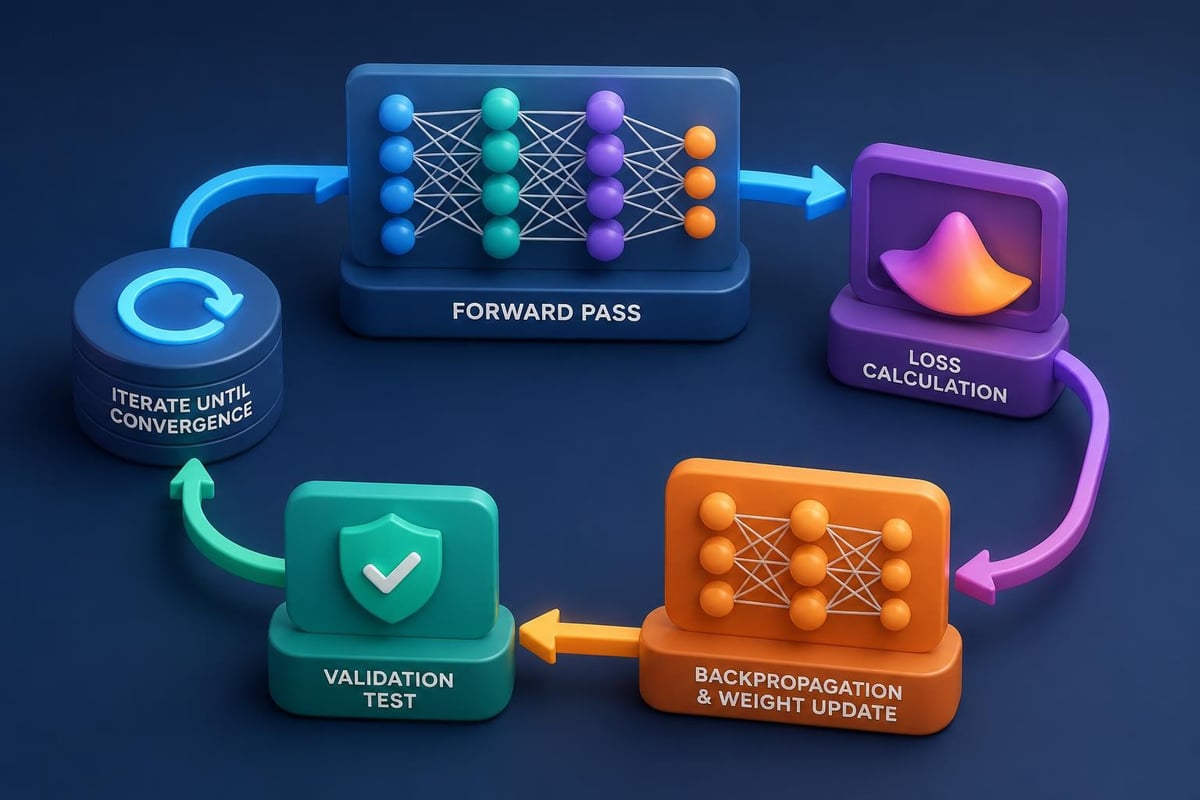
This creates a three-layer network with dropout regularization to prevent overfitting. The sigmoid activation in the final layer outputs probabilities for binary classification.
Debugging and Optimizing AI Models
Models rarely work perfectly on the first attempt. Systematic debugging improves results.
Common Issues and Solutions
Overfitting: Model performs well on training data but poorly on new data.
from sklearn.model_selection import cross_val_score

# Use cross-validation
scores = cross_val_score(model, X, y, cv=5)
print(f"Cross-validation scores: {scores}")
print(f"Average: {scores.mean():.2%}")

# Add regularization
from sklearn.linear_model import Ridge
model = Ridge(alpha=1.0)  # Increase alpha to reduce overfitting
Underfitting: Model performs poorly on both training and test data.
- Increase model complexity (more features, deeper networks)
- Train for more epochs
- Reduce regularization strength
Class Imbalance: One category dominates the dataset.
from sklearn.utils import class_weight

# Calculate balanced weights
weights = class_weight.compute_class_weight(
    'balanced',
    classes=np.unique(y_train),
    y=y_train
)

# Use weights during training
model.fit(X_train, y_train, class_weight=dict(enumerate(weights)))
For developers seeking comprehensive resources for learning Python, building a strong programming foundation accelerates AI development. Similarly, exploring AI concepts from first principles deepens understanding of how algorithms actually work.
Real-World Project: Email Campaign Optimizer
Combine multiple techniques to build a tool that analyzes email performance and suggests improvements. This project demonstrates practical application when you learn AI with Python.
Step 1: Analyze Historical Performance
import pandas as pd
from sklearn.ensemble import RandomForestRegressor

def analyze_email_performance(campaign_data):
    df = pd.read_csv(campaign_data)

    # Encode categorical features
    df_encoded = pd.get_dummies(df, columns=['day_of_week', 'segment'])

    # Define features and target
    X = df_encoded.drop(['open_rate', 'campaign_id'], axis=1)
    y = df_encoded['open_rate']

    # Train model
    model = RandomForestRegressor(n_estimators=100, random_state=42)
    model.fit(X, y)

    # Feature importance
    importance = pd.DataFrame({
        'feature': X.columns,
        'importance': model.feature_importances_
    }).sort_values('importance', ascending=False)

    return model, importance

model, importance = analyze_email_performance('email_campaigns.csv')
print(importance.head(10))
Step 2: Generate Optimization Recommendations
def optimize_campaign(model, current_settings):
    base_prediction = model.predict([current_settings])[0]

    recommendations = []

    # Test different sending times
    for hour in range(8, 18):
        modified_settings = current_settings.copy()
        modified_settings[f'send_hour_{hour}'] = 1
        predicted_rate = model.predict([modified_settings])[0]

        if predicted_rate > base_prediction:
            recommendations.append({
                'change': f'Send at {hour}:00',
                'predicted_improvement': f'+{(predicted_rate - base_prediction):.2%}'
            })

    return sorted(recommendations, key=lambda x: x['predicted_improvement'], reverse=True)

suggestions = optimize_campaign(model, current_campaign_features)
for suggestion in suggestions[:3]:
    print(f"{suggestion['change']}: {suggestion['predicted_improvement']} improvement")
Example Output:
Send at 10:00: +3.24% improvement
Send at 14:00: +2.87% improvement
Send at 9:00: +2.15% improvement
This tool identifies optimization opportunities based on historical patterns. You can extend it to test subject lines, content length, and personalization elements.
Deploying Your AI Model
After training a model, you need to make it accessible. Python offers several deployment options.
Create a REST API with Flask
from flask import Flask, request, jsonify
import pickle

app = Flask(__name__)

# Load trained model
with open('model.pkl', 'rb') as f:
    model = pickle.load(f)

@app.route('/predict', methods=['POST'])
def predict():
    data = request.get_json()
    features = data['features']
    prediction = model.predict([features])[0]

    return jsonify({
        'prediction': float(prediction),
        'confidence': 0.95  # Add actual confidence if available
    })

if __name__ == '__main__':
    app.run(debug=True, host='0.0.0.0', port=5000)
This creates an API endpoint that accepts features and returns predictions. Deploy it to cloud platforms like AWS, Google Cloud, or Azure.
Containerize with Docker
FROM python:3.11-slim

WORKDIR /app
COPY requirements.txt .
RUN pip install -r requirements.txt

COPY model.pkl .
COPY app.py .

EXPOSE 5000
CMD ["python", "app.py"]
Docker containers ensure your model runs consistently across different environments.
Continuous Learning and Model Updates
AI models degrade over time as data patterns change. Implement monitoring and retraining pipelines.
Monitor Model Performance
import datetime

def log_prediction(features, prediction, actual_outcome=None):
    log_entry = {
        'timestamp': datetime.datetime.now(),
        'features': features,
        'prediction': prediction,
        'actual': actual_outcome
    }

    # Store in database or file
    with open('predictions.log', 'a') as f:
        f.write(str(log_entry) + 'n')

def calculate_drift():
    # Load recent predictions
    recent_predictions = pd.read_csv('predictions.log')

    # Calculate accuracy over time windows
    weekly_accuracy = recent_predictions.groupby(
        pd.Grouper(key='timestamp', freq='W')
    ).apply(lambda x: (x['prediction'] == x['actual']).mean())

    # Alert if accuracy drops
    if weekly_accuracy.iloc[-1] < 0.85:
        print("Warning: Model accuracy has dropped. Consider retraining.")

    return weekly_accuracy
Set up automated retraining when performance falls below thresholds. This maintains model reliability in production.
Best Practices for AI Development
Follow these principles as you learn AI with Python and build production systems:
Version Control Everything
- Track model code, training scripts, and configurations in Git
- Tag model versions with performance metrics
- Document data sources and preprocessing steps
Test Thoroughly
- Unit test data preprocessing functions
- Validate model outputs on edge cases
- Monitor for bias in predictions across different groups
Document Your Work
- Explain feature engineering decisions
- Record hyperparameter choices and their rationale
- Create runbooks for model deployment and troubleshooting
Prioritize Interpretability
- Use SHAP values or LIME to explain predictions
- Visualize feature importance
- Provide confidence scores with predictions
Organizations looking for structured guidance can explore practical tutorials at Prompt Hero.Ai, which offers step-by-step instructions for implementing AI solutions in business contexts.
Essential Python Libraries for AI
| Library | Purpose | Key Features | Best For |
|---|---|---|---|
| NumPy | Numerical computing | Array operations, linear algebra | Data manipulation, mathematical operations |
| pandas | Data manipulation | DataFrames, CSV/Excel handling | Data cleaning, exploratory analysis |
| scikit-learn | Machine learning | Classification, regression, clustering | Traditional ML algorithms |
| TensorFlow | Deep learning | Neural networks, GPU support | Computer vision, NLP, complex models |
| PyTorch | Deep learning | Dynamic computation graphs | Research, experimentation |
| NLTK | Natural language | Text processing, tokenization | Text analysis, linguistics |
| OpenCV | Computer vision | Image processing, object detection | Visual data, video analysis |
| Matplotlib | Visualization | Charts, plots, customization | Data exploration, reporting |
Each library serves specific needs in the AI development pipeline. Start with NumPy, pandas, and scikit-learn for foundational skills.
Next Steps in Your AI Journey
You've covered the fundamentals of how to learn AI with Python through practical examples. Your next actions should focus on building real projects that solve actual problems.
Project Ideas to Build Skills:
- Customer churn predictor using historical transaction data
- Content recommendation engine based on user behavior
- Automated report generator that summarizes key metrics
- Price optimization tool using competitive and demand data
- Fraud detection system for financial transactions
Each project reinforces different aspects of AI development. Start with simpler classification tasks before moving to complex neural networks.
Resources for Continued Learning:
- Build implementations of core algorithms to understand mechanics
- Read research papers to stay current with techniques
- Join AI communities to discuss challenges and solutions
- Contribute to open-source projects for real-world experience
The field evolves rapidly. Dedicate time each week to learning new techniques and tools. Python's ecosystem constantly adds capabilities that simplify previously complex tasks.
As you progress, focus on understanding when to use different approaches. Not every problem requires deep learning. Sometimes a well-designed linear model outperforms complex alternatives by being more interpretable and requiring less data.
Learning AI with Python opens doors to automation, optimization, and intelligent decision-making across every business function. The combination of Python's accessibility and powerful libraries makes AI development achievable for professionals at any skill level. Whether you're categorizing support tickets, forecasting sales, or building recommendation systems, these foundational skills translate directly to business value. Ready to accelerate your AI journey? Prompt Hero.Ai provides step-by-step tutorials, copy-and-paste prompts, and real-world examples designed specifically for professionals who want to implement AI solutions immediately.