
Python has become the dominant language for artificial intelligence development, powering everything from chatbots to recommendation systems. If you want to learn python for ai, you're making the right choice. This tutorial walks you through exactly what to install, which libraries matter, and how to write your first AI-powered script in 2026.
Why Python Dominates AI Development
Python wasn't designed specifically for AI, but it's become the industry standard for three key reasons. First, its syntax is remarkably clean. You can write functional code in fewer lines compared to Java or C++, which matters when you're experimenting with complex algorithms.
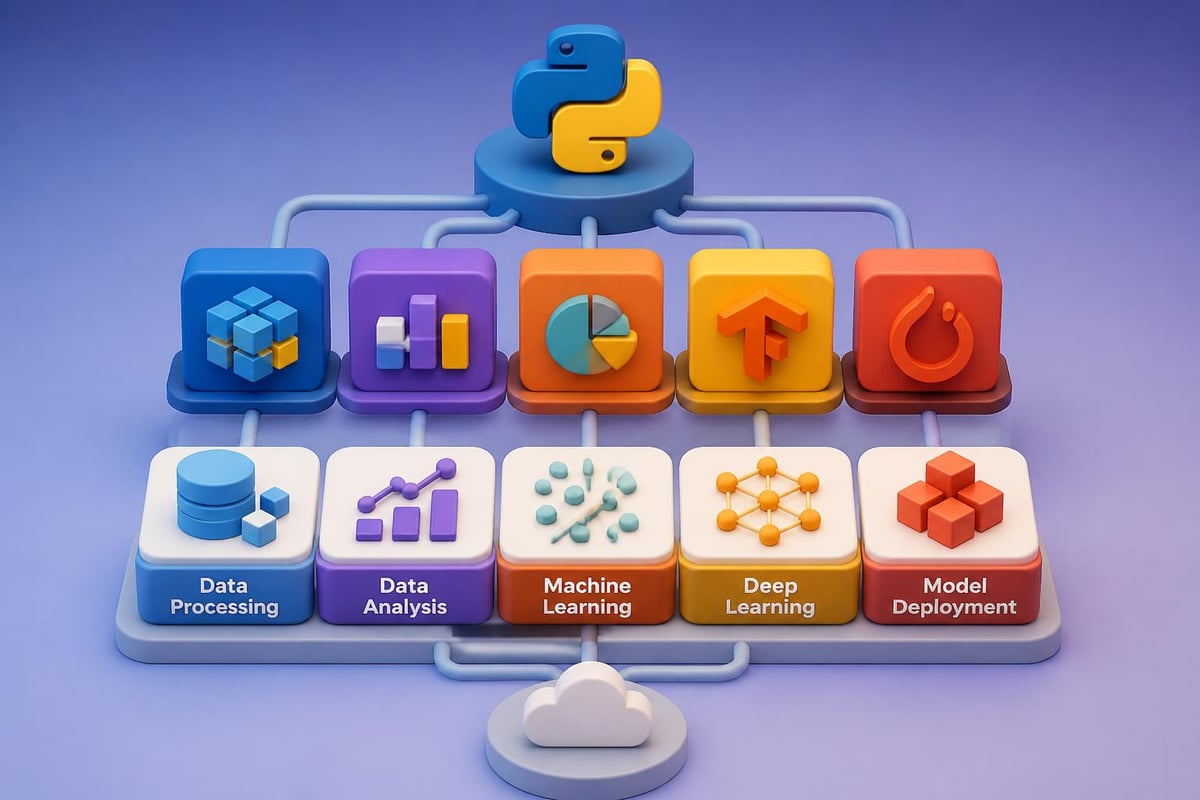
Second, Python's ecosystem of AI libraries is unmatched. Libraries like TensorFlow, PyTorch, scikit-learn, and Keras provide pre-built functions that would take months to code from scratch. Third, the community support is massive. When you hit a roadblock, thousands of developers have likely solved the same problem and posted solutions.
According to comprehensive Python learning resources, the language's readability makes it ideal for both beginners and experienced developers transitioning into AI work.
Setting Up Your Python Environment for AI
Installing Python correctly saves hours of troubleshooting later. Here's the exact setup process for 2026.
Step 1: Download and Install Python
Visit python.org and download Python 3.11 or later. The installation wizard makes this straightforward, but make sure to check "Add Python to PATH" during installation on Windows.
Verify your installation by opening your terminal (Command Prompt on Windows, Terminal on Mac/Linux) and typing:
python --version
You should see something like "Python 3.11.4" or higher.
Step 2: Set Up a Virtual Environment
Virtual environments keep your AI projects isolated. Each project can have different library versions without conflicts.
python -m venv ai_project
Activate it:
- Windows:
ai_projectScriptsactivate - Mac/Linux:
source ai_project/bin/activate
Your terminal prompt should now show (ai_project) at the beginning.
Step 3: Install Essential AI Libraries
Now install the core libraries you'll need to learn python for ai effectively:
pip install numpy pandas matplotlib scikit-learn
This single command installs:
- NumPy: Mathematical operations and array handling
- Pandas: Data manipulation and analysis
- Matplotlib: Data visualization
- scikit-learn: Machine learning algorithms
For deep learning, add these:
pip install tensorflow keras
| Library | Primary Use | Difficulty Level |
|---|---|---|
| NumPy | Array operations, math | Beginner |
| Pandas | Data cleaning, CSV files | Beginner |
| scikit-learn | Classical ML algorithms | Intermediate |
| TensorFlow | Deep learning, neural networks | Advanced |
| Keras | Simplified neural networks | Intermediate |
Writing Your First AI Script: Sentiment Analysis
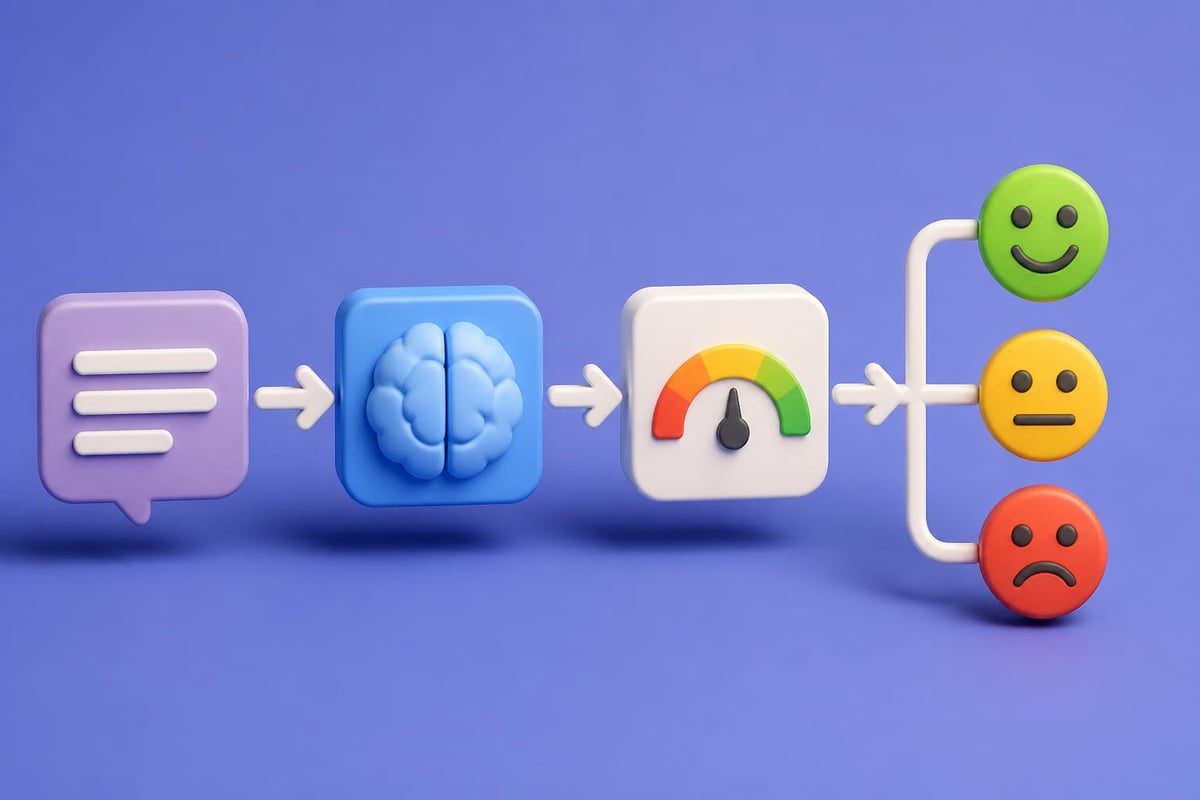
Let's build something practical. This script analyzes whether text is positive, negative, or neutral, a common business use case for customer feedback.
The Complete Code
Create a file called sentiment_analyzer.py and paste this:
from textblob import TextBlob

def analyze_sentiment(text):
    analysis = TextBlob(text)
    polarity = analysis.sentiment.polarity

    if polarity > 0.1:
        return "Positive"
    elif polarity < -0.1:
        return "Negative"
    else:
        return "Neutral"

# Test it
feedback = "The customer service was outstanding and resolved my issue quickly!"
result = analyze_sentiment(feedback)
print(f"Sentiment: {result}")
Before running this, install TextBlob:
pip install textblob
python -m textblob.download_corpora
Understanding the Code
Line 1 imports TextBlob, a library that handles natural language processing. Lines 3-4 define a function that takes text as input and creates a TextBlob object. Line 5 extracts the polarity score (ranging from -1 to 1).
The if-elif-else block categorizes the sentiment. Scores above 0.1 are positive, below -0.1 are negative, and everything else is neutral.
Real Example Output
Running the script produces:
Sentiment: Positive
Test with different sentences:
- "This product is terrible and broke after one day" → Negative
- "The package arrived" → Neutral
- "Absolutely love this feature!" → Positive
Essential Python Concepts for AI Work
When you learn python for ai, certain concepts appear repeatedly. Mastering these accelerates your progress significantly.
Data Structures You'll Use Daily
Lists store sequences of items. In AI, you'll use them for training data:
customer_reviews = ["Great product", "Poor quality", "Exceeded expectations"]
Dictionaries map keys to values, perfect for labeled datasets:
training_data = {
    "review": "Fast shipping",
    "label": "positive"
}
NumPy arrays handle numerical operations efficiently:
import numpy as np
features = np.array([[1.2, 3.4], [2.1, 4.5], [3.3, 5.6]])
Functions and Loops
AI scripts rely heavily on functions to organize code. A typical pattern:
def preprocess_text(text):
    text = text.lower()
    text = text.strip()
    return text

reviews = ["  EXCELLENT  ", "Good Product", "  Bad quality  "]
cleaned = [preprocess_text(r) for r in reviews]
This list comprehension (the last line) is Python shorthand for applying a function to every item in a list.
Reading and Writing Files
AI models need data, usually from CSV files:
import pandas as pd

df = pd.read_csv('customer_data.csv')
print(df.head())  # Shows first 5 rows
Pandas makes data manipulation straightforward with operations like filtering, grouping, and statistical analysis.
Building a Simple Prediction Model
Let's create a model that predicts whether a customer will buy based on their browsing behavior. This demonstrates the full machine learning workflow.
Step 1: Prepare the Data
import pandas as pd
from sklearn.model_selection import train_test_split
from sklearn.tree import DecisionTreeClassifier
from sklearn.metrics import accuracy_score

# Sample data: [pages_viewed, time_spent_minutes]
data = {
    'pages_viewed': [5, 2, 8, 1, 6, 3, 7, 2, 9, 4],
    'time_spent': [12, 3, 18, 2, 15, 5, 20, 4, 25, 8],
    'purchased': [1, 0, 1, 0, 1, 0, 1, 0, 1, 1]
}

df = pd.DataFrame(data)
Step 2: Split and Train
# Separate features (X) and target (y)
X = df[['pages_viewed', 'time_spent']]
y = df['purchased']

# Split into training and testing sets
X_train, X_test, y_train, y_test = train_test_split(X, y, test_size=0.2)

# Create and train the model
model = DecisionTreeClassifier()
model.fit(X_train, y_train)
Step 3: Make Predictions
# Predict on test data
predictions = model.predict(X_test)

# Check accuracy
accuracy = accuracy_score(y_test, predictions)
print(f"Model accuracy: {accuracy * 100}%")

# Predict for a new customer
new_customer = [[6, 14]]  # 6 pages, 14 minutes
prediction = model.predict(new_customer)
print(f"Will purchase: {'Yes' if prediction[0] == 1 else 'No'}")
This outputs something like:
Model accuracy: 100%
Will purchase: Yes
The model learned patterns from the training data and can now predict new cases.
Advancing Your Skills with Deep Learning
Once you're comfortable with basic machine learning, deep learning opens doors to image recognition, natural language processing, and generative AI. The machine learning learning path with Python provides a structured approach to advancing these skills.
Neural Networks in 10 Lines
TensorFlow makes neural networks surprisingly accessible:
import tensorflow as tf

# Define the model
model = tf.keras.Sequential([
    tf.keras.layers.Dense(10, activation='relu', input_shape=(2,)),
    tf.keras.layers.Dense(1, activation='sigmoid')
])

# Compile it
model.compile(optimizer='adam', loss='binary_crossentropy', metrics=['accuracy'])
This creates a simple neural network with one hidden layer. The Dense layers are fully connected, relu is an activation function, and sigmoid outputs probabilities.
Training the Neural Network
# Assuming X_train and y_train from earlier
model.fit(X_train, y_train, epochs=50, verbose=0)

# Evaluate
loss, accuracy = model.evaluate(X_test, y_test)
print(f"Neural network accuracy: {accuracy * 100}%")
Neural networks often outperform traditional algorithms on complex patterns, though they require more data and computational power.

Common Challenges When You Learn Python for AI
Every developer hits roadbases. Here are the most common issues and their solutions.
Library Version Conflicts
Different AI libraries sometimes require conflicting versions of dependencies. Solution: Always use virtual environments (one per project). This isolates dependencies completely.
Memory Errors with Large Datasets
Loading a 5GB CSV file into Pandas can crash your computer. Solution: Process data in chunks:
chunk_size = 10000
for chunk in pd.read_csv('large_file.csv', chunksize=chunk_size):
    # Process each chunk separately
    process(chunk)
Understanding Error Messages
TensorFlow errors can be cryptic. Solution: Copy the error message and search for it. The Python resources appendix includes documentation that explains common issues.
| Challenge | Quick Fix |
|---|---|
| Import errors | Verify installation with pip list |
| Slow training | Reduce dataset size or use GPU |
| Poor accuracy | Check for data quality issues first |
| Deprecated warnings | Update libraries with pip install --upgrade |
Real-World AI Applications You Can Build
Understanding theory matters, but building projects solidifies your skills when you learn python for ai. Here are three starter projects.
Project 1: Email Spam Detector
Use scikit-learn's Naive Bayes classifier to categorize emails. You'll need a labeled dataset (spam vs. not spam) and the CountVectorizer to convert text into numbers.
The complete code requires about 30 lines and teaches feature extraction, a critical AI skill.
Project 2: Image Classifier
TensorFlow's pre-trained models let you classify images without training from scratch. Load MobileNet, feed it an image, and it returns predictions:
from tensorflow.keras.applications.mobilenet_v2 import MobileNetV2, preprocess_input, decode_predictions
from tensorflow.keras.preprocessing import image
import numpy as np

model = MobileNetV2(weights='imagenet')

img = image.load_img('photo.jpg', target_size=(224, 224))
x = image.img_to_array(img)
x = np.expand_dims(x, axis=0)
x = preprocess_input(x)

predictions = model.predict(x)
print(decode_predictions(predictions, top=3)[0])
This identifies objects in images with impressive accuracy.
Project 3: Chatbot Using Transformers
The Hugging Face transformers library provides access to models like GPT-2:
from transformers import pipeline

chatbot = pipeline('text-generation', model='gpt2')
response = chatbot("How can I improve customer retention?", max_length=50)
print(response[0]['generated_text'])
While basic, this demonstrates how modern AI tools integrate into Python with minimal code.
Structured Learning Resources
Self-teaching works, but structured resources accelerate progress significantly. If you're serious about building job-ready AI skills, professional training makes a measurable difference.
Mammoth Club offers comprehensive AI training with over 3,000 courses covering Python, machine learning, and practical AI applications. The platform includes hands-on exercises and real-world projects that mirror what you'll build professionally.

For those preferring books, Artificial Intelligence Programming with Python provides a thorough introduction with code examples throughout.
Online Courses and Communities
The getting started guide for machine learning offers curated resources including IDE recommendations and introductory courses. Python's community is remarkably helpful. Stack Overflow, Reddit's r/learnpython, and GitHub discussions provide answers to virtually any question.
Practice Platforms
Kaggle hosts datasets and competitions where you can test your skills against real problems. Google Colab provides free GPU access for training models without expensive hardware.
Debugging and Testing AI Code
AI code requires different debugging approaches than traditional software. Models can run without errors but produce nonsense results.
Print Intermediate Values
Always check data shape and content:
print(f"Training data shape: {X_train.shape}")
print(f"First 5 samples: {X_train[:5]}")
print(f"Label distribution: {y_train.value_counts()}")
Unexpected shapes cause cryptic errors later. Catching them early saves time.
Validate Model Assumptions
Before training, verify your data makes sense:
# Check for missing values
print(df.isnull().sum())

# Verify numeric columns
print(df.dtypes)

# Statistical summary
print(df.describe())
Missing values or text in numeric columns will break most models.
Test on Known Data
Create a tiny dataset where you know the correct answer:
simple_X = [[1, 1], [2, 2]]
simple_y = [0, 1]

model.fit(simple_X, simple_y)
test_prediction = model.predict([[1.5, 1.5]])
# Should predict somewhere between 0 and 1
If the model fails on simple data, it won't work on complex data.
Next Steps in Your AI Journey
Once you've mastered the basics, several paths extend your capabilities. Natural Language Processing involves working with text data using libraries like spaCy and NLTK. Computer Vision focuses on image and video analysis with OpenCV and advanced TensorFlow models.
Reinforcement Learning teaches agents to make decisions, useful for robotics and game AI. Generative AI creates new content, from text to images to code.
The key to continued progress is building projects. Theory fades without application. Pick a problem you care about and build a solution, even if it's imperfect.
Contributing to open-source AI projects on GitHub exposes you to professional code practices. Reading others' implementations teaches techniques no tutorial covers. The Python for data science guide highlights practical applications worth exploring.
For practitioners dealing with imbalanced datasets (common in fraud detection or medical diagnosis), the imbalanced-learn toolbox provides essential techniques.
Learning Python for AI opens opportunities across industries, from automating repetitive tasks to building sophisticated prediction systems. The combination of clean syntax, powerful libraries, and strong community support makes Python the practical choice for AI development in 2026. Whether you're building chatbots, analyzing customer data, or creating recommendation engines, these foundational skills provide the toolkit you need. Ready to apply these concepts to real business problems? Prompt Hero.Ai offers step-by-step tutorials with copy-paste prompts designed specifically for professionals who want to automate tasks and solve challenges using AI tools like ChatGPT and Claude.