
Artificial intelligence has changed how we write code. You don't need years of programming experience to build functional applications anymore. This ai coding tutorial walks you through using AI tools like ChatGPT and Claude to generate, debug, and optimize code for real-world projects. Whether you're automating spreadsheet tasks or building a web scraper, you'll learn exactly how to prompt AI assistants to write working code in minutes instead of hours.
Understanding AI-Assisted Coding
AI coding tools work differently than traditional programming. Instead of memorizing syntax and libraries, you describe what you want in plain English. The AI translates your requirements into functional code.
Here's what AI can handle:
- Writing functions from scratch based on your description
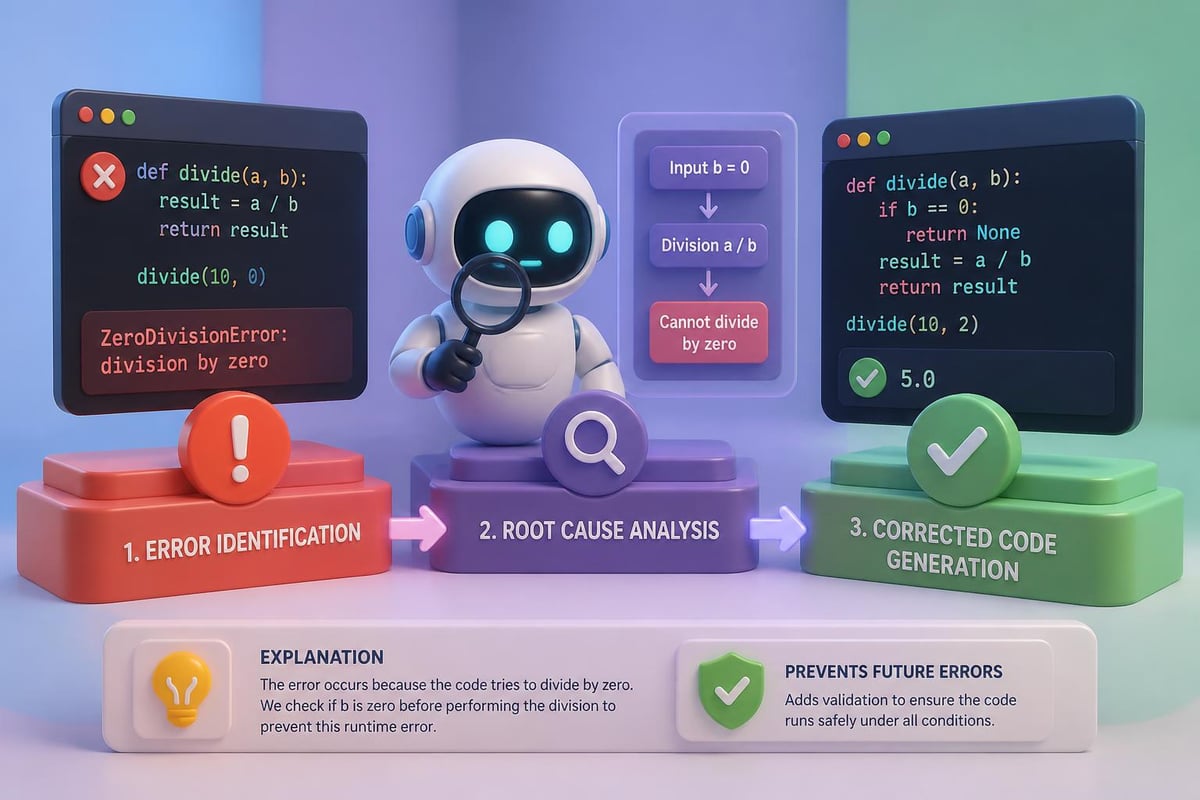
- Debugging error messages and fixing broken code
- Converting code between programming languages
- Optimizing existing code for better performance
- Explaining complex code in simple terms
The key is learning how to communicate effectively with AI. Generic requests like "write me a Python script" produce generic results. Specific requests with clear requirements produce production-ready code.
How AI Coding Differs from Traditional Programming
Traditional coding requires you to know the exact syntax, understand data structures, and architect solutions from scratch. AI coding shifts the focus to problem definition and quality control.
You become the architect and reviewer instead of the builder. The AI generates the initial code, and you verify it works correctly. This approach dramatically reduces development time while maintaining code quality.

Writing Your First AI Code Prompt
The quality of your output depends entirely on the quality of your prompt. A well-structured ai coding tutorial prompt includes four essential elements: context, task, constraints, and output format.
Essential prompt components:
| Component | Purpose | Example |
|---|---|---|
| Context | Explains the situation | "I need to process customer data from CSV files" |
| Task | Defines what you need | "Create a Python script that extracts email addresses" |
| Constraints | Sets limitations | "Use only standard libraries, no external dependencies" |
| Output | Specifies format | "Include error handling and comments explaining each step" |
Creating a Python Data Processing Script
Let's build a practical script that processes customer data. This example shows how to structure prompts for maximum effectiveness.
Copy-paste this prompt into ChatGPT or Claude:
I need a Python script that reads a CSV file containing customer data and generates a summary report.

Requirements:
- Read from a file called "customers.csv" with columns: name, email, purchase_amount, date
- Calculate total sales, average purchase, and count of customers
- Handle missing values gracefully
- Save the summary to a new file called "summary.txt"
- Include error handling for file not found
- Add comments explaining each section

Use pandas for data manipulation. Make the code beginner-friendly.
Here's the AI-generated output you can expect:
import pandas as pd

def generate_sales_summary(input_file='customers.csv', output_file='summary.txt'):
    """
    Reads customer data from CSV and generates a sales summary report.

    Args:
        input_file: Path to the CSV file containing customer data
        output_file: Path where the summary will be saved
    """
    try:
        # Read the CSV file into a DataFrame
        df = pd.read_csv(input_file)

        # Remove rows with missing purchase amounts
        df = df.dropna(subset=['purchase_amount'])

        # Calculate summary statistics
        total_sales = df['purchase_amount'].sum()
        average_purchase = df['purchase_amount'].mean()
        customer_count = len(df)

        # Create summary report
        summary = f"""
        Sales Summary Report
        ====================
        Total Sales: ${total_sales:,.2f}
        Average Purchase: ${average_purchase:,.2f}
        Number of Customers: {customer_count}
        """

        # Save to file
        with open(output_file, 'w') as f:
            f.write(summary)

        print(f"Summary saved to {output_file}")
        return summary

    except FileNotFoundError:
        print(f"Error: {input_file} not found. Please check the file path.")
        return None
    except Exception as e:
        print(f"An error occurred: {str(e)}")
        return None

# Run the function
if __name__ == "__main__":
    generate_sales_summary()
This code is immediately usable. Copy it into a .py file, ensure you have pandas installed, and run it with your customer data.
Debugging Code with AI Assistance
When code breaks, AI excels at identifying issues and suggesting fixes. Instead of searching Stack Overflow for hours, you can resolve errors in minutes. For those looking to deepen their understanding, platforms like QWE AI Academy offer extensive free tutorials on AI coding fundamentals.
The Debugging Prompt Structure
Effective debugging requires sharing three pieces of information: the code that's failing, the error message, and what you expected to happen.
Use this template for debugging:
I'm getting an error in my Python script. Here's the code:

[paste your code]

Error message:
[paste the exact error]

Expected behavior:
[describe what should happen]

Please explain what's wrong and provide the corrected code with comments explaining the fix.
Let's work through a real debugging scenario. Suppose you have code that's throwing a "KeyError" when processing JSON data.
Real debugging prompt:
I'm getting an error when trying to extract data from a JSON API response.

Code:
import requests
import json

response = requests.get('https://api.example.com/users')
data = json.loads(response.text)
for user in data:
    print(user['email'])

Error message:
KeyError: 'email'

Expected behavior:
Should print all user email addresses from the API response.

Please fix this and add error handling for missing fields.
The AI will identify that not all users have an email field and suggest using .get() instead of direct key access. This pattern of sharing exact errors with context leads to precise solutions.
Building a Web Scraper with AI
Web scraping is a common task that benefits enormously from AI assistance. You can build a functional scraper without understanding BeautifulSoup or Selenium syntax. The Claude Code Tutorial offers an interactive approach to learning these concepts for non-technical users.
Creating a Product Price Tracker
This ai coding tutorial example creates a scraper that monitors product prices on e-commerce sites.
Complete scraper prompt:
Create a Python web scraper that tracks product prices on Amazon.

Specifications:
- Accept a product URL as input
- Extract the product title and current price
- Save the data with a timestamp to a CSV file
- Use requests and BeautifulSoup libraries
- Include user-agent headers to avoid blocking
- Add error handling for network issues and missing elements
- Include a 2-second delay to be respectful of the server

Make it runnable as a standalone script with clear comments.
The AI generates a complete scraper with proper HTML parsing, error handling, and CSV output. You get production-ready code that respects robots.txt and implements rate limiting.
Key features the AI includes automatically:
- Proper HTTP headers to mimic browser requests
- Exception handling for connection timeouts
- CSS selector logic to find price elements
- Data validation before saving
- Timestamp formatting for tracking price changes
This approach works for scraping job listings, monitoring stock availability, or aggregating news articles. Just modify the URL and element selectors in your prompt.
Automating Excel Tasks with Python
Excel automation saves hours of manual work. AI can generate scripts that process spreadsheets, create reports, and update formulas without touching Excel's VBA environment.
Merging Multiple Excel Files
Business teams often receive data spread across multiple Excel files that need consolidation. Here's how AI handles it.
Write a Python script that merges multiple Excel files into one master file.

Requirements:
- Read all .xlsx files from a folder called "input_files"
- Combine them into a single DataFrame
- Remove duplicate rows based on "ID" column
- Sort by "Date" column in descending order
- Save the result as "merged_data.xlsx"
- Create a summary sheet showing row counts from each source file
- Use openpyxl for Excel handling
- Add progress messages so users know what's happening
The AI produces code that handles file operations, data deduplication, and multi-sheet Excel creation. You avoid the complexity of Excel's object model while getting professional results.
Converting Between Programming Languages
Sometimes you inherit code in one language but need it in another. AI translates code while preserving logic and adding language-specific optimizations. The emergence of vibe coding demonstrates how AI is making cross-language translation more intuitive than ever.
JavaScript to Python Conversion
Conversion prompt example:
Convert this JavaScript function to Python:

function calculateDiscount(price, discountPercent) {
    if (discountPercent < 0 || discountPercent > 100) {
        throw new Error('Invalid discount percentage');
    }
    const discount = price * (discountPercent / 100);
    return price - discount;
}

Make the Python version include type hints and a docstring. Keep the same validation logic.
The AI doesn't just translate syntax. It adapts to Python conventions, using type hints, docstrings, and appropriate exception types. You get idiomatic Python that follows PEP 8 standards.
Optimizing and Refactoring Code
Existing code often works but runs slowly or contains repetitive sections. AI identifies inefficiencies and suggests improvements without changing functionality.
Performance Optimization Prompt
When code takes too long to execute, AI can suggest algorithmic improvements and better data structures.
Optimization request:
This Python function is too slow with large datasets. Please optimize it:

def find_duplicates(numbers):
    duplicates = []
    for i in range(len(numbers)):
        for j in range(i + 1, len(numbers)):
            if numbers[i] == numbers[j] and numbers[i] not in duplicates:
                duplicates.append(numbers[i])
    return duplicates

Explain why the original is slow and how the optimized version improves performance.
The AI recognizes the O(n²) time complexity and refactors using sets for O(n) performance. It explains that nested loops create quadratic time, while set operations provide constant-time lookups.
| Approach | Time Complexity | Best For |
|---|---|---|
| Nested Loops | O(n²) | Small datasets (<100 items) |
| Set Operations | O(n) | Large datasets (1000+ items) |
| Hash Maps | O(n) | Key-value duplicate tracking |
Working with APIs and JSON Data
Modern applications rely heavily on API integration. AI generates code that handles authentication, processes JSON responses, and manages rate limits. Resources like Prompt Hero.Ai provide practical tutorials for these real-world scenarios.
Building an API Client
API integration prompt:
Create a Python class that interacts with a REST API for weather data.

Features needed:
- Initialize with API key
- Method to get current weather for a city
- Method to get 5-day forecast
- Parse JSON responses into clean Python dictionaries
- Handle API errors and rate limiting
- Cache responses for 10 minutes to reduce API calls
- Include example usage

Use the requests library and include type hints.
The AI builds a complete class with proper error handling, caching logic, and documentation. You get an API wrapper ready for production use.

Advanced Prompt Techniques
As you gain experience, advanced prompting techniques produce even better results. These methods help AI understand complex requirements and generate sophisticated solutions.
Chain-of-Thought Prompting for Complex Logic
When building complex algorithms, ask AI to explain its reasoning step-by-step before generating code.
Advanced prompt structure:
I need an algorithm that schedules employee shifts while respecting these constraints:
- Each employee works max 5 days per week
- No employee works more than 8 hours per day
- At least 3 employees must be present during peak hours (9am-5pm)
- Weekend shifts pay 1.5x rate

Before writing code, explain your approach to solving this scheduling problem.
Then provide the Python implementation using appropriate data structures.
The AI outlines its strategy first, which you can review and adjust before it generates hundreds of lines of code. This prevents wasted effort on wrong approaches.
Iterative Refinement
Good code rarely emerges from a single prompt. Use follow-up questions to refine outputs:
- "Add unit tests for the main function"
- "Refactor this to use async/await for better performance"
- "Convert the function parameters to use a configuration dictionary instead"
- "Add logging to track execution time for each step"
Each refinement builds on the previous version, gradually improving code quality.
Real-World Application: Building a Task Automation Bot
Let's combine everything into a practical project. This ai coding tutorial example creates a bot that monitors your inbox and automatically categorizes emails.
Comprehensive project prompt:
Build a Python email automation bot with these capabilities:

1. Connect to Gmail using IMAP
2. Check for unread emails every 5 minutes
3. Categorize emails based on keywords:
   - "invoice", "payment" -> Finance
   - "meeting", "schedule" -> Calendar
   - "urgent", "ASAP" -> Priority
4. Move emails to appropriate labels
5. Send a daily summary at 5 PM
6. Log all actions to a file
7. Use environment variables for credentials
8. Include setup instructions

Provide the complete code with configuration file examples.
The AI generates a multi-file project with proper structure, security practices (environment variables for credentials), and deployment instructions. You get a functional automation tool in minutes.
Project components the AI creates:
- Main bot script with IMAP connection handling
- Configuration file template
- Requirements.txt for dependencies
- README with setup instructions
- Logging configuration
- Error notification system
Learning Resources and Next Steps
Mastering AI coding requires practice and exposure to diverse problems. Starting with structured learning paths helps build foundational skills systematically. Mammoth Club’s AI certification program offers access to over 3,000 courses covering AI tools, coding fundamentals, and real-world automation projects, with hands-on practice questions that reinforce learning through application.

For continued growth, supplement AI-generated code with these practices:
Development best practices:
- Always test AI-generated code before production use
- Review code line-by-line to understand what it does
- Modify prompts based on output quality
- Save effective prompts for reuse
- Learn the underlying concepts gradually
Skill progression path:
- Week 1-2: Simple scripts (file operations, data processing)
- Week 3-4: API integration and web scraping
- Week 5-6: Database operations and automation
- Week 7-8: Multi-file projects and deployment
The OpenCode Practical Guide provides comprehensive free resources that complement AI coding practice with theoretical foundations.
Common Pitfalls and How to Avoid Them
Even with AI assistance, certain mistakes appear frequently. Recognizing these patterns saves debugging time.
Security Mistakes
AI sometimes generates code with security vulnerabilities. Always review for:
- Hardcoded credentials (use environment variables instead)
- SQL injection risks (use parameterized queries)
- Unvalidated user input (add input sanitization)
- Missing error handling (wrap in try/except blocks)
Dependency Issues
Generated code may reference outdated libraries or incompatible versions. Before running any script:
# Create a virtual environment
python -m venv ai_project
source ai_project/bin/activate  # On Windows: ai_projectScriptsactivate

# Install dependencies
pip install -r requirements.txt
This isolates project dependencies and prevents conflicts with system packages.
Over-Complexity
AI sometimes generates overly complex solutions when simple ones suffice. If the code includes multiple design patterns for a basic task, simplify your prompt:
"Create the simplest possible solution using only standard library functions."
Integrating AI Coding Into Your Workflow
Successful developers blend AI assistance with traditional skills. The goal isn't replacing programming knowledge but accelerating development cycles. Research on AI-based coding in scientific contexts outlines practical workflows that balance automation with human oversight.
Daily Integration Strategies
Morning: Use AI to generate boilerplate code for new projects
Midday: Debug errors with AI assistance as they arise
Afternoon: Refactor existing code for better performance
Evening: Document code by asking AI to generate docstrings
This rhythm keeps you productive while building genuine understanding.
Team Collaboration
When working with teams, establish AI usage guidelines:
- Document which prompts generated which code sections
- Review all AI-generated code in pull requests
- Share effective prompts in team knowledge bases
- Set quality standards that AI outputs must meet
Transparency about AI usage builds trust and maintains code quality across projects.
AI coding transforms how quickly you can build functional applications, turning ideas into working software within hours instead of weeks. This ai coding tutorial has equipped you with prompt templates, debugging strategies, and real examples you can apply immediately to your projects. Ready to accelerate your development skills even further? Prompt Hero.Ai offers step-by-step tutorials, copy-paste prompts, and practical examples designed specifically for professionals who want to solve real business problems with AI tools like ChatGPT and Claude.