
An AI prompting course teaches you how to write instructions that make tools like ChatGPT and Claude return accurate, usable results, and most good ones cover clear instructions, context, examples, output formats and iteration. If you use AI at work, a few hours of structured practice usually improves your results more than any amount of random experimenting. This guide explains what such a course covers, how to choose one, and how to build the skill step by step.
What Is an AI Prompting Course?
An AI prompting course is structured training in writing prompts, the instructions you give an AI model, so the output matches what you actually need. It sits between a casual tutorial and a full machine learning program. You do not learn how models are built. You learn how to direct them.
Courses vary in depth. A short course might run an hour and cover basic patterns. A longer one adds projects, evaluation methods and techniques for building prompts into repeatable workflows. You may also see the same material called prompt engineering, since the two terms overlap heavily in practice.
The skill matters because models respond to what you write, not to what you meant. Vague input produces vague output. A course gives you a repeatable method so you are not guessing each time.
What Topics Does a Prompt Engineering Syllabus Cover?
A solid prompt engineering syllabus covers six core areas: prompt anatomy, context and constraints, examples, reasoning techniques, output control and iteration. Courses differ in order and depth, but these show up again and again.
Prompt anatomy and clear instructions
Microsoft Learn describes a prompt as generally having two parts: an instruction and context. Everything else in a syllabus builds on that split.
Context, constraints and format
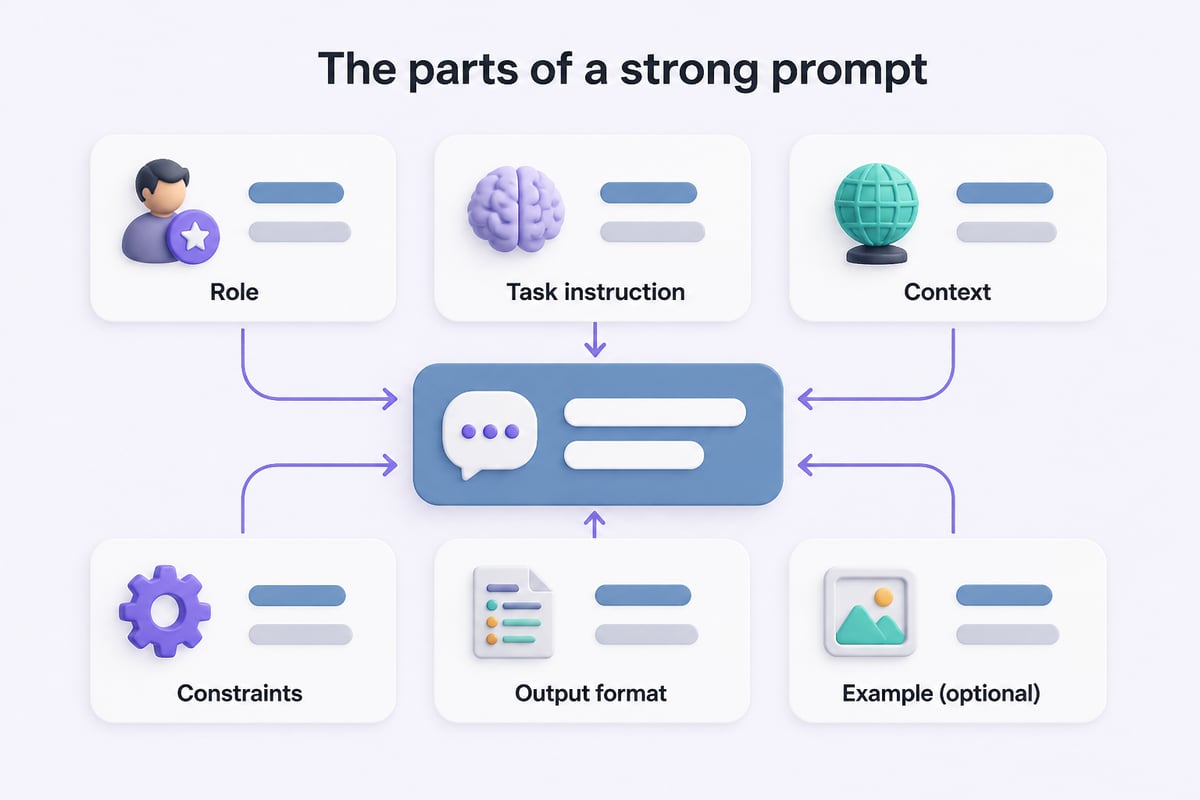
OpenAI advises specifying the desired context, outcome, length, format and style to make prompts more precise, as laid out in its prompt engineering best practices. A course turns this into a habit: every prompt states who the output is for, how long it should be, and what shape it should take.
Zero-shot and few-shot prompting
Zero-shot means asking without examples. Few-shot means including one or more sample inputs and outputs. The same OpenAI guidance recommends starting with zero-shot, then trying few-shot examples, and considering fine-tuning only if those approaches do not work. That order saves time and money.
Reasoning and task decomposition
Complex requests work better when broken into steps. Breaking a complex request into steps is a core technique that a good course teaches through exercises like "analyze, then summarize, then recommend."
Iteration and evaluation
Your first prompt rarely gives the best result. Courses teach you to refine through follow-up prompts and to judge output against a clear standard.
Advanced topics
Longer programs add retrieval-augmented generation, prompt templates for teams, and testing prompts across models.
What Skills Will You Have When You Finish?
By the end of a good course you can turn a vague work task into a precise prompt, fix a weak output without starting over, and save your best prompts as reusable templates. Those three abilities cover most daily use.
Concretely, expect to be able to:
- Write prompts with a clear task, context and format
- Add examples to lock in tone or structure
- Break multi-step work into a chain of prompts
- Catch and correct common failures such as made-up facts or off-brand tone
- Build a personal prompt library for recurring tasks
Hypothetical example: a marketing team that drafts weekly status reports could build one template that takes raw notes and returns a three-section summary in a consistent format, saved and reused instead of rewritten each week.
How Do You Choose the Right AI Prompting Course?
Choose a course by matching four things to your situation: your goal, your time, your tools and the amount of hands-on practice. Skip anything that is mostly slides and no exercises.
Use this checklist:
- Goal fit. Decide whether you want everyday productivity, content work, automation, or developer-level API prompting. Pick the course that matches.
- Hands-on practice. Look for exercises where you write prompts and compare outputs. Watching someone else prompt teaches far less.
- Tool coverage. Models behave differently. A course that uses more than one tool, such as ChatGPT and Claude, teaches you what transfers and what does not.
- Time and format. Self-paced courses suit irregular schedules. Cohort-based ones add accountability.
- Credential value. A certificate can help in some workplaces, but a portfolio of working prompts often persuades more.
- Current content. Models change quickly. Check that materials were updated recently.
If you want a broader credential alongside prompting, certification platforms are an option. Mammoth Club offers AI certification and training, with courses covering how to use tools like ChatGPT and Claude to automate tasks. That makes it a reasonable fit if you want prompting training bundled with a wider course library.

How Does a Free Course Compare With a Paid One?
Free courses are enough to learn the fundamentals, while paid courses mainly add structure, feedback and credentials. Neither is automatically better, and the right pick depends on how you learn.
| Factor | Free resources | Paid courses |
|---|---|---|
| Cost | None | Varies by provider |
| Structure | Often scattered | Usually a set sequence |
| Feedback | Rare | Sometimes included |
| Certificate | Seldom | Often available |
| Updates | Inconsistent | Depends on the provider |
| Best use | Learning basics, testing your interest | Career goals, accountability |
A practical path is to start free, find out whether you enjoy the work, and pay only when you need structure or a credential. The vendors' own documentation is free and accurate. OpenAI's guide to creating a good prompt is a solid starting point for the basics.
How Do You Learn Prompting Step by Step?
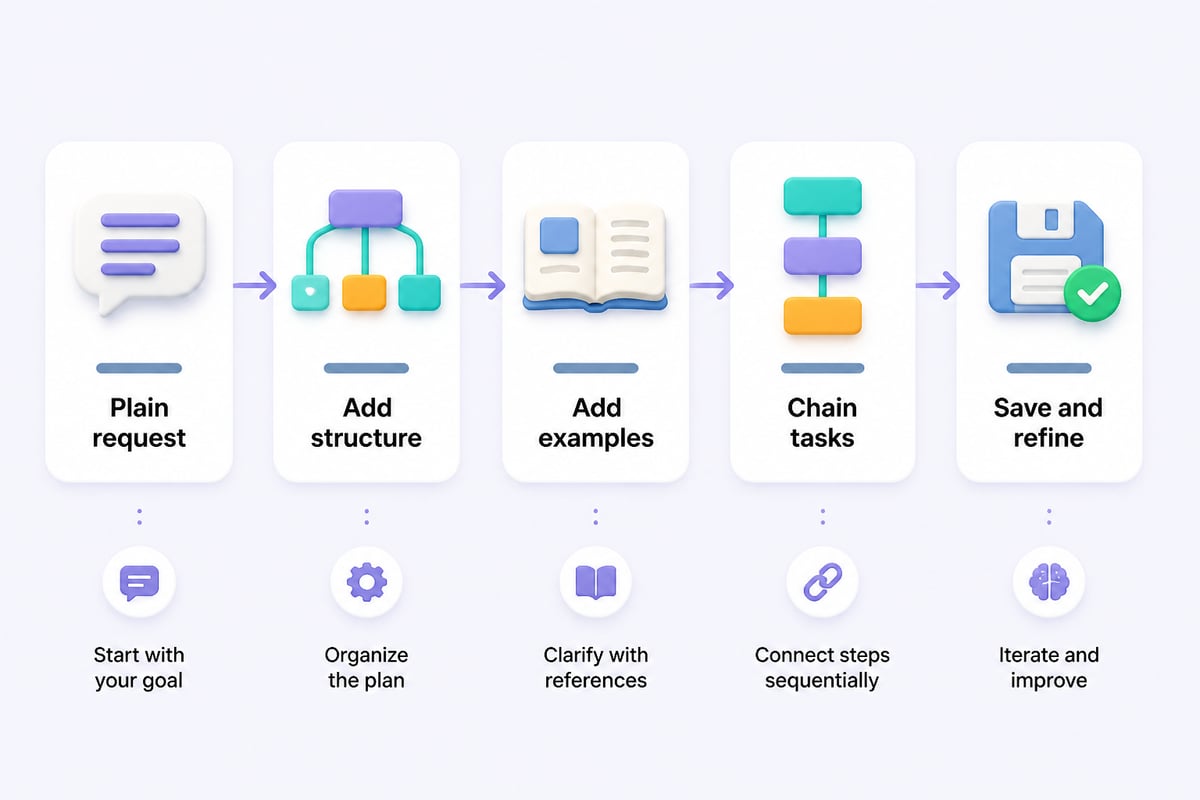
You learn prompting by moving through five stages: write plain requests, add structure, add examples, chain tasks and then save what works. Each stage builds on the last, and you can do all five in a few weeks of short sessions.
Stage 1: Start with a plain request
Ask for one thing and read the result critically. Note what is missing. This gives you a baseline.
Stage 2: Add structure
Put the instruction first and separate it from supporting material. OpenAI recommends placing instructions at the beginning of a prompt and using delimiters such as ### or triple quotes to separate them from context. For example:
Summarize the text below in three bullet points for a busy executive.

Text: """
[paste meeting notes here]
"""
Stage 3: Add examples
If the tone or format keeps missing, show the model one sample of what you want. Few-shot prompting is often the quickest fix.
Stage 4: Chain tasks
Break big jobs into parts. Ask for an outline, review it, then ask for the draft. You keep control at each step.
Stage 5: Save and refine
Store prompts that work, note which model they suit, and revise them when results drift.
Which Prompt Techniques Should Professionals Practice First?
Professionals get the fastest returns from four techniques: role and audience framing, format control, examples and self-review. These apply to nearly every business task.
- Role and audience framing. Tell the model who it is helping and who will read the output. "Draft a client update for a non-technical CFO" beats "write an update."
- Format control. Request a table, a numbered list or a fixed word count. Specifying format cuts editing time.
- Examples. Paste one strong past output and ask for the same style on new material.
- Self-review. Ask the model to check its draft against your criteria and revise. This catches many weak spots before you do.
Here is a reusable pattern you can copy:
Act as a [role]. My audience is [audience].
Task: [what you need].
Context: [relevant background].
Format: [length, structure, tone].
Before answering, ask me any questions you need.
The last line is useful. It turns a guess into a short conversation and often improves accuracy. For more on tuning prompts for ChatGPT specifically, OpenAI's ChatGPT prompting best practices cover clear instructions, iteration and tone.
How Can You Get AI Prompts Without Writing Everything From Scratch?
You can get AI prompts from prompt libraries, tutorial sites, vendor documentation and your own saved history, then adapt them to your task. Copying a prompt as is rarely works well, so treat it as a first draft.
Good sources include:
- Tutorial sites with copy-and-paste prompts and worked examples, such as the guides at Prompt Hero.Ai
- Official documentation from model providers
- Your own chat history, where past successful prompts already exist
- Colleagues' shared templates, if your team keeps a library
When you adopt a prompt, replace every bracketed placeholder with your real context. Then test it twice with different inputs. A prompt that works once may not hold up on messy real data.

What Mistakes Do Learners Make Most Often?
The most common mistakes are vague instructions, missing context, accepting the first answer and trusting facts without checking them. Each has a simple fix.
- Vague asks. "Make this better" gives the model nothing to aim at. Say better how: shorter, more formal, more persuasive.
- No context. The model cannot see your industry, your customer or your last meeting. Include the relevant background.
- Stopping at draft one. Treat the first answer as a starting point and push back with specific edits.
- Skipping verification. Models can state wrong details confidently. Check names, figures and quotes before sharing anything.
- Overloading one prompt. Asking for ten things at once lowers quality. Split the work.
- Pasting sensitive data. Follow your company's policy on what can go into an AI tool.
What If You Want to Go Beyond Prompting Into Code?
If you want to build with AI rather than only chat with it, learn Python alongside prompting. Python is the common language for calling model APIs, automating repetitive prompts and working with data.
A sensible order is prompting first, then basic Python, then API calls. Prompting teaches you how models respond, which makes your code better. Prompt Hero.Ai has beginner-friendly material on this path, including an AI prompting engineering course page and a guide to Python for AI. Developers can pair those with OpenAI's prompt engineering documentation, which covers instruction hierarchy and evaluation for model applications.
How Do You Know Your Prompting Is Improving?
You know your prompting is improving when you need fewer revisions to reach a usable result and when your outputs match a standard you set in advance. Measure it instead of relying on a feeling.
A simple method:
- Pick three recurring tasks, such as meeting summaries, email drafts and report outlines.
- Write down what a good result looks like for each in two or three criteria.
- Run your current prompt and count how many follow-ups it takes to meet the criteria.
- Rewrite the prompt using what you learned, then count again.
When the number of follow-ups drops, the skill is growing. Keep a short log of what changed. Patterns will appear quickly, and they become the core of your personal prompt library.
Key Takeaways
- An AI prompting course teaches you to direct tools like ChatGPT and Claude with clear instructions, context, format and examples.
- Start with zero-shot prompts, add examples if needed, and break large jobs into steps.
- Choose a course for its hands-on exercises, tool coverage and current content, not only its certificate.
- Verify facts, protect sensitive data and treat the first output as a draft.
- Measure progress by how many revisions each task needs.
Frequently Asked Questions
What is a prompt course?
A prompt course is training that teaches you to write effective instructions for AI models. It covers how to structure requests, add context, control output format and refine results, usually through exercises with tools like ChatGPT and Claude.
What is the best course to learn about artificial intelligence?
The best course depends on your goal. If you want to use AI at work, start with a prompting course. If you want to build models or write AI code, choose a Python and machine learning path. Many learners do prompting first because it gives quick, practical wins.
How long does it take to learn prompt engineering?
You can learn the fundamentals in a few hours and become comfortable within a few weeks of regular practice. Advanced topics such as evaluation and retrieval-augmented generation take longer.
Do I need to know how to code to take an AI prompting course?
No. Most prompting courses for business users require no coding. Coding becomes useful when you want to automate prompts through an API.
Will a prompting certificate help my career?
It can help in workplaces that value formal credentials, but a portfolio of prompts and workflows that save real time usually carries more weight. Combine both if you can.
Do prompts work the same way in every AI tool?
Not exactly. Core principles carry over, but each model has its own quirks in tone, length and how it follows instructions. Test important prompts in each tool you use.
Pick one task you repeat every week, write a structured prompt for it using the pattern above, and save the version that works. If you want step-by-step tutorials with copy-and-paste prompts to practice on, and a wider certification path to go with them, Mammoth Club is one option to explore. Prompt Hero.Ai provides practical AI tutorials and prompts for real-world use, with step-by-step instructions and copy-and-paste prompts for tools like ChatGPT and Claude.