
The best AI prompting tips come down to four habits: state one clear task, give the model the context it needs, show an example of the output you want, and refine the result with follow-up instructions. A vague request gets a generic answer, while a specific one gets something you can use at work. The rest of this article explains how to apply those habits to ChatGPT, Claude and similar tools, then reviews four prompt libraries that save time once your own prompts are working.
Start with a prompt structure you can reuse
A reliable prompt has five parts: role, task, context, format and constraints. You do not need all five every time, but having the checklist stops you from sending a one-line request and hoping for the best.
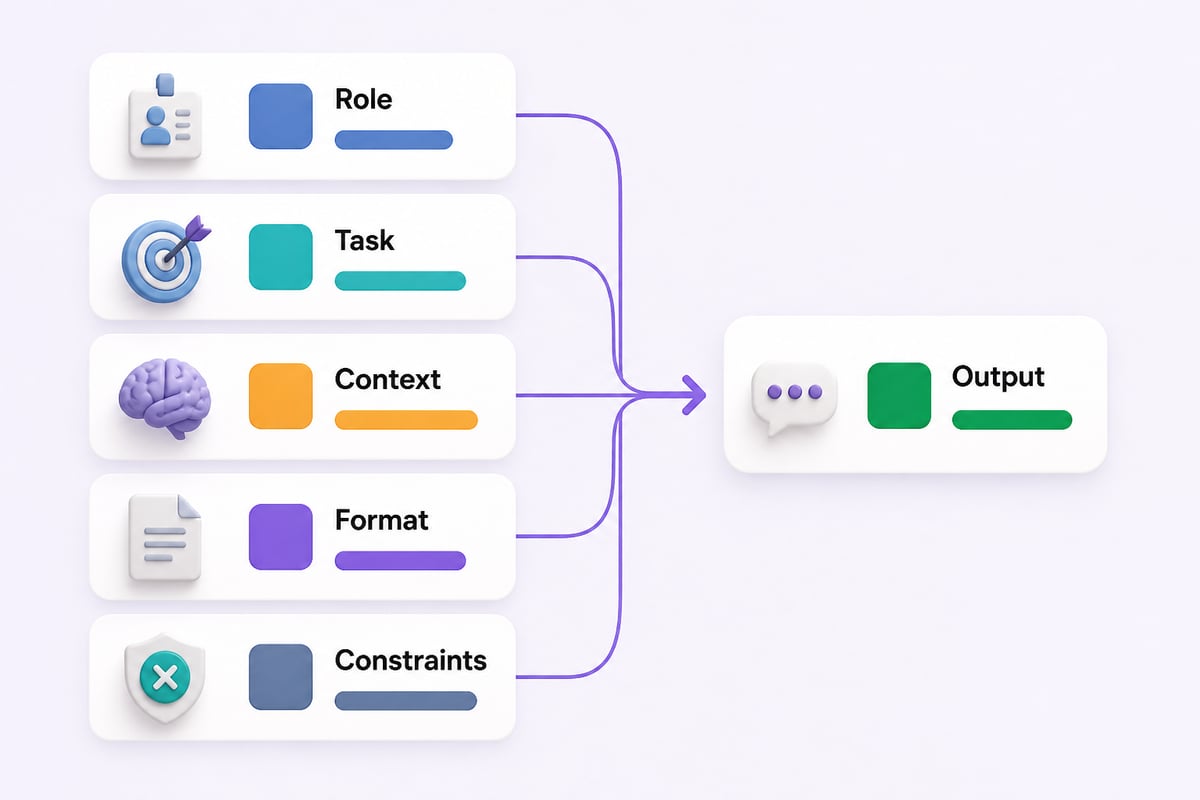
OpenAI’s prompting guide recommends specifying the desired context, outcome, length, format and style, and using examples to show the output you want. That maps neatly onto the structure above.
Here is a weak prompt and a stronger version of the same request:
- Weak: "Write an email about our delayed project."
- Stronger: "You are a project manager. Write a 120-word email to a client whose software rollout is delayed by two weeks. Explain the cause (a vendor integration issue), state the new date, and offer a call this week. Tone: direct and apologetic without over-explaining. Output: subject line plus body."
The second version leaves the model very little to guess. That is the whole game.
Be specific and quantify what you want
Specific prompts produce usable drafts because they remove guesswork about length, scope and tone. Numbers are the easiest way to add specificity.
Google’s prompt-engineering guide recommends quantifying requests where possible, and its example asks for a sonnet with 14 lines rather than a poem. In a business setting, the same idea looks like this:
- "Summarize this report in 5 bullet points, each under 20 words."
- "Give me 3 subject-line options under 50 characters."
- "List the top 4 risks, ranked by likelihood."
A 2025 survey study, Prompt Engineering and the Effectiveness of Large Language Models in Enhancing Human Productivity, collected responses over roughly six weeks in early 2025 and reports that more specific, contextual prompts were associated with better task efficiency and outcomes. It is survey data, so treat it as supporting evidence rather than proof, but it matches what most people see in daily use.
Give context the model cannot guess
Context is the information the AI does not have unless you provide it: your audience, your goal, your constraints and the source material. Without it, the model fills gaps with plausible but generic assumptions.
Useful context to include:
- Audience: who will read the output and what they already know.
- Purpose: what decision or action the output should support.
- Source material: paste the actual text, data or notes to work from.
- Boundaries: what is out of scope, such as pricing, legal claims or competitor names.
Microsoft's prompt-engineering guidance lists grounding context among its core techniques, alongside clear instructions, few-shot examples and output structure. Grounding simply means giving the model the facts to rely on instead of asking it to recall them. For anything involving figures, policies or quotes, paste the source in and tell the model to use only that material.
Show examples of the output you want
Examples teach format and tone faster than descriptions do. This technique is called few-shot prompting: you include one to three samples of the input and the output you expect, then ask for a new one.
A short pattern that works well:
- "Here are two product descriptions in our house style: [example 1] [example 2]. Write a third for [new product] in the same style."
- "Classify these support tickets as billing, bug or feature request. Example: 'I was charged twice' = billing."
If you only have one good example, one is still better than none. If the model copies the example too closely, add "match the tone and structure, but use different wording and details."
Break complex work into steps
Large tasks produce better results when you split them into smaller prompts, or ask the model to work through stages in order. Google's guide recommends this and gives a three-step marketing-plan example: identify the audience, develop messages, then choose channels.
A practical sequence for a business task like a competitive briefing:
- Ask for a list of the questions the briefing should answer.
- Approve or edit that list.
- Have the model draft each section from your supplied notes.
- Ask for a one-paragraph executive summary last.
This also gives you checkpoints, so errors are caught early instead of buried in a 1,500-word draft. For reasoning-heavy tasks, asking the model to work through its logic before answering is a related technique, covered in this guide to chain-of-thought prompting.

Iterate with follow-up instructions
Treat the first answer as a draft, not a verdict. The fastest way to improve output is to tell the model exactly what to change, one thing at a time.
Effective follow-ups:
- "Shorten to 100 words and cut the first paragraph."
- "Make the tone less formal. Keep the three numbers."
- "Rewrite for a CFO who only cares about cost and timeline."
- "What assumptions did you make? List them."
That last one is underused. Asking a model to list its assumptions exposes where it guessed, which tells you what context to add next time. If you find yourself making the same corrections repeatedly, move them into the original prompt as constraints, and you have a reusable template.
Match your AI prompting tips to the task type
The same prompt habits apply everywhere, but the emphasis shifts by task. Use this as a quick guide:
- Summarizing: specify length, audience and what to prioritize (decisions, risks, next steps).
- Drafting: specify tone, length and a reader profile, and supply bullet notes rather than asking for invention.
- Analysis: paste the data, define the question, and ask for the method used.
- Brainstorming: ask for a set number of options across different angles, then ask for a ranking with reasons.
- Classification or extraction: define the categories, give two examples, and request a fixed output format such as a table or JSON.
For a deeper catalog of methods, see this overview of AI prompting techniques.
Common mistakes that weaken results
Most poor outputs trace back to a handful of avoidable errors:
- Stacking several unrelated tasks in one prompt, so none gets full attention.
- Leaving out the audience, which defaults the model to a generic reader.
- Accepting facts without checking. Models can state incorrect details confidently, so verify figures, names and citations before sharing.
- Pasting sensitive data into a tool without checking your company's policy.
- Starting over instead of refining. A follow-up instruction is usually faster than a rewrite.
The research is also clear that prompting is a deep field. A systematic survey of prompt engineering describes more than 41 distinct techniques and reports that OPRO-optimized prompts outperformed human-designed ones on several benchmarks. You do not need dozens of techniques for daily work, but it shows that prompt wording has measurable effects.
Prompt libraries and tools worth knowing
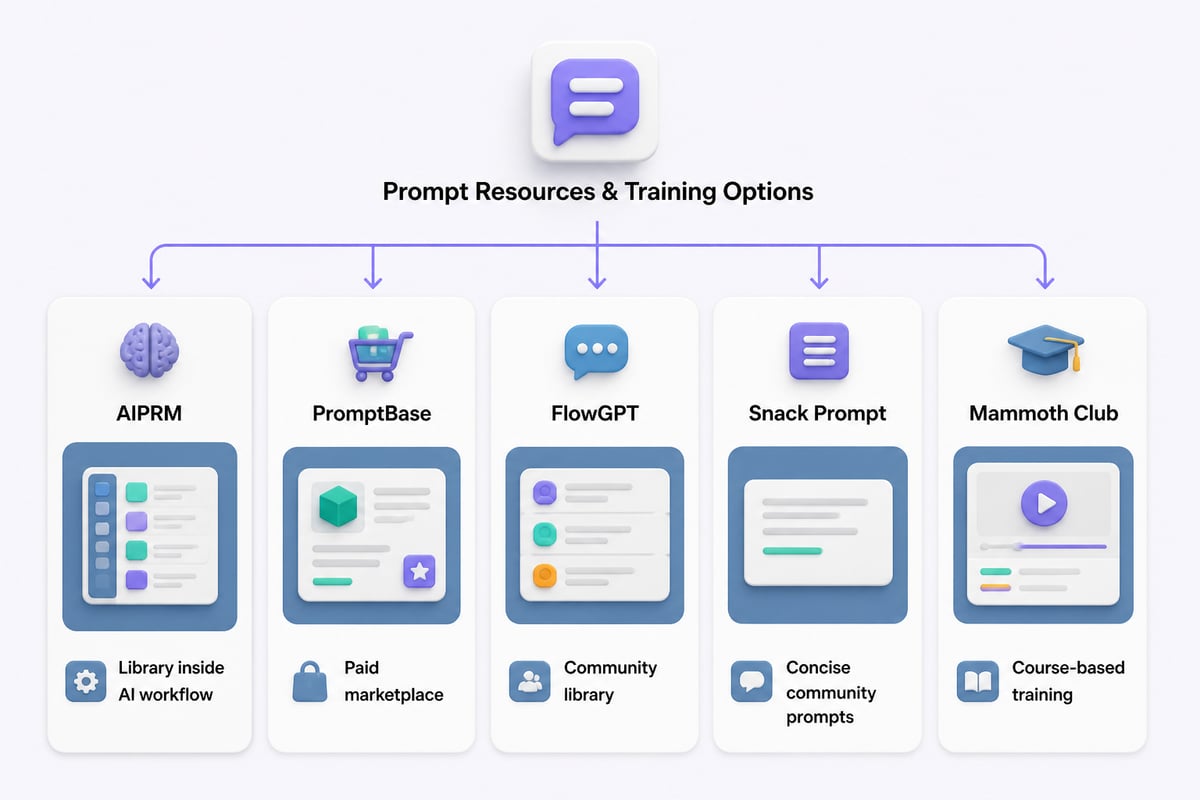
If you do not want to build every prompt from scratch, a prompt library gives you tested starting points you can adapt. The tools below differ in how they work, so the descriptions stick to what is known about each. Prices change, so check each site directly.
1. AIPRM
AIPRM is a prompt library with search and organization features and community-contributed prompts. It works with supported AI platforms, so you can use ready-made prompts inside your existing workflow. A free plan is available, with paid plans offered above it.
Suits: professionals who want a large, searchable library of ready-made prompts without leaving their usual AI tool.
Verdict: the best choice here if you want breadth and quick access to starting prompts.
2. PromptBase
PromptBase is a marketplace where creators sell prompts for text, image, video and audio tools. It includes creator storefronts and prompt ratings and reviews. Individual prompts are sold through the marketplace, with prices varying by prompt.
Suits: people who want to buy specialized prompts and reuse them rather than develop each one from scratch.
Verdict: useful for niche tasks where paying for a refined prompt saves iteration time.
3. FlowGPT
FlowGPT is a community prompt library built around discovery and sharing, with collections, categories, user ratings and discussions. Free access is available, and optional paid features may apply (approximate, as of November 2026).
Suits: beginners looking for examples and community-tested prompts across common AI tasks.
Verdict: a good place to see how other people phrase prompts before writing your own.
4. Snack Prompt
Snack Prompt is a prompt marketplace and library with categories, community sharing and prompt discovery through voting. Free access is available, and optional paid features may apply (approximate, as of November 2026).
Suits: users who want concise, practical prompts and a community-oriented way to find improvements.
Verdict: a lightweight option for quick, short prompts you can adapt in minutes.
5. Mammoth Club – AI Certification & Training
Mammoth Club is a training subscription rather than a prompt library. It offers access to 3,000+ courses and over 1 million practice questions. It covers using AI tools like ChatGPT and Claude to automate tasks and build job-ready skills. See its page for current pricing.

Suits: professionals who want structured learning and a credential, not only copy-and-paste prompts. If certification is your goal, see this guide to AI prompting certification.
Verdict: the right fit when you want to build skills systematically instead of collecting prompts.
Side-by-side comparison
| Tool | Type | Access | Suits |
|---|---|---|---|
| AIPRM | Prompt library | Free plan; paid plans | Large searchable library inside your AI workflow |
| PromptBase | Marketplace | Prompts priced individually | Buying specialized prompts |
| FlowGPT | Community library | Free; optional paid features | Beginners wanting community-tested examples |
| Snack Prompt | Marketplace and library | Free; optional paid features | Concise prompts and community voting |
| Mammoth Club | Training subscription | See product page | Structured learning and certification |
FAQ
What is the single most useful AI prompting tip?
Add context. Tell the model who the output is for, what it is for, and what source material to use. This one habit fixes more weak outputs than any advanced technique.
How long should a prompt be?
As long as it needs to be. A routine task may need two sentences, while a client-facing document may need a paragraph of context plus pasted notes. Length matters less than whether the key details are present.
Do the same prompts work in ChatGPT and Claude?
Mostly yes. Clear tasks, context, examples and format instructions help in both. Outputs will differ in style, so test your important prompts in the tool you actually use and adjust the wording.
Should I use a prompt library or write my own?
Use a library for starting points and write your own for anything tied to your company's voice, data or process. Adapting a library prompt with your own context usually beats using it unchanged.
How do I stop the AI from making things up?
Paste the source material, instruct the model to use only that material, and ask it to say when information is missing. Then verify figures and names yourself before sharing.
Is prompt engineering still worth learning in 2026?
Yes. Models keep improving, but they still depend on the clarity of your instructions. If you want a guided path, this AI prompting course outline is a reasonable starting point.
This week, take one prompt you use often, rewrite it with a clear audience, a quantified output and one example, and compare the result to your old version. If you want ready-to-use material, Mammoth Club offers structured AI training for professionals who want formal skills. For step-by-step tutorials with copy-and-paste prompts and real examples built for business use, explore Prompt Hero.Ai.