
AI chain of thought prompting is the practice of asking a language model to work through a problem in explicit intermediate steps before it gives a final answer. For multi-step tasks such as financial estimates, policy comparisons, or diagnosing a broken workflow, this usually produces more accurate and easier-to-check results than asking for the answer directly. The technique is simple to apply, but newer reasoning models change when you should use it, and that distinction saves both money and frustration.
This guide covers how the method works, the main variations, ready-to-use prompts for business tasks, and the situations where you should skip it entirely.
What Is Chain of Thought Prompting?
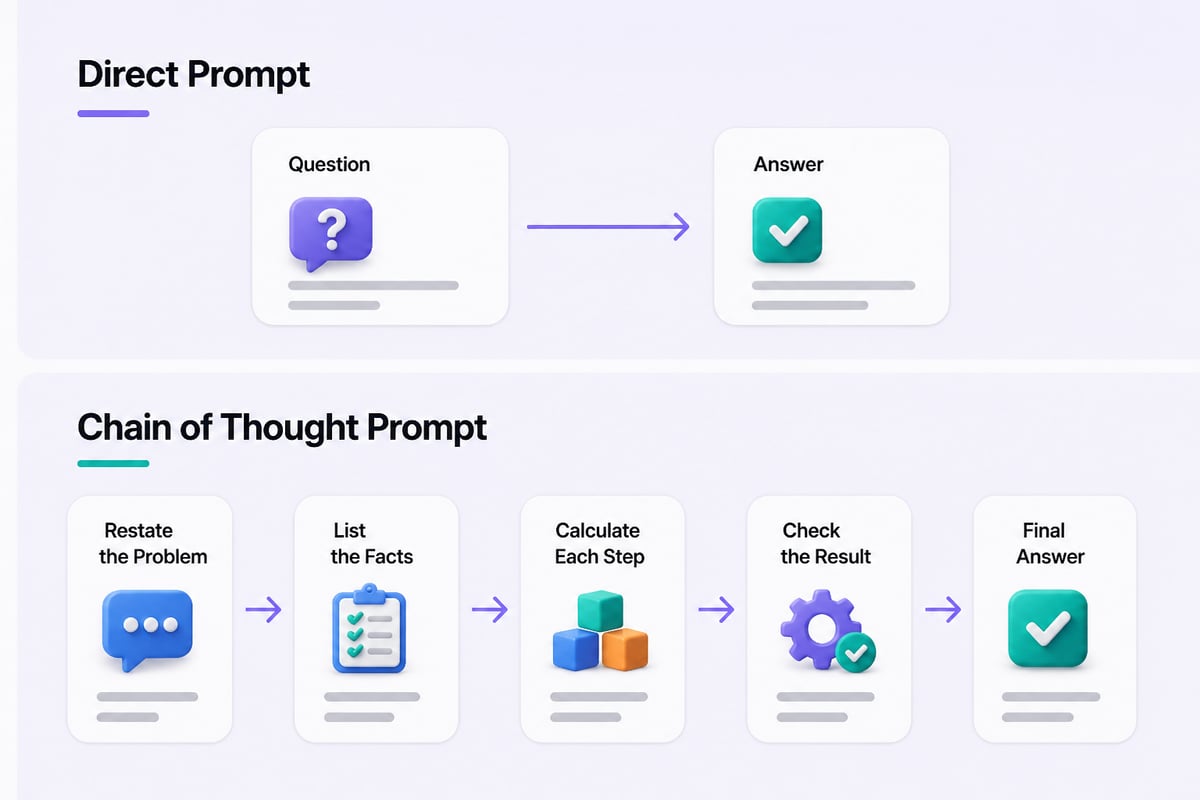
Chain of thought (CoT) prompting is a prompting technique that gets an AI model to lay out its reasoning as a series of steps, then conclude with an answer. Instead of jumping from question to result, the model writes out the path in between.
A language model generates text one piece at a time, and each piece is influenced by everything written before it. When the model writes out intermediate steps, those steps become part of the context it relies on for the next piece, which generally makes a calculation split into small steps easier to get right than one done "in its head."
Here is the difference in practice:
- Direct prompt: "Our subscription costs $49 per month with a 12% annual churn. How much revenue do we keep from 500 subscribers after one year?"
- Chain of thought prompt: "Our subscription costs $49 per month with a 12% annual churn. How much revenue do we keep from 500 subscribers after one year? Work through this step by step, showing each calculation before giving the final number."
The second version asks the model to show its work. That visible work does two jobs. It improves the odds of a correct answer, and it lets you spot exactly where a mistake entered if the answer looks wrong.
How Does AI Chain of Thought Prompting Work?
AI chain of thought prompting works by turning one hard leap into several small, checkable moves. The model handles each move with the text it has already produced, so errors have fewer places to hide.
Three mechanisms explain most of the benefit:
- Decomposition. A complex question gets split into sub-questions the model can handle one at a time.
- Working memory on the page. Intermediate results are written down, so the model doesn't have to hold them implicitly.
- Inspectability. You can read the reasoning, catch a wrong assumption, and correct it in a follow-up message.
The technique is not a guarantee of correct logic. A model can write a confident, fluent chain of steps that contains a flawed premise. Treat the reasoning as evidence to review, not proof. For anything with financial, legal, or compliance consequences, verify the key numbers yourself.
What Are the Main Types of Chain of Thought Prompting?
The main types are zero-shot, few-shot, self-consistency, and least-to-most prompting, and each suits a different level of effort and risk. Start with the simplest and move up only when the task demands it.
Zero-shot chain of thought
You add a short instruction such as "think through this step by step" with no examples. It costs almost nothing and works well for moderate problems like comparing vendor quotes or checking a schedule for conflicts.
Few-shot chain of thought
You include one to three worked examples that show the reasoning style you want, then give the real question. This is the best choice when you need a consistent format, such as the same layout for every customer-ticket triage or every lead-scoring review. The examples teach the model both the steps and the tone.
Self-consistency
You ask the same question several times (or request several independent solutions), then compare the answers. If four of five runs agree, confidence goes up. If they scatter, the problem is ambiguous or the model is guessing. This is useful for numerical estimates and forecasts where a single run can be misleading.
Least-to-most prompting
You ask the model to first list the sub-problems, then solve them in order, feeding earlier answers into later ones. It suits large tasks such as drafting a project plan, where the output of one stage becomes the input of the next.
| Technique | Effort | Best for | Main drawback |
|---|---|---|---|
| Zero-shot CoT | Low | Quick checks, moderate logic | Format varies between runs |
| Few-shot CoT | Medium | Repeatable, structured tasks | Needs good examples |
| Self-consistency | Higher | Estimates, high-stakes numbers | Multiple runs cost more |
| Least-to-most | Medium | Large, staged projects | Needs a clear task breakdown |
When Does Chain of Thought Prompting Actually Help?
Chain of thought helps most on tasks with several dependent steps, where a wrong early assumption would corrupt the final result. If a task can be answered by recall or a single lookup, extra reasoning adds length without adding accuracy.
Good candidates include:
- Budget and pricing calculations with several inputs
- Comparing options against weighted criteria
- Diagnosing why a process or automation failed
- Reviewing a contract clause or policy against a checklist
- Planning a project with dependencies
- Analyzing survey or sales data for patterns
Poor candidates include rewriting a sentence, summarizing a short email, or pulling a fact from a document you pasted in. For those, a direct instruction is faster, cheaper, and often just as good.
There is also a cost angle. OpenAI notes that prompting its non-reasoning GPT-4.1 model to think step by step can help it break problems into manageable pieces, but the tradeoff is higher cost and latency from the additional output tokens. If you run a task hundreds of times a week, those extra tokens add up, so reserve the technique for steps where accuracy matters.
Should You Use Chain of Thought With Reasoning Models?
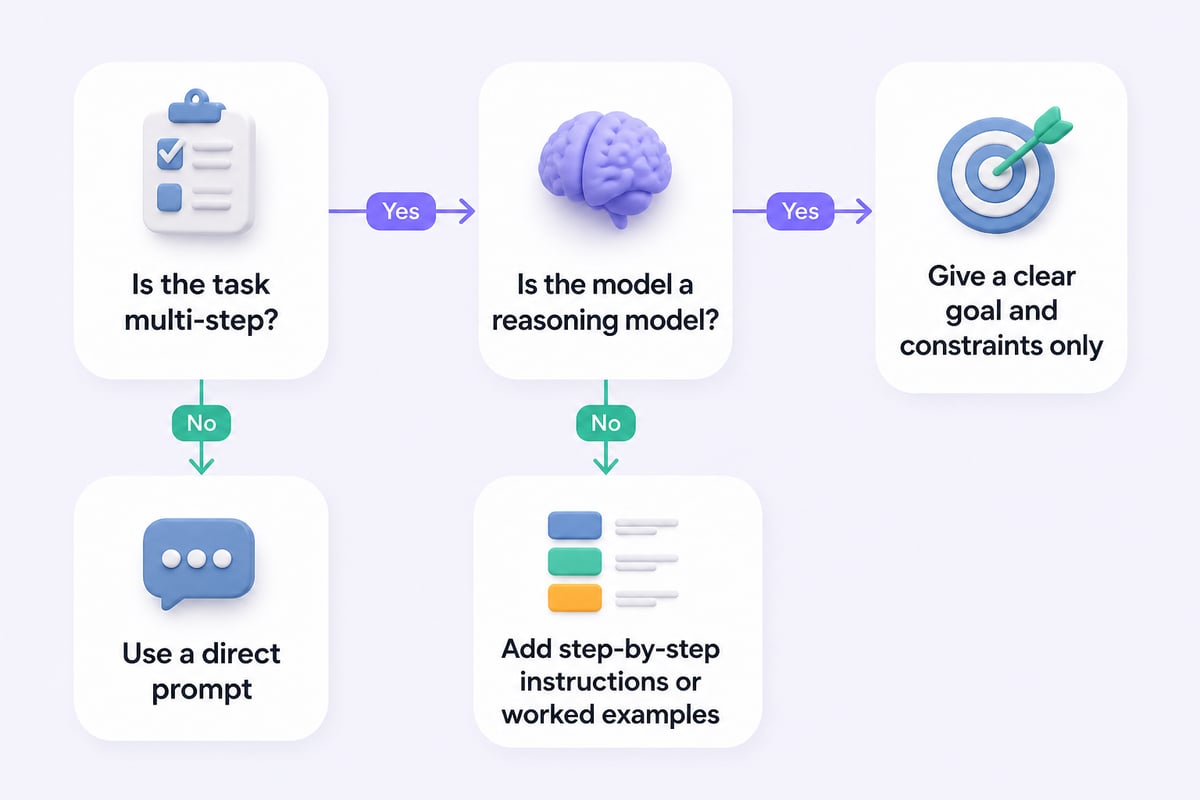
Usually not in the same way. Reasoning models such as OpenAI's o-series already perform their own internal chain of thought, so adding "think step by step" often does little and can sometimes backfire.
OpenAI's documentation explains that its o1 models use reasoning tokens to analyze a prompt and then produce visible answer tokens, with the reasoning tokens discarded from the model’s context. The model is already doing the step-by-step work behind the scenes. OpenAI also advises keeping prompts for these models simple and direct, noting that asking them to "think step by step" may not improve performance and can sometimes hinder it.
The same pattern shows up in agent workflows. OpenAI's function-calling guide for o3 and o4-mini says not to prompt these models to plan more extensively before each tool call, because additional reasoning prompts may hurt performance. The official reasoning best practices are worth reading if you rely on these models daily.
A practical rule of thumb:
- Standard chat models (general-purpose assistants without built-in extended reasoning): use explicit chain of thought on multi-step tasks.
- Reasoning models (those that think before answering): state the goal, constraints, and desired output clearly, then let the model reason on its own.
- Not sure which you have? Run the same task both ways and compare accuracy and length.
Model names and capabilities change quickly, so check your tool's current documentation rather than assuming how a given model behaves.
How Do You Write a Chain of Thought Prompt Step by Step?
Write the prompt in five parts: the role, the task, the reasoning instruction, the output format, and a verification step. Keeping each part short makes the prompt easy to reuse and adjust.
- Set the context. Tell the model who it is helping and what the situation is. One or two sentences is enough.
- State the task and the data. Paste the numbers, text, or criteria it needs. Label them clearly.
- Specify the reasoning. Say how you want it to think: list assumptions first, solve in order, or compare options against named criteria.
- Define the output. Ask for the steps first and a clearly marked final answer last, so you can skim to the result.
- Add a check. Ask the model to re-verify the calculation or flag anything it assumed.
A template you can adapt:
You are helping me with [task type]. Here is the situation: [context and data]. First, list any assumptions you are making. Then work through the problem step by step, showing each calculation or comparison. Finally, give your answer under the heading "Final answer," and flag anything you are unsure about.
If you want a library of reusable structures like this one, Prompt Hero.Ai's AI prompting template page and its collection of AI prompting examples show how to adapt prompts across different business tasks.

What Are Practical Business Examples You Can Copy?
The following prompts apply chain of thought to everyday professional work. Replace the bracketed parts with your own details.
Vendor comparison
I need to choose between three software vendors. Criteria and weights: price (40%), integration with our CRM (35%), support quality (25%). Here is the information on each: [paste details]. Score each vendor from 1 to 10 on every criterion, explain the reasoning for each score in one or two sentences, calculate the weighted total, then recommend one. List any criterion where the information was too thin to score confidently.
Diagnosing a failed workflow
Our automation that [describes trigger and action] stopped working. Here is the error message and the recent changes: [paste]. Work through this step by step: list the possible causes in order of likelihood, say what evidence supports or weakens each one, then suggest the first three things to check and how to check them.
Budget estimate
Estimate the first-quarter cost of a campaign with these inputs: [list inputs]. Break the estimate into line items, show the arithmetic for each, add them up, and then recalculate the total a second way to confirm it matches. State any assumption you had to make.
Reviewing a document against a checklist
Here is a draft policy and a compliance checklist: [paste both]. Go through the checklist one item at a time. For each, quote the relevant passage, state whether it is met, partly met, or missing, and explain why. End with a short list of required fixes.
Each of these asks for visible reasoning, a defined structure, and a self-check, which are the three habits that make the technique reliable. For a broader grounding in the skills behind them, the AI prompting course overview is a useful next stop.
How Do You Check and Improve the Reasoning?
Review the chain itself, not just the final answer. A correct answer reached through a flawed step is a warning sign, because the same flaw may produce a wrong answer on the next run.
Use this review routine:
- Check the inputs. Did the model use the numbers you gave it, or substitute its own?
- Check the arithmetic. Recompute one or two key calculations yourself or with a spreadsheet.
- Look for hidden assumptions. Ask, "What did you assume that I didn't tell you?"
- Challenge the weakest step. Ask the model to argue against its own conclusion, then see whether the answer survives.
- Re-run for stability. Run the prompt two or three times. If the answer changes meaningfully, the task needs clearer constraints or a different approach.
When the model goes wrong, correct the specific step rather than restarting. A message like "Step 3 used a 15% rate, but the correct rate is 12%. Redo from step 3 onward" is more efficient than rewriting the whole prompt.
One more point on context: if you are feeding documents into a prompt for the model to reason over, keep extra context to the most relevant documents so the task doesn't get overcomplicated. Long, loosely related material gives the model more chances to chase the wrong detail.
What Mistakes Should You Avoid?
Most failures come from applying the technique where it isn't needed or leaving the task underspecified. Watch for these:
- Adding "think step by step" to everything. It lengthens responses and raises cost on tasks that don't need it.
- Trusting fluent reasoning. Polished prose is not the same as correct logic.
- Vague goals. "Analyze this" produces wandering steps. "Rank these three options by cost over two years" produces focused ones.
- Skipping the format. Without a marked final answer, you have to hunt through the reasoning to find the result.
- Using one example only. In few-shot prompts, a single example can lock the model into copying its length and style too closely. Use two or three varied ones.
- Ignoring model differences. A prompt that works on one assistant may need trimming for a reasoning model.
Building these checks into your habits is part of a wider skill. If you want to go deeper into the discipline as a whole, the AI prompting engineering course page lays out the broader set of techniques around this one.
How Can You Build This Into Daily Work?
The easiest path is to save two or three tested prompts and reuse them, instead of rewriting reasoning instructions each time. Keep a short document with your best chain of thought templates for the tasks you repeat: estimates, comparisons, reviews, and troubleshooting.
Then treat each template like a small process. Version it, note which model it works best on, and update it when results drift. Over a few weeks you will build a personal toolkit that makes AI output more consistent and far easier to audit.
For professionals who want structured, credential-backed learning to go with that practice, Mammoth Club's AI certification and training offers access to more than 3,000 courses and over 1 million practice questions.

Frequently Asked Questions
What is the difference between chain of thought and a normal prompt?
A normal prompt asks for an answer. A chain of thought prompt asks the model to show the intermediate steps that lead to the answer, which tends to improve accuracy on multi-step problems and makes errors easier to find.
Does chain of thought prompting work in ChatGPT and Claude?
Yes. Both respond well to instructions to reason step by step, especially on standard chat models. For models that already reason internally, keep instructions short and direct, since extra reasoning prompts may not help.
Is "let's think step by step" enough?
It is a good starting point for simple problems. For better results, also specify the order of reasoning, the output format, and a verification step, as in the template above.
Can chain of thought make answers worse?
It can. On simple tasks it adds length and cost without benefit, and on reasoning models it may reduce performance. A fluent chain can also hide a wrong assumption, so always review the steps.
How many examples should a few-shot prompt include?
Two or three varied examples usually work well. One example can cause the model to copy its style too literally, while many long examples consume space and add cost.
Is the reasoning the model shows the same as how it actually computed the answer?
Not necessarily. The written steps are useful and often improve results, but they are generated text, not a guaranteed record of internal computation. Verify important results independently.
Where can I find more prompt examples to practice with?
Prompt Hero.Ai publishes tutorials with step-by-step instructions and copy-and-paste prompts, including pages on AI prompting fundamentals you can work through alongside the templates above.
Pick one recurring task this week, such as a vendor comparison or a monthly estimate, and run it twice: once with a direct prompt and once with the step-by-step template above, then compare accuracy and effort. Keeping the better version as a saved prompt is the fastest way to make the technique stick. For more tutorials with copy-and-paste prompts built for professionals, and structured training through Mammoth Club, visit Prompt Hero.Ai and start building your own library.