
A good AI prompt states who the model should act as, what it must do, what background it needs, and what the output should look like. This prompting guide for AI walks through that structure step by step, so you can get usable results from ChatGPT, Claude and similar tools instead of generic text you have to rewrite.
What Is a Prompt and Why Does Wording Change the Result?
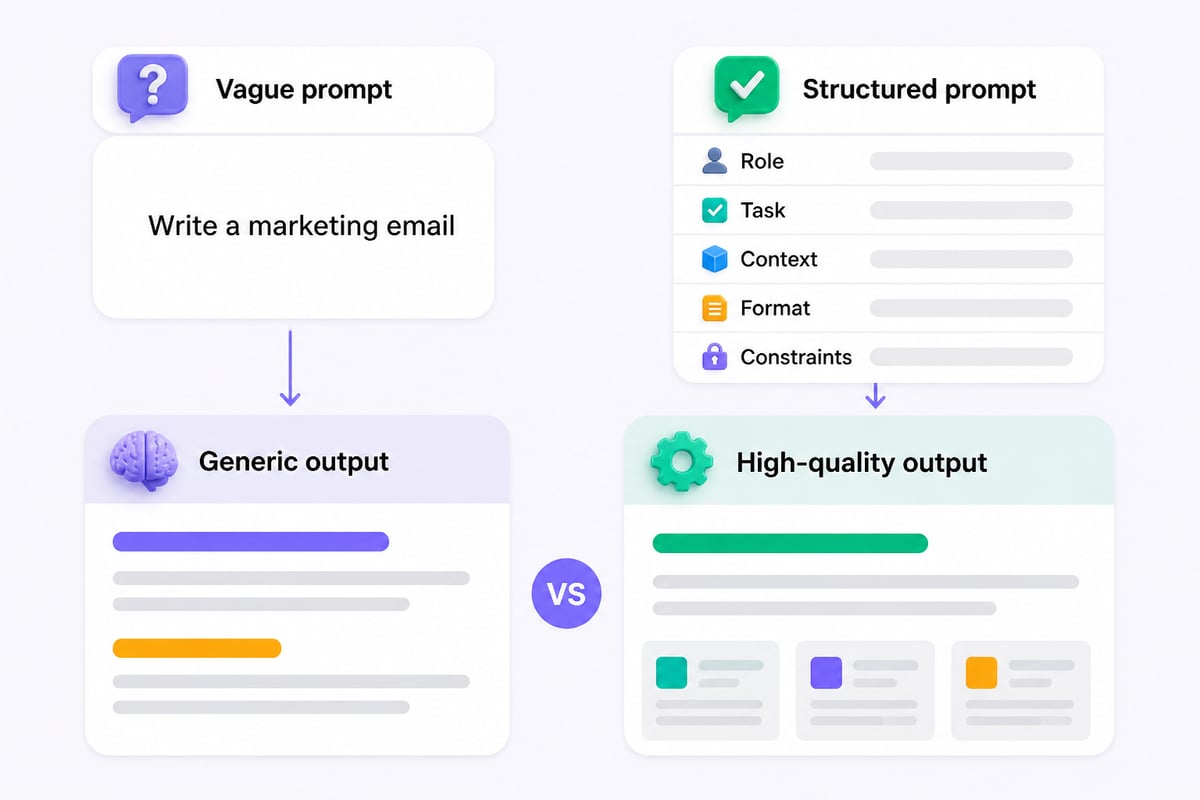
A prompt is the full set of instructions and material you give an AI model, and the model can only work from what is on the page. If your request is vague, the model fills the gaps with averages, which is why short requests like "write a marketing email" return bland, interchangeable drafts.
Google Cloud notes that two things affect how well a prompt works: its content and its structure, where structure covers ordering, labeling and delimiters. That is a useful way to think about the whole discipline. Content is what you tell the model. Structure is how you arrange it so the model can follow it.
For professionals, the practical consequence is simple. A prompt is closer to a work brief than a search query. You would not hand a new colleague a one-line request and expect a finished client proposal. The same applies here.
What Are the Core Parts of an Effective Prompt?
An effective prompt has five parts: a role, a task, context, a format, and constraints. Google's Gemini for Workspace guide organizes strong prompts around four elements: persona, task, context, and format, and adding constraints gives you a fifth lever that is useful in business writing.
| Part | What it does | Example |
|---|---|---|
| Role | Sets expertise and point of view | "You are a B2B SaaS customer success manager." |
| Task | States the exact action | "Draft a renewal reminder email." |
| Context | Supplies facts the model cannot guess | "The customer has used the product for 11 months and has two unused seats." |
| Format | Defines the shape of the output | "Under 120 words, three short paragraphs, plain text." |
| Constraints | Sets limits and exclusions | "No discounts, no exclamation marks, friendly but direct." |
You do not need all five every time. A quick brainstorm may only need a task and format. A client-facing document usually benefits from all five.
How Do You Write a Prompt Step by Step?
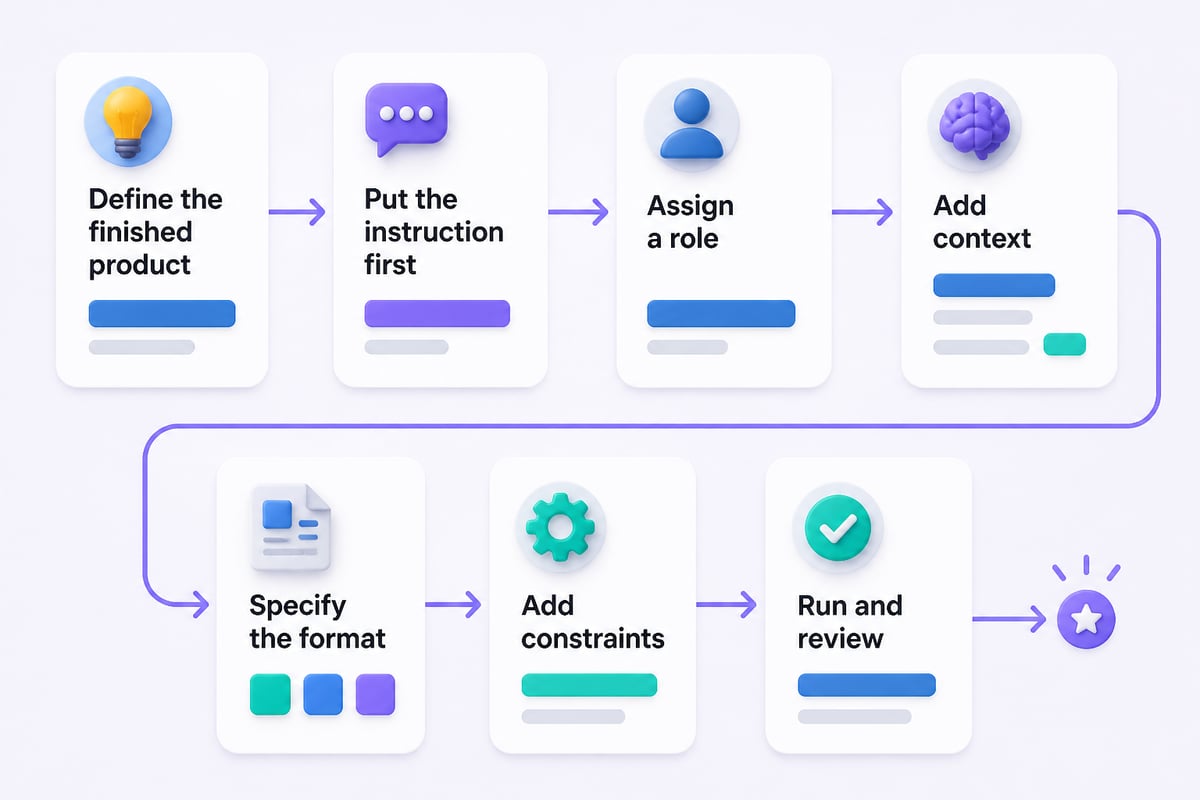
Write a prompt by deciding the outcome first, then adding each part in a fixed order and reading it back as if you were the model. Follow these steps:
- Define the finished product. Name the deliverable in one sentence: "A one-page summary of this contract's termination terms for a non-lawyer."
- Put the instruction first. OpenAI recommends placing instructions at the beginning of the prompt and separating them from context with delimiters such as ### or triple quotation marks.
- Assign a role. Choose one that matches the audience, such as financial analyst, HR generalist or support lead.
- Add context. Include audience, goal, background facts and any source text, clearly fenced off.
- Specify the format. Say whether you want a table, bullets, an email, JSON, or a numbered plan, and set a length.
- Add constraints. List what to avoid, what tone to use, and what to do if information is missing.
- Run it, then review. Check the output against your step 1 definition and adjust one element at a time.
Here is a complete prompt built this way:
You are a senior operations analyst writing for a non-technical executive.

Task: Summarize the meeting notes below into a decision memo.

Context: The team must choose between two vendors by Friday. The audience is our COO, who has not attended the meetings.

Format: A memo under 250 words with three headings: Recommendation, Key Trade-offs, Open Risks.

Constraints: Use plain language. If a fact is missing from the notes, write "Not stated" instead of guessing.

###
[paste meeting notes here]
###
Why Do Delimiters and Ordering Matter?
Delimiters and ordering matter because they tell the model which text is an instruction and which text is material to work on. Without them, a pasted email or report can blend into your request, and the model may follow instructions that were hidden inside the source text, or summarize your instructions along with the document.
Use consistent separators:
- Triple hashes (###) or triple quotes around pasted source material
- Labeled sections such as "Task:", "Context:" and "Format:"
- XML-style tags like
<document>and</document>, which Claude’s prompting documentation suggests XML-style tags for organizing complex instructions and long inputs
When you paste long material, put it above or below your instructions consistently and refer to it by name: "Using only the text inside the <report> tags, list the three largest cost increases." Naming the section removes ambiguity.
How Do Examples Improve Output Quality?
Examples improve output because they show the model your standard instead of describing it. Adding one to three samples of the result you want, often called few-shot prompting, is the fastest way to lock in tone, structure and level of detail.
Suppose you want product feedback sorted into categories. Instead of explaining your taxonomy at length, show it:
Classify each comment as Bug, Feature Request, or Praise.

Comment: "The export button does nothing on Safari." -> Bug
Comment: "Could you add a dark mode?" -> Feature Request
Comment: "Setup took five minutes. Great." -> Praise

Comment: "Reports load slowly when I filter by region." ->
Keep examples representative and varied. If all your samples are short, the model will produce short answers. If they all share one structure, the output will be rigid. For a deeper library of samples you can adapt, see these AI prompting examples and this AI prompting template.
How Do You Prompt for Reasoning-Heavy Tasks?
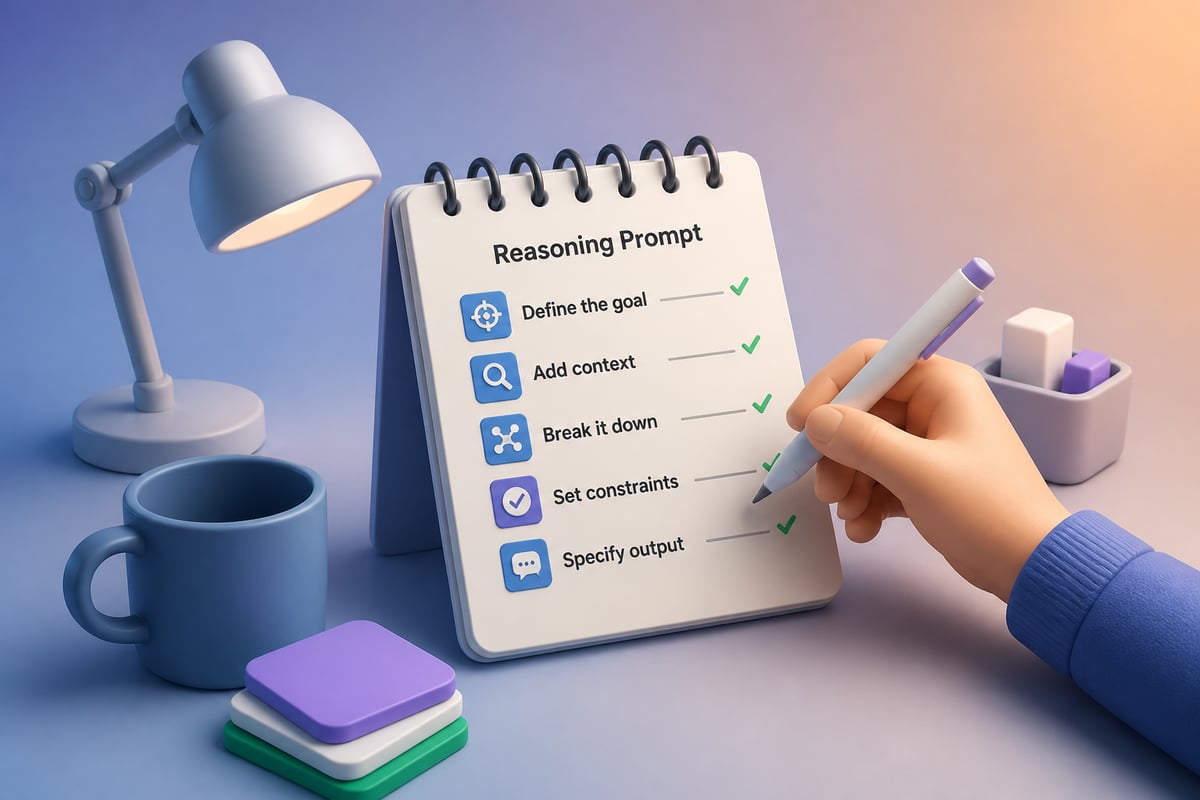
For reasoning-heavy tasks, ask the model to work through the problem in stages before giving a final answer. Analysis, forecasting, prioritization and troubleshooting all benefit from this, because intermediate steps catch errors that a single-pass answer hides.
A reliable pattern:
- State the question and the decision criteria.
- Ask the model to list its assumptions first.
- Ask it to evaluate each option against the criteria.
- Ask for a recommendation and a confidence level, plus what would change its mind.
This technique is called chain-of-thought prompting, and you can learn it in more depth in this guide to AI chain-of-thought prompting. One caution: some newer reasoning models handle step-by-step thinking internally, so you may get better results by describing the goal and criteria clearly rather than scripting every step. Check the provider's current guidance for the specific model you use.
How Do You Test and Iterate on a Prompt?
Test a prompt by running it several times on realistic inputs, comparing the outputs against a checklist, and changing one variable per revision. This step turns a prompt from a lucky guess into a reusable work asset.
OpenAI points out that model outputs are non-deterministic and recommends testing prompt behavior with evaluation suites as prompts and model versions change. You do not need engineering tools to apply the idea. A simple version looks like this:
- Collect three to five real inputs, including one messy or edge-case example.
- Write a pass/fail checklist: correct facts, right length, right tone, required sections present.
- Run the prompt on each input and score the results.
- Change one thing, such as adding a constraint or an example, and rerun.
- Save the version that passes consistently, with a date and a note on what it is for.
When a response misses, tell the model what was wrong in specific terms: "The second paragraph is too technical for finance leaders. Rewrite it in two sentences without jargon." Iterative refinement, where you tell the model specifically what to fix, is a practical way to improve a first response that falls short.
What Mistakes Make Prompts Fail?
Most failed prompts share a small set of avoidable problems. Check your draft against this list before you blame the model:
- Missing context. The model cannot know your audience, your product, or last quarter's results unless you say so.
- Several tasks in one request. "Summarize, critique, rewrite and translate this" usually produces a muddled result. Split it into steps or chain separate prompts.
- Unstated format. If you do not specify length and structure, you get whatever the model defaults to.
- Negative-only instructions. "Don't be formal" is weaker than "Write in a warm, conversational tone, like a message to a colleague you know well."
- Unchecked facts. Models can produce confident errors. Verify figures, quotes, legal points and anything client-facing.
- Sensitive data. Follow your company's policy on what may be pasted into an AI tool, and remove confidential details when in doubt.
How Do You Turn Good Prompts Into a Reusable System?
Turn good prompts into a system by storing them as templates with clearly marked blanks, then maintaining them like any other team document. This is where the productivity gains compound, because the second and third use of a strong prompt costs almost nothing.
Build a small prompt library with these habits:
- Use bracketed placeholders such as [AUDIENCE], [GOAL] and [SOURCE TEXT] so anyone can fill them in.
- Group templates by job: meeting summaries, client emails, research briefs, reporting, job descriptions.
- Add a one-line note on when to use each prompt and what a good result looks like.
- Record which model each prompt was tested on, since results can shift between models and versions.
- Review the library every few months and retire prompts that no longer pass your checklist.
If you want structured practice beyond templates, a certification path can help. Mammoth Club offers AI certification and training, with access to courses and practice questions on using tools like ChatGPT and Claude to automate tasks.

What Is Different About Prompting ChatGPT, Claude and Other Tools?
The core method stays the same across tools, but each model has habits worth knowing. Clear role, task, context, format and constraints work everywhere. The differences are in how each tool handles structure, long documents and follow-up questions.
- Claude responds well to XML-style tags and detailed instructions, and it handles long documents comfortably when you label each section.
- ChatGPT works well with explicit formatting requests and iterative refinement in conversation, and it benefits from clear delimiters around source text.
- Other assistants and workplace-integrated tools often have their own features, such as built-in document access, so check what data they can see before you rely on a prompt.
The safest habit is to test your best prompts on each tool you use rather than assuming one prompt behaves identically everywhere. For more on building this skill, explore the broader overview of AI prompting or consider a structured AI prompting course.
Frequently Asked Questions
What is the best prompting guide for AI beginners?
The best starting point is a simple framework you can reuse: role, task, context, format and constraints. Practice it on one real work task per day, such as a meeting summary or a client email, and save the versions that work. Repetition on real tasks teaches more than reading about techniques.
How long should a prompt be?
A prompt should be as long as it needs to be to supply the missing context and no longer. A quick question can be a sentence. A report, analysis or client document often needs a structured prompt of several short paragraphs plus pasted source material. Length matters less than clarity and order.
Do I need to learn prompt engineering to use AI at work?
You do not need a technical background. The essentials are writing clear instructions, giving context, specifying the format and reviewing results. Those habits cover most business use. Advanced techniques like chain-of-thought and few-shot prompting add value as your tasks get more complex.
Why does the same prompt give different answers each time?
Language models generate responses with some built-in variation, so outputs are not identical from run to run. You reduce the variation by being specific, providing examples and fixing the format, and you manage what remains by testing prompts on several inputs.
Can a prompt guarantee accurate results?
No prompt can guarantee accuracy. You can reduce errors by supplying source material, telling the model to say "Not stated" when information is missing, and asking it to cite which part of your text supports each claim. Always verify facts and figures before using them in client-facing or regulated work.
What is the difference between prompt design and prompt engineering?
The terms overlap heavily. Prompt design usually refers to crafting individual prompts for a task, while prompt engineering often includes testing, versioning and optimizing prompts across many inputs or inside applications. For most professionals, the practical work is the same: write clearly, test, and refine. If you want to go further, an AI prompting engineering course covers the more technical side.
Pick one task you repeat every week, rewrite its prompt using the role, task, context, format and constraints structure, and save the best version as your first template. If you want to keep building, Mammoth Club gives you course access and practice questions for structured AI certification. For step-by-step tutorials, copy-and-paste prompts and real examples built for professionals, visit Prompt Hero.Ai.