
ChatGPT has transformed how professionals approach daily tasks, from drafting emails to analyzing complex data sets. Whether you're completely new to AI assistants or looking to refine your skills, this chatgpt tutorial will walk you through everything from account setup to advanced prompt engineering techniques. You'll learn practical strategies that save time, improve output quality, and unlock ChatGPT's full potential for your specific business needs.
Getting Started with ChatGPT
Setting up your ChatGPT account takes just minutes. Visit the OpenAI website and click the signup button. You'll need an email address and phone number for verification. Once you confirm your account, you're immediately granted access to the interface.
The platform offers both free and paid subscription tiers. Free users access GPT-3.5, which handles most everyday tasks effectively. ChatGPT Plus subscribers ($20/month) get access to GPT-4, priority response times during peak hours, and early access to new features.
Understanding the Interface
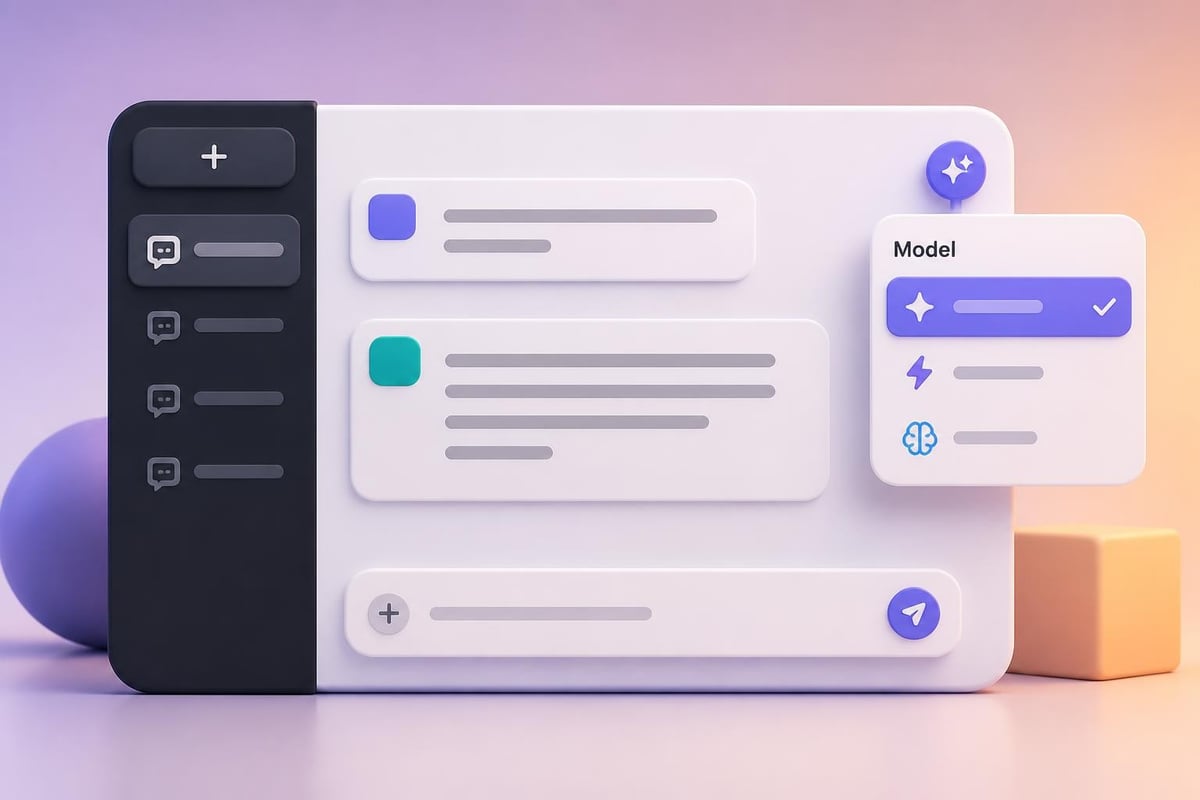
Understanding how ChatGPT’s interface works is crucial for efficient use. The main chat window occupies the center of your screen. Your conversation history appears in the left sidebar, organized chronologically. Each conversation thread saves automatically, allowing you to return to previous discussions anytime.
Key interface elements include:
- New Chat button: Starts fresh conversations with clean context
- Chat history: Access past conversations organized by date
- Model selector: Switch between GPT-3.5 and GPT-4 (Plus subscribers)
- Regenerate response: Request alternative answers to the same prompt
- Share conversation: Create shareable links to specific chats
The settings menu allows you to customize your experience. You can enable data controls to prevent your conversations from training future models, manage custom instructions, and configure plugins if you're a Plus subscriber.
Writing Effective Prompts
Prompt quality directly determines output quality. This chatgpt tutorial emphasizes that specific, detailed prompts consistently outperform vague requests. Instead of asking "write about marketing," try "create a 300-word email explaining our new product launch to existing customers, emphasizing the time-saving benefits."
The RISE Framework for Prompts
Role: Define who ChatGPT should become
Instructions: Specify exactly what you need
Style: Describe the tone, format, and voice
Examples: Provide reference points or formats
Here's this framework in action:
Role: "You are a senior financial analyst with 15 years of experience."
Instructions: "Analyze this quarterly revenue data and identify the top three trends."
Style: "Write in a concise, professional tone suitable for C-level executives."
Examples: "Similar to the format used in McKinsey quarterly reports."
This structured approach transforms generic outputs into precisely targeted results. The more context you provide, the better ChatGPT understands your expectations.
Common Prompting Mistakes to Avoid
Many users still employ outdated ChatGPT habits from the early versions. Modern ChatGPT understands natural language exceptionally well, so you don't need to oversimplify your requests.
| Old Habit | Better Approach |
|---|---|
| "Please write…" | Direct commands work fine: "Write…" |
| Overly formal language | Conversational, natural phrasing |
| One-word prompts | Detailed, context-rich descriptions |
| Starting fresh each time | Continue conversations for context |
Building Reusable Prompt Templates
Creating reusable prompts for recurring tasks dramatically increases efficiency. Instead of crafting new prompts daily, develop templates for your most common tasks.
Email Response Template
"Draft a professional email response to [CUSTOMER SITUATION]. Key points to address: [POINT 1], [POINT 2], [POINT 3]. Tone should be [TONE]. Length: approximately [WORD COUNT] words."
Save this template in a note-taking app. When you need it, simply fill in the bracketed sections. This approach maintains consistency while reducing the mental effort required for routine communications.
Content Creation Template
"Create a [CONTENT TYPE] about [TOPIC] for [AUDIENCE]. Include these sections: [SECTION 1], [SECTION 2], [SECTION 3]. Focus on [MAIN BENEFIT]. Avoid [UNWANTED ELEMENTS]. Target length: [WORD COUNT] words."
Professional users often maintain libraries of 10-20 templates covering their most frequent tasks. This investment pays dividends through faster turnaround times and more consistent outputs.
Advanced Conversation Techniques
Once you master basic prompting, this chatgpt tutorial section covers advanced techniques that professionals use to extract maximum value from ChatGPT.
Multi-Turn Conversations
ChatGPT remembers context within a conversation thread. Use this to build complex outputs through iterative refinement.
- Start broad: "I need to create a marketing strategy for a B2B software product."
- Add specifics: "Focus on the enterprise segment, companies with 500+ employees."
- Request components: "Now create three customer persona profiles for this strategy."
- Refine outputs: "Make the first persona more technical, they're likely an IT director."
Each response builds on previous context. This iterative approach produces far better results than trying to capture everything in one massive prompt.
Custom Instructions
ChatGPT Plus allows you to set permanent custom instructions that apply to every conversation. This feature eliminates repetitive context-setting.
Example custom instructions:
"What would you like ChatGPT to know about you?"
- I run a digital marketing agency focused on healthcare clients
- I prefer actionable advice over theoretical concepts
- I work primarily with small practices (5-20 employees)
"How would you like ChatGPT to respond?"
- Use professional but conversational language
- Always provide specific examples
- Format responses with clear headings and bullet points
Once configured, every conversation starts with this context. You skip the setup phase and dive directly into productive work. For those looking to build comprehensive skills across multiple AI platforms, Mammoth Club’s AI Certification & Training offers structured learning paths that complement hands-on practice with ChatGPT.

Practical Business Applications
This chatgpt tutorial wouldn't be complete without real-world applications. Here's how professionals use ChatGPT across different business functions.
Data Analysis and Research
ChatGPT excels at processing information and identifying patterns. Feed it survey results, customer feedback, or market research data, then ask for analysis.
Sample prompt: "Here are 50 customer service transcripts [paste data]. Identify the top five complaint categories, estimate the percentage of each, and suggest three specific improvements for each category."
The AI processes large text volumes faster than manual review, though you should always verify critical findings with human judgment.
Content Creation Workflows
Using ChatGPT for writing projects follows a systematic process:
- Brainstorming: Generate topic ideas and angles
- Outlining: Create structured frameworks
- Drafting: Produce initial content sections
- Editing: Refine tone, clarity, and style
- Optimization: Adjust for specific audiences or platforms
Never publish AI-generated content without human editing. Use ChatGPT to accelerate the creation process, then apply your expertise to ensure accuracy, originality, and brand alignment.
Meeting Preparation and Follow-Up
Prepare for meetings by providing ChatGPT with context and asking for relevant questions, talking points, or potential objections.
Pre-meeting prompt: "I'm meeting with a potential client in the manufacturing sector. They're considering our inventory management software. What are the top 10 questions they're likely to ask, and how should I address each one?"
After meetings, summarize notes and action items: "Here are my meeting notes [paste notes]. Create a professional follow-up email summarizing key discussion points, agreed action items with owners, and next steps with deadlines."
Troubleshooting Common Issues
Even experienced users encounter challenges with ChatGPT. Understanding these common issues helps you work around limitations.
When ChatGPT Gets Things Wrong
ChatGPT sometimes generates inaccurate information, especially about recent events or specialized technical topics. This happens because:
- Training data has a knowledge cutoff date
- The model prioritizes coherent-sounding responses over factual accuracy
- It cannot access real-time information (unless using web browsing features)
Solutions:
- Verify all facts, statistics, and dates independently
- Ask ChatGPT to cite reasoning or explain conclusions
- Use web browsing mode for current information (Plus subscribers)
- Cross-reference with authoritative sources
Handling Overly Verbose Responses
ChatGPT sometimes produces unnecessarily long answers. Control output length through explicit instructions.
"Provide a concise answer in under 150 words" works better than hoping for brevity. You can also request specific formats: "Summarize this in exactly five bullet points" or "Create a one-paragraph executive summary."
Breaking Through Generic Responses
When outputs feel generic or templated, your prompt likely lacks sufficient detail. Add constraints, examples, and specific requirements.
| Generic Prompt | Improved Prompt |
|---|---|
| "Write a blog post about productivity" | "Write a 600-word blog post targeting remote workers about using time-blocking techniques. Include a real-world example of someone managing client calls, deep work, and administrative tasks. Tone: encouraging but realistic." |
| "Help me with social media" | "Create five LinkedIn post ideas for a commercial real estate broker. Each should provide valuable insights to property investors. Include specific topics like cap rates, market trends, or financing strategies." |
Integrating ChatGPT into Daily Workflows
Successful ChatGPT users integrate the tool seamlessly into existing processes rather than treating it as a separate activity. For more advanced integration strategies, explore additional resources at Prompt Hero.Ai.
Morning Planning Routine
Start your day by discussing priorities with ChatGPT:
- List your scheduled meetings and tasks
- Ask ChatGPT to suggest time allocations
- Request preparation materials for complex items
- Generate email drafts for routine communications
This 15-minute planning session often saves hours throughout the day.
Document Creation Pipeline
Establish a consistent process for creating reports, proposals, or presentations:
Phase 1: Research and Outlining (ChatGPT)
- Generate preliminary research questions
- Create document structure and flow
- Draft section headings and key points
Phase 2: Content Development (ChatGPT + Human)
- Produce initial content for each section
- Request alternative phrasings for complex ideas
- Generate supporting examples or analogies
Phase 3: Refinement (Human-led)
- Fact-check all claims and statistics
- Add personal insights and proprietary information
- Adjust tone to match your brand voice
- Format and polish for final delivery
Learning and Skill Development
Use ChatGPT as a personal tutor for professional development. This chatgpt tutorial demonstrates how asking for explanations builds understanding:
"Explain [CONCEPT] as if I'm a beginner. Then provide three progressively more complex examples showing how it applies in [YOUR INDUSTRY]."
Follow up with: "What are the most common mistakes people make when applying this concept?" This interactive learning accelerates skill acquisition compared to passive reading.
Privacy and Security Considerations
Professional use of ChatGPT requires awareness of data privacy implications. Never input confidential information, proprietary data, or personally identifiable information unless you've configured appropriate data controls.
Data Handling Best Practices
Safe to share:
- Generic industry scenarios
- Anonymized examples
- Public information
- Hypothetical situations
Never share:
- Customer names or contact information
- Proprietary business strategies
- Confidential financial data
- Protected health information
- Trade secrets or intellectual property
OpenAI's data usage policies allow conversations to train future models unless you opt out. Navigate to Settings > Data Controls to disable this feature if handling sensitive business information.
Creating Sanitized Versions
When you need ChatGPT's help with sensitive material, create sanitized versions:
Original: "Draft an email to John Smith at Acme Corp about extending his $150,000 contract."
Sanitized: "Draft an email to a client about extending their services contract for another year. Emphasize the value they've received and offer a 10% discount for renewal."
This approach maintains privacy while still accessing ChatGPT's capabilities.

Measuring ChatGPT's Impact
Track how ChatGPT affects your productivity to justify the time investment and identify improvement opportunities.
Quantitative Metrics
| Metric | Measurement Method |
|---|---|
| Time saved per task | Compare completion times before/after ChatGPT |
| Tasks completed daily | Track output volume changes |
| Draft revision cycles | Monitor how often you need to iterate |
| Response quality ratings | Score outputs on a consistent scale (1-10) |
Qualitative Improvements
Beyond time savings, ChatGPT often improves work quality:
- Consistency: Standardized formats and messaging across documents
- Thoroughness: AI prompts you to consider angles you might have missed
- Creativity: Exposure to alternative approaches and perspectives
- Learning: Explanations that build your understanding over time
Document these benefits to build a comprehensive picture of ChatGPT's value in your workflow.
Staying Current with ChatGPT Updates
OpenAI regularly releases updates, new features, and model improvements. Staying informed ensures you leverage the latest capabilities.
Subscribe to OpenAI's official blog for announcements. Major updates typically include enhanced reasoning abilities, new interaction modes, or expanded knowledge domains. Research on ChatGPT’s applications across various domains continues to reveal new use cases and best practices.
Test new features as they launch. When OpenAI releases updates, spend 30 minutes exploring how they might benefit your specific workflows. Early adopters gain competitive advantages by integrating improvements before they become standard practice.
Join communities of ChatGPT users. Forums, social media groups, and professional networks share discoveries, prompts, and techniques that accelerate your learning curve beyond what any individual tutorial can provide.
Advanced Features for Plus Subscribers
ChatGPT Plus unlocks several features that enhance professional use significantly. Understanding these capabilities helps you determine whether the subscription cost delivers sufficient value.
GPT-4 Access
GPT-4 provides noticeably better reasoning, especially for complex tasks requiring multi-step logic. It handles nuanced instructions more reliably and produces more accurate outputs for specialized topics.
Use GPT-4 for:
- Complex analysis requiring careful reasoning
- Technical writing with specific accuracy requirements
- Creative projects needing sophisticated understanding
- Tasks where mistakes carry significant consequences
Use GPT-3.5 for:
- Routine communications and emails
- Brainstorming and initial ideation
- Simple reformatting or summarization
- High-volume tasks where speed matters more than perfection
Plugins and Extensions
Plugins extend ChatGPT's capabilities beyond text generation. Popular professional plugins include:
- Web browsing: Access current information and cite sources
- Code interpreter: Analyze data files and generate visualizations
- Document readers: Process PDFs and extract information
- API integrations: Connect to external business systems
Each plugin solves specific limitations, transforming ChatGPT from a text generator into a comprehensive business assistant.
DALL-E Integration
ChatGPT Plus includes image generation capabilities through DALL-E integration. Create custom graphics, diagrams, illustrations, and concept visualizations directly within conversations.
Request images using descriptive prompts: "Create a simple flowchart showing our customer onboarding process: initial contact, needs assessment, proposal, contract signing, and kickoff meeting."
The AI generates visual content that you can iterate on through conversation: "Make the boxes larger and use a blue color scheme" or "Add icons representing each stage."
Combining ChatGPT with Other Tools
Maximum productivity comes from integrating ChatGPT into broader tool ecosystems rather than using it in isolation.
Workflow Integration Examples
ChatGPT + Project Management:
- Generate project plans and timelines
- Draft status updates and progress reports
- Create task descriptions and acceptance criteria
- Develop risk assessments and mitigation strategies
ChatGPT + CRM Systems:
- Compose personalized outreach messages
- Summarize customer interaction histories
- Generate follow-up sequences
- Create response templates for common scenarios
ChatGPT + Content Management:
- Develop content calendars and topic clusters
- Create meta descriptions and SEO elements
- Generate social media variations
- Draft newsletter sections and email campaigns
Each integration multiplies ChatGPT's value by connecting it to systems where you already work.
API and Automation Possibilities
Technical teams can leverage OpenAI's API to embed ChatGPT directly into custom applications. This enables automated workflows that trigger AI processing based on specific events or conditions.
Automation examples:
- Automatically summarize support tickets as they arrive
- Generate draft responses to common email inquiries
- Process survey responses and extract insights
- Create reports from database queries
While API implementation requires technical expertise, the resulting automation can process thousands of tasks that would be impractical to handle manually with the web interface.
Building Your ChatGPT Skill Progression
Like any professional tool, ChatGPT mastery follows a predictable progression. This chatgpt tutorial concludes by mapping the journey from beginner to expert user.
Beginner Stage (Weeks 1-4)
Focus on fundamental interactions and basic prompt writing. Practice daily with low-stakes tasks like email drafting, brainstorming, and simple research questions. Getting started guides help establish foundational habits.
Key milestones:
- Create clear, specific prompts consistently
- Navigate the interface efficiently
- Recognize when outputs need refinement
- Develop 5-10 reusable prompt templates
Intermediate Stage (Months 2-3)
Expand into multi-turn conversations and more complex tasks. Start experimenting with different prompting frameworks and develop templates for your most common professional needs.
Key milestones:
- Use iterative refinement effectively
- Configure custom instructions
- Integrate ChatGPT into daily workflows
- Solve problems through prompt engineering rather than accepting initial outputs
Advanced Stage (Months 4+)
Master sophisticated techniques like chain-of-thought prompting, role-playing scenarios, and complex analysis tasks. Begin exploring integrations with other tools and potentially API implementations.
Key milestones:
- Quickly diagnose and fix prompt issues
- Create comprehensive prompt libraries
- Design workflows combining multiple tools
- Train others on effective ChatGPT use
Each stage builds on previous skills. Don't rush the progression. Solid fundamentals enable more sophisticated applications later.
Mastering ChatGPT transforms how you approach daily work, from routine communications to complex problem-solving. This comprehensive tutorial provides the foundation you need to start using ChatGPT effectively today, but continuous practice and exploration will refine your skills over time. Ready to accelerate your AI learning journey with structured tutorials and ready-to-use prompts? Visit Prompt Hero.Ai for step-by-step guides, practical examples, and expert insights that help you solve real business problems with AI tools. Start building your AI toolkit today and discover how the right prompts unlock productivity gains you never thought possible.