
OpenAI has transformed how professionals approach artificial intelligence, making powerful language models accessible to businesses of all sizes. Whether you're automating customer service, generating content, or building custom applications, understanding how to use OpenAI's tools effectively can dramatically improve your productivity. This comprehensive guide walks through practical open ai tutorials designed for professionals who want real results, not theoretical knowledge. You'll learn step-by-step approaches to ChatGPT, API integration, prompt engineering, and business automation that you can implement immediately.
Understanding OpenAI's Core Tools and Capabilities
OpenAI offers several distinct tools, each serving different business needs. ChatGPT provides conversational AI for brainstorming, writing, and problem-solving. GPT-4 delivers advanced reasoning and multimodal capabilities. The OpenAI API enables developers to integrate AI into applications. DALL-E 3 generates images from text descriptions. Whisper transcribes and translates audio.
Most professionals start with ChatGPT because it requires no technical knowledge. You simply type questions or requests and receive intelligent responses. However, the real power emerges when you understand how to craft effective prompts and chain multiple interactions together.
Getting Started with ChatGPT
Begin by creating an OpenAI account and exploring the free tier. ChatGPT Plus ($20/month in 2026) provides access to GPT-4, faster response times, and priority access during peak hours.
Your first sessions should focus on understanding how the model responds to different prompt styles:
- Direct questions: "What are the three main benefits of automated email responses?"
- Role-based prompts: "Act as a marketing consultant and review this email campaign"
- Step-by-step requests: "Break down the process of creating a content calendar into 5 actionable steps"
The quality of your output depends entirely on prompt clarity. Instead of asking "How do I market my business?", ask "Create a 30-day social media marketing plan for a B2B software company targeting HR managers, including post topics, timing, and engagement strategies."

Essential OpenAI Tutorials for Business Automation
The most valuable open ai tutorials focus on solving specific business problems. Here's how to approach common automation scenarios.
Automating Email Responses and Customer Communication
Create a prompt template for handling customer inquiries:
You are a customer service representative for [Company Name].
Respond to this customer email: [paste email]
Tone: Professional and helpful
Include: Answer their question, offer next steps, thank them for their business
Keep response under 150 words
This template works for 80% of routine customer emails. You can refine it by adding company-specific policies, common FAQs, and brand voice guidelines.
Content Creation Workflows
Professional content requires structure. Build a three-stage prompt sequence:
- Research and outline: "Research the topic [topic] and create a detailed outline with 5 main sections, including key points and supporting examples for each"
- Draft creation: "Using this outline [paste outline], write section 1 in 300 words with a conversational tone for marketing professionals"
- Editing and refinement: "Review this content for clarity, remove jargon, and suggest three improvements to make it more actionable"
This staged approach produces better results than single, complex prompts. Each stage allows you to review and adjust before proceeding.
| Automation Task | Prompt Complexity | Time Savings | Business Impact |
|---|---|---|---|
| Email responses | Low | 2-3 hours/day | Faster customer service |
| Content drafting | Medium | 5-10 hours/week | Consistent output |
| Data analysis | Medium-High | 3-5 hours/task | Better decisions |
| Code generation | High | Variable | Faster development |
Working with the OpenAI API for Custom Solutions
The OpenAI API unlocks programmatic access to GPT-4 and other models. This enables you to build custom applications, automate workflows, and integrate AI into existing systems. You'll find comprehensive technical guidance through OpenAI Academy’s official platform, which provides free courses and community support.
Setting Up Your First API Integration
Authentication requires an API key from your OpenAI dashboard. Store this securely using environment variables, never in your code. The basic structure for an API call includes:
- Model selection: gpt-4-turbo, gpt-3.5-turbo, or specialized models
- Messages array: System message (sets behavior), user message (your input)
- Parameters: Temperature (creativity), max_tokens (length), top_p (diversity)
Temperature settings dramatically affect output quality. Use 0.3 for factual, consistent responses like data analysis. Use 0.7-0.9 for creative tasks like brainstorming or content generation.
Practical API Use Cases
Document processing: Extract key information from contracts, invoices, or reports. Send the document text with instructions like "Extract client name, project scope, deadlines, and budget from this proposal."
Chatbot development: Create customer service bots that understand context across multiple messages. Maintain conversation history in the messages array to preserve context.
Content generation at scale: Generate product descriptions, email variations, or social media posts for entire catalogs. Loop through your data and make API calls with product-specific information.
For professionals interested in building AI agents and automation workflows, exploring resources like Python learning materials focused on AI development provides valuable foundational knowledge.

Advanced Prompt Engineering Techniques
Mastering prompt engineering transforms basic open ai tutorials into powerful business tools. These techniques work across ChatGPT, the API, and other OpenAI products.
The Chain-of-Thought Approach
Instead of asking for final answers, request the reasoning process. Add "Let's think step-by-step" to complex prompts. This improves accuracy for:
- Mathematical calculations
- Logical reasoning
- Multi-step processes
- Decision analysis
Example: "Calculate the ROI for this marketing campaign. Let's think step-by-step: First, identify all costs. Second, calculate total revenue generated. Third, determine net profit. Fourth, compute ROI percentage."
Role Assignment and Context Setting
Define exactly who the AI should be and what it should know. Detailed roles produce specialized outputs.
Poor: "Write a marketing email"
Better: "You are a B2B SaaS marketing director with 10 years of experience. Write a cold outreach email to HR managers at mid-size companies (100-500 employees) introducing our automated onboarding software. Focus on pain points: manual paperwork, compliance risks, and poor new hire experience."
Output Formatting and Constraints
Specify exact formats to get usable results:
- "Provide your answer as a numbered list"
- "Create a table with columns for Task, Owner, Deadline, and Status"
- "Write exactly 3 paragraphs, each 100 words"
- "Format as JSON with keys: summary, action_items, next_steps"
These constraints save editing time and ensure consistency across multiple outputs.
Building Effective AI Workflows for Teams
Individual productivity gains multiply when entire teams use AI effectively. Successful implementation requires standardization and training.
Creating a Prompt Library
Document your best prompts as templates. Organize by function:
Sales prompts: Email follow-ups, proposal summaries, objection handling
Marketing prompts: Content outlines, social media posts, campaign analysis
Operations prompts: Process documentation, meeting summaries, data analysis
HR prompts: Job descriptions, candidate assessments, training materials
Store these in a shared document with clear instructions for customization. Include examples showing input and expected output.
Quality Control and Review Processes
AI outputs require human review. Establish clear guidelines:
- Fact-checking: Verify all statistics, dates, and claims
- Brand alignment: Ensure tone and messaging match company standards
- Completeness: Confirm all required elements are present
- Accuracy: Check for hallucinations or invented information
Assign review responsibilities based on content type. Marketing reviews marketing outputs, legal reviews contracts, technical teams review code.
Many professionals enhance their AI skills through structured certification programs. Mammoth Club – AI Certification & Training provides comprehensive courses covering ChatGPT, Claude, and other AI tools, with over 3,000 courses and extensive practice questions to build job-ready skills for real-world automation and productivity improvements.

Solving Common Challenges in OpenAI Implementation
Even experienced users encounter obstacles. Understanding solutions saves time and frustration.
Managing Inconsistent Outputs
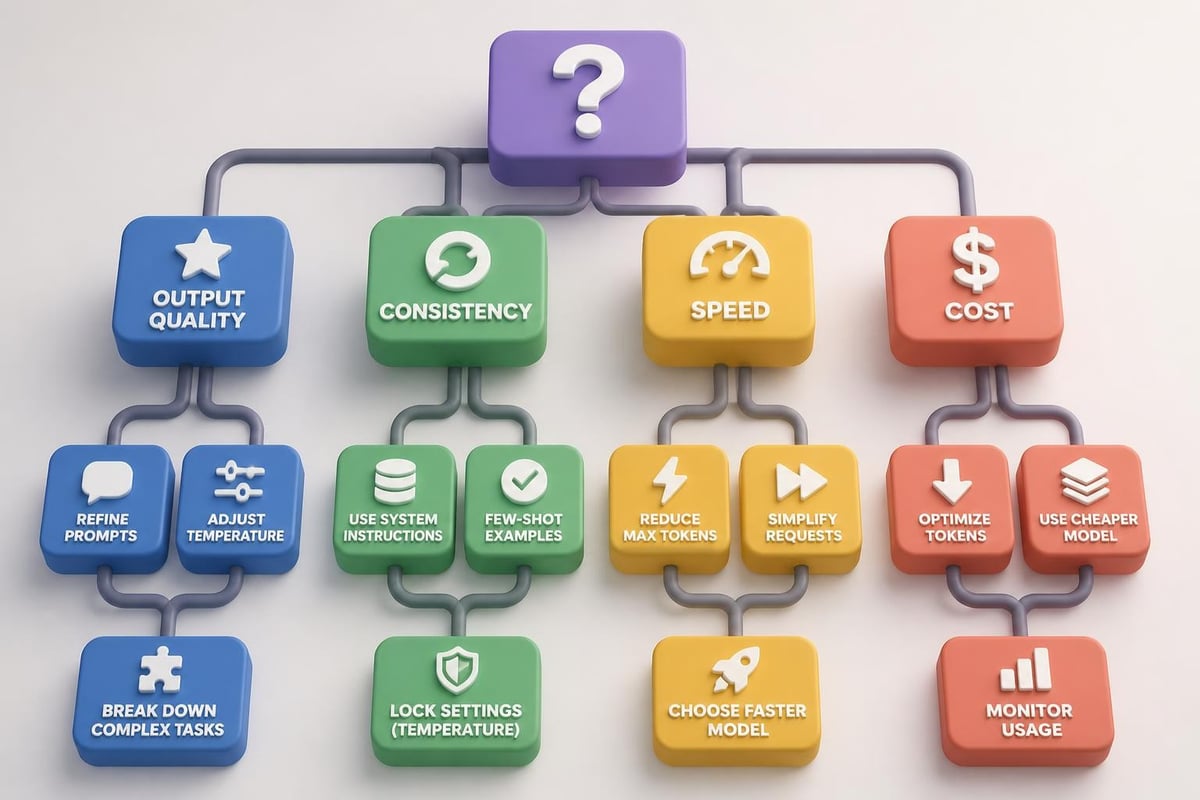
GPT models use probability-based generation, creating natural variation. Reduce inconsistency by:
- Lowering temperature settings (0.2-0.4 for consistent results)
- Providing detailed examples of desired output
- Using few-shot prompting (show 2-3 examples before your request)
- Breaking complex tasks into smaller, specific steps
Handling Token Limits
GPT-4 supports up to 128,000 tokens (roughly 96,000 words) in 2026, but practical limits vary. For large documents:
- Summarize in chunks, then synthesize summaries
- Extract specific information rather than processing entire documents
- Use embedding-based search to find relevant sections first
- Implement document preprocessing to remove unnecessary content
Avoiding Common Prompt Mistakes
Vague instructions produce vague results. "Make this better" fails because "better" lacks definition. Instead: "Improve clarity by simplifying complex sentences, adding transition phrases, and replacing jargon with plain language."
Multiple requests in one prompt confuse priorities. Separate distinct tasks: "First, summarize this article in 3 bullet points" then "Now create 5 social media posts based on those points."
Ignoring context limitations. The model doesn't remember previous conversations unless you include that information. Always provide necessary context within each prompt or conversation.
Integrating OpenAI with Business Systems
Maximum value comes from connecting OpenAI to your existing tools and workflows. Integration transforms one-off assistance into systematic automation.
CRM and Sales Automation
Connect OpenAI to your CRM for:
- Lead scoring: Analyze lead information and assign priority scores
- Email personalization: Generate customized outreach based on lead data
- Meeting preparation: Summarize previous interactions and suggest talking points
- Proposal generation: Create custom proposals from templates and client information
Use Zapier, Make.com, or custom API integrations to trigger AI actions based on CRM events.
Content Management Systems
Automate content workflows by integrating with WordPress, Contentful, or other CMS platforms:
- Create content outlines from keyword research
- Generate draft content in sections
- Optimize for SEO with meta descriptions and headlines
- Create social media promotional content
- Generate image descriptions for accessibility
Project Management Tools
Enhance project management with AI summaries, status updates, and task generation. For those exploring generative AI applications in project workflows, integration possibilities include automated standup reports, risk assessments, and timeline adjustments.
| Integration Type | Setup Difficulty | Business Value | Common Tools |
|---|---|---|---|
| Email automation | Easy | High | Gmail, Outlook |
| CRM enhancement | Medium | Very High | Salesforce, HubSpot |
| Content systems | Medium | High | WordPress, Webflow |
| Development tools | Hard | Medium-High | GitHub, VS Code |
| Analytics platforms | Medium | Medium | Google Analytics, Tableau |
Staying Current with OpenAI Updates and Best Practices
OpenAI releases new models, features, and capabilities regularly. The landscape in 2026 differs significantly from even a year ago.
Following Official Resources
Monitor OpenAI's official channels for announcements about model updates, pricing changes, and new capabilities. The OpenAI Academy platform regularly updates its course content to reflect the latest features and best practices.
Testing New Models and Features
When new models release, run your existing prompts to compare:
- Output quality: Is the response more accurate or helpful?
- Speed: Does the new model process requests faster?
- Cost: Calculate token usage and API costs
- Capabilities: Does it handle new task types better?
Document performance differences to make informed decisions about upgrading.
Community Learning and Collaboration
Join professional communities focused on AI implementation. Share prompts, discuss challenges, and learn from others' experiences. For structured learning paths and official documentation, platforms like ChatGPT courses and tutorials provide hand-reviewed educational content.
Measuring ROI and Business Impact
Track specific metrics to justify AI investment and identify improvement opportunities.
Quantifiable Metrics
Time savings: Document hours saved on specific tasks. If content creation dropped from 4 hours to 1.5 hours per piece, that's 62.5% efficiency gain.
Cost reduction: Compare AI automation costs to previous solutions. API costs typically run $0.01-0.06 per 1,000 tokens, far less than human labor for routine tasks.
Quality improvements: Measure customer satisfaction scores, content engagement rates, or error reduction in automated processes.
Revenue impact: Track how AI-enhanced sales emails, personalized marketing, or faster customer service affect conversion rates and revenue.
Qualitative Benefits
Not everything measures in numbers. Document:
- Employee satisfaction with reduced tedious work
- Ability to take on new projects previously impossible
- Improved consistency across team outputs
- Faster onboarding of new team members
Optimization Cycles
Review performance monthly:
- Identify highest-value use cases
- Refine prompts based on actual results
- Expand successful implementations
- Eliminate low-value applications
- Train team members on best practices
Mastering OpenAI tools requires understanding both the technology and your specific business needs, combining technical knowledge with strategic thinking about where AI creates the most value. Whether you're automating routine tasks, enhancing creative work, or building custom applications, the key is starting with clear goals and iterating based on real results. Prompt Hero.Ai provides the step-by-step tutorials, ready-to-use prompts, and practical examples you need to implement these strategies immediately, helping you move from theory to measurable business outcomes with AI-powered automation.