
The most effective AI prompting techniques are the ones that give the model a clear goal, enough context, an example of the output you want, and room to reason before it answers. The 15 below cover those basics, then move into reasoning, structure, refinement and the tools that keep a good prompt reusable. Each one includes a short example you can adapt for ChatGPT, Claude or a similar assistant.
One rule applies to all of them. Anthropic advises choosing techniques for the task rather than applying every technique at once, and refining prompts through iteration. Treat this list as a menu, not a checklist.
1. State the goal, context, output and limits
This is the foundation: tell the model what you want, why, in what form, and where the boundaries are. OpenAI Academy recommends including a goal, relevant context, desired output, and boundaries for larger or more important tasks.
Hypothetical example: "Draft a short customer update (goal) about a shipping delay for wholesale accounts (context). Use a calm, direct tone and end with a next step (output). Don't promise compensation or mention the supplier (limits)."
- Best for: any task where a vague request produces generic text.
- Verdict: the single highest-return habit, and it costs one extra sentence.
2. Zero-shot prompting
Zero-shot prompting means giving a direct instruction with no examples. Google Cloud describes it as a direct instruction or question without additional context or examples.
It works well for common tasks the model has seen many times: summarizing a memo, rewording an email, listing risks in a plan. If the result misses your standard, move to a technique with more guidance instead of rewriting the same short instruction.
- Best for: quick, familiar tasks.
- Verdict: your starting point, not your finish line.
3. Few-shot prompting
Few-shot prompting places one or more input-output examples before your real request. Google Cloud describes it as providing one or more input-output examples before the actual prompt.
Show two or three samples of the format you want, such as how you label support tickets or how you phrase product descriptions. The model copies the pattern more reliably than it follows a description of the pattern. For more worked samples, see the examples collected in our AI prompting examples guide.
- Best for: classification, tone matching, and fixed formats.
- Verdict: the fastest fix when outputs "almost" match what you need.
4. Role or persona prompting
Assigning a role tells the model which vocabulary, priorities and level of detail to use. "Act as a financial controller reviewing this expense policy" produces different feedback than a bare request.
Pair the role with an audience: "explain this to a non-technical executive." Roles shape tone and focus, but they don't add knowledge the model lacks, so verify factual claims.
- Best for: reviews, critiques and audience-specific writing.
- Verdict: useful for tone and perspective, weak as a substitute for facts.
5. Chain-of-thought prompting
Chain-of-thought prompting asks the model to reason through intermediate steps before giving a final answer. Microsoft Learn's prompt-engineering guidance lists chain-of-thought prompting among its core techniques, alongside clear instructions, output priming, clear syntax, task decomposition, and specifying output structure.
A simple version: "Work through this step by step, then give your recommendation." It helps with pricing logic, schedule conflicts, and any comparison with several variables. Our guide to chain-of-thought prompting walks through variations.
- Best for: multi-step reasoning, calculations and trade-off analysis.
- Verdict: use it whenever the answer depends on a sequence of judgments.
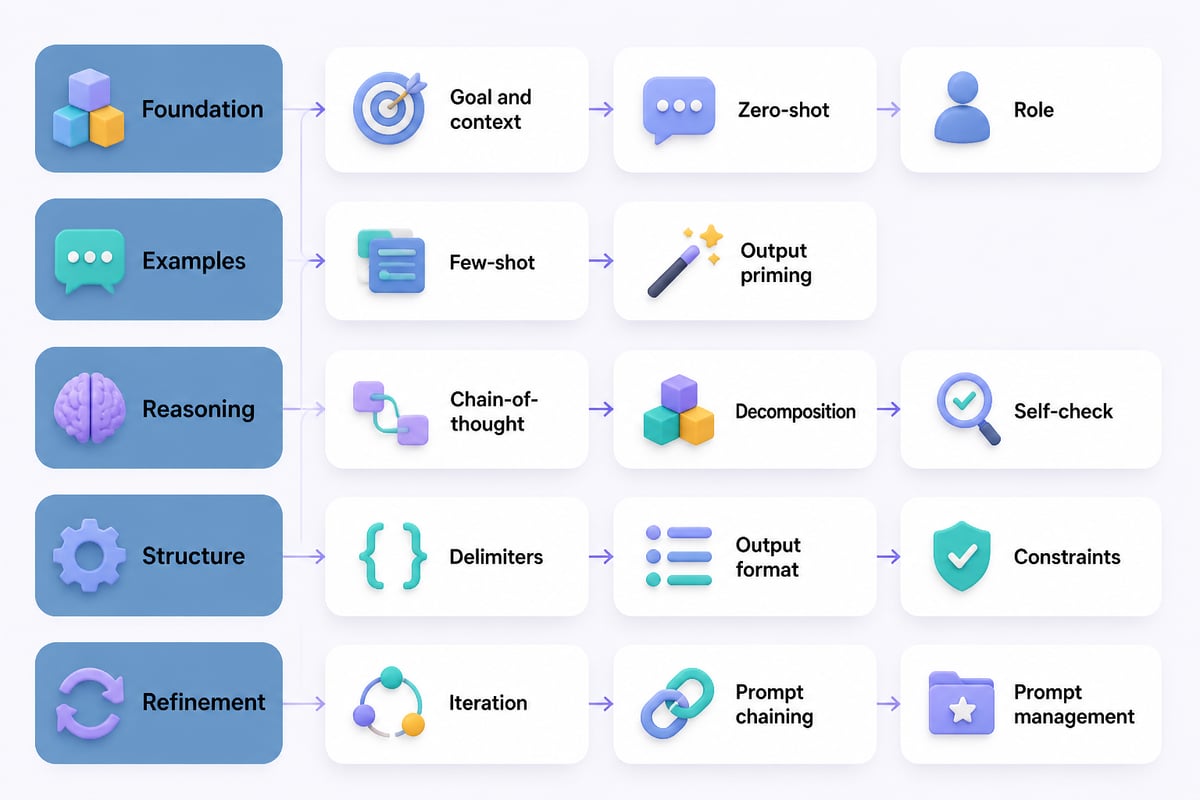
6. Task decomposition
Decomposition splits a large request into smaller ones the model handles one at a time. Instead of "write a market analysis," ask for competitors first, then customer segments, then risks, then a combined summary.
Smaller tasks give you checkpoints. You can correct a weak section before it contaminates the rest, and each answer stays focused.
- Best for: reports, plans and anything that would take you several hours.
- Verdict: the most reliable way to improve long outputs.
7. Prompt chaining
Prompt chaining feeds one prompt's output into the next. IBM identifies prompt chaining as linking prompts so that one prompt's output becomes the next prompt's input.
A common business chain: extract key points from meeting notes, turn those points into action items with owners, then draft a follow-up email from the action items. Each step is simple, and you can inspect the handoff between steps.
- Best for: repeatable workflows such as meeting follow-ups and content pipelines.
- Verdict: decomposition made repeatable.
8. Output format specification
Tell the model exactly how to structure its answer: a table with named columns, three bullets under 20 words each, or a JSON object with fixed keys. Without this, the model picks a format, and it may not match where the text is going next.
Specify length, order and headings. "Return a table with columns: Risk, Likelihood, Owner, Mitigation" saves editing time and makes outputs comparable across runs.
- Best for: reports, spreadsheets and anything pasted into another tool.
- Verdict: one line that removes a lot of reformatting.
9. Delimiters and clear syntax
Use visible separators to mark which text is instruction and which is material to work on. Triple quotes, XML-style tags or labeled headings all work: "Summarize the text between the markers below."
This matters most when you paste emails, contracts or transcripts, because the model can otherwise treat parts of that text as commands. Clear syntax is one of the techniques named in Microsoft's prompt-engineering guidance.
- Best for: long pasted inputs and mixed instructions.
- Verdict: cheap insurance against confused outputs.
10. Output priming
Output priming starts the answer for the model by supplying the opening words or structure. End your prompt with "Executive summary:" or begin a table header yourself, and the model continues in that shape.
It is a gentle way to lock in format and voice without long instructions. Microsoft's prompt-engineering guidance lists output priming as a named technique.
- Best for: keeping responses short and on-pattern.
- Verdict: small trick, steady results.
11. Constraints and negative instructions
State what the answer must avoid or stay within: word limits, banned phrases, sources it may use, topics to skip. Boundaries are part of the goal-context-output-limits pattern from technique 1, but they deserve their own pass on a draft that keeps drifting.
Phrase constraints positively where you can ("use plain language") and keep a short "do not" list for the repeat offenders.
- Best for: brand voice, compliance-sensitive writing and tight word counts.
- Verdict: tighten these after the first draft shows you what goes wrong.
12. Iterative refinement
Treat the first answer as a draft and give specific feedback: "Shorten the second paragraph, keep the numbers, drop the opening anecdote." This follows Anthropic's advice on refining prompts through iteration.
Vague feedback ("make it better") produces vague changes. Point at the exact part and name the change. When a refined prompt finally works, save it.
- Best for: polished deliverables such as proposals and executive summaries.
- Verdict: the technique professionals use most after the basics.
13. Self-check and critique passes
Ask the model to review its own output against criteria you supply: "Check this draft against the brief. List anything missing, anything unsupported, and anything off-tone, then revise."
This catches omissions and unsupported claims before you see them. It does not replace your own review of facts, figures and names, because a model can confidently approve its own mistakes.
- Best for: drafts that need to meet a written brief or checklist.
- Verdict: a cheap second pair of eyes, never the final one.
14. Reusable prompt templates
Turn a prompt that worked into a template with placeholders: [audience], [goal], [source text], [format]. Fill the blanks each time instead of rewriting from scratch.
Templates make results consistent across a team and cut the time spent re-inventing instructions. Our collection of AI prompting templates shows the structure in practice.
- Best for: recurring tasks such as reports, outreach and ticket replies.
- Verdict: where prompting skill turns into saved hours.
15. Prompt management and versioning
Once prompts matter to a business, they need the same care as other working documents: version history, testing against sample inputs, and a place where colleagues find the approved version. The tools below cover that. Prices are the starting figures researched for each tool and may have changed.
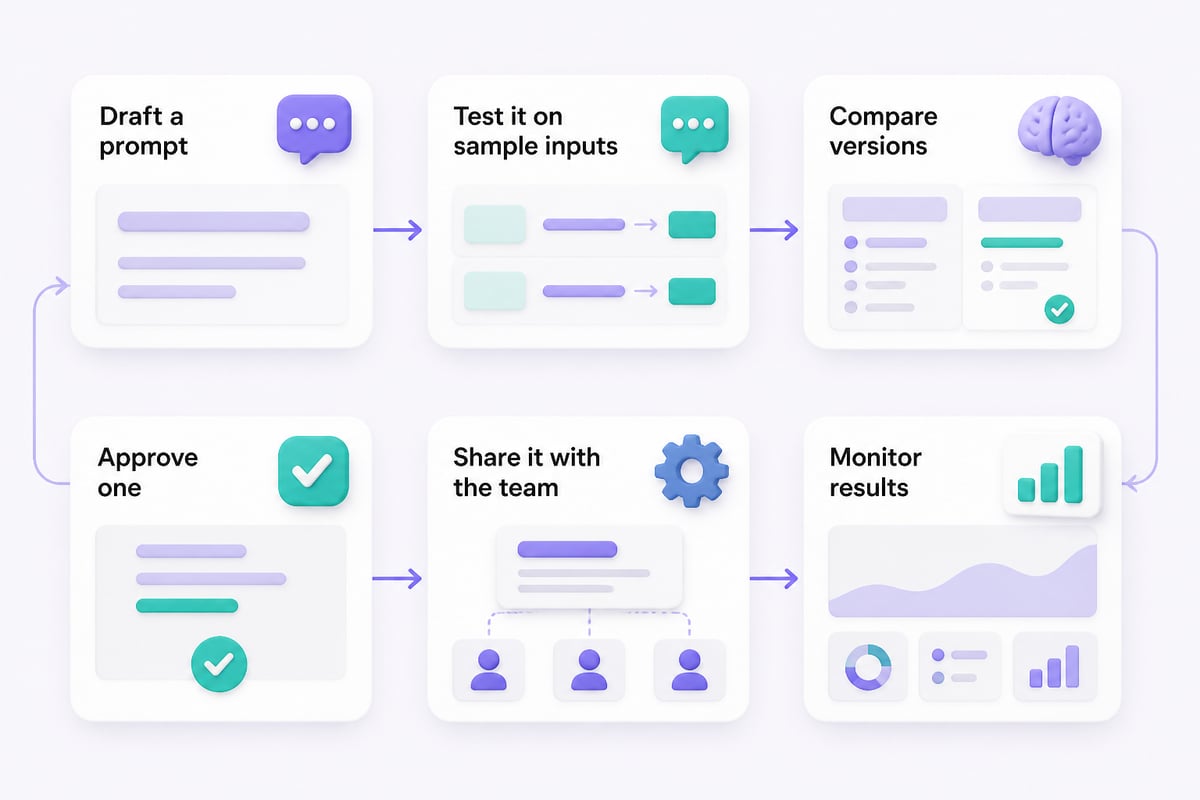
PromptHub has a free plan, with paid plans from $9 per month. It offers prompt versioning, prompt testing, prompt templates and access controls. Best for teams organizing, testing and sharing reusable prompts. Verdict: a low-cost entry point on this list.
Agenta has a free plan, with paid plans from $29 per month. It offers prompt versioning, testing and evaluations, tracing, and multi-provider deployment. Best for open-source teams managing prompts and evaluations across the development lifecycle. Verdict: strong where evaluation matters as much as storage.
Langfuse has a free plan, with paid plans from $29 per month. It offers open-source prompt management plus tracing and observability. Best for teams that want open-source prompt management with observability. Verdict: a fit when you also want to see how prompts behave in production.
PromptLayer has a free plan, with paid plans from $49 per month. It offers prompt versioning, testing and evaluation, and a prompt registry. Best for teams that need a prompt registry and want non-engineers to edit prompts. Verdict: the pick when marketing or operations staff own prompt wording.
If you want to build the skill behind these tools, Mammoth Club's AI certification and training offers courses and practice questions on using ChatGPT and Claude to automate tasks and improve productivity.

Comparing the 15 AI prompting techniques at a glance
The table groups the techniques by what they fix, so you can pick based on the problem in front of you.
| # | Technique | Fixes | Effort | Best use |
|---|---|---|---|---|
| 1 | Goal, context, output, limits | Vague results | Low | Any important task |
| 2 | Zero-shot | Slow starts | Very low | Familiar tasks |
| 3 | Few-shot | Format mismatch | Medium | Labeling, tone matching |
| 4 | Role prompting | Wrong perspective | Low | Reviews, audience tone |
| 5 | Chain-of-thought | Weak reasoning | Low | Multi-variable decisions |
| 6 | Task decomposition | Shallow long outputs | Medium | Reports, plans |
| 7 | Prompt chaining | Manual copy-paste | Medium | Repeatable workflows |
| 8 | Output format specification | Reformatting | Low | Tables, structured data |
| 9 | Delimiters | Confused inputs | Low | Pasted documents |
| 10 | Output priming | Format drift | Low | Short, patterned answers |
| 11 | Constraints | Off-brand drafts | Low | Compliance, word limits |
| 12 | Iterative refinement | Near-miss drafts | Medium | Polished deliverables |
| 13 | Self-check passes | Missed requirements | Low | Brief-driven drafts |
| 14 | Prompt templates | Inconsistency | Medium | Recurring tasks |
| 15 | Prompt management tools | Lost or untested prompts | Medium | Teams sharing prompts |
How to choose AI prompting techniques for a task
Start with technique 1 and add one other technique at a time based on the failure you see. Output too generic: add context or few-shot examples. Reasoning shaky: add chain-of-thought or decomposition. Format wrong: specify the format or prime the output. Results inconsistent across colleagues: write a template.
A practical sequence for a new business task:
- Write a zero-shot prompt with goal, context, output and limits.
- Read the result and name the single biggest flaw.
- Add the one technique that targets that flaw.
- Repeat until the output is usable, then save the prompt as a template.
If you want a structured path through these methods, the AI prompting course and the broader prompting guide cover them step by step.

FAQ
What is the easiest prompting technique to start with?
Technique 1: state your goal, give context, name the output you want, and set limits. It needs no special syntax and improves almost every result.
Do I need to use all 15 techniques in one prompt?
No. Most good prompts combine two or three. Pick based on the specific problem with the output.
What is the difference between zero-shot and few-shot prompting?
Zero-shot gives an instruction with no examples. Few-shot adds one or more input-output examples first, so the model copies the pattern.
When should I use chain-of-thought prompting?
Use it when the answer depends on several steps or trade-offs, such as comparing vendors or checking a schedule. For simple lookups or rewording, it adds length without benefit.
Do these techniques work in both ChatGPT and Claude?
The principles apply to both, since they rely on clear instructions, examples and structure rather than a single product feature. Wording that works in one usually transfers to the other with small adjustments.
How do I keep prompts consistent across a team?
Save working prompts as templates with placeholders, and store them in a shared, versioned place. The management tools in technique 15 exist for this.
Pick one prompt you use every week, rewrite it with technique 1 and one example from technique 3, and compare the two outputs side by side. If you want ready-made versions to start from, Prompt Hero.Ai publishes practical tutorials with step-by-step instructions, copy-and-paste prompts and examples for ChatGPT and Claude, built around business tasks like automation and productivity. For structured, certificate-backed practice, you can also explore Mammoth Club. Start with a tutorial that matches your current workload and adapt the prompt to your own material.