
An AI prompting cheat sheet is a short reference of prompt formulas, techniques and ready-to-paste templates that helps you get usable output from ChatGPT, Claude and similar tools on the first or second try. The core idea is simple: state who the AI should act as, what the task is, what context it needs, what format you want back, and what limits apply. This guide gives you that formula, a set of copy-paste prompts for common work tasks, the techniques worth memorizing, and four prompt libraries you can buy or browse when you need more.
1. The five-part prompt formula
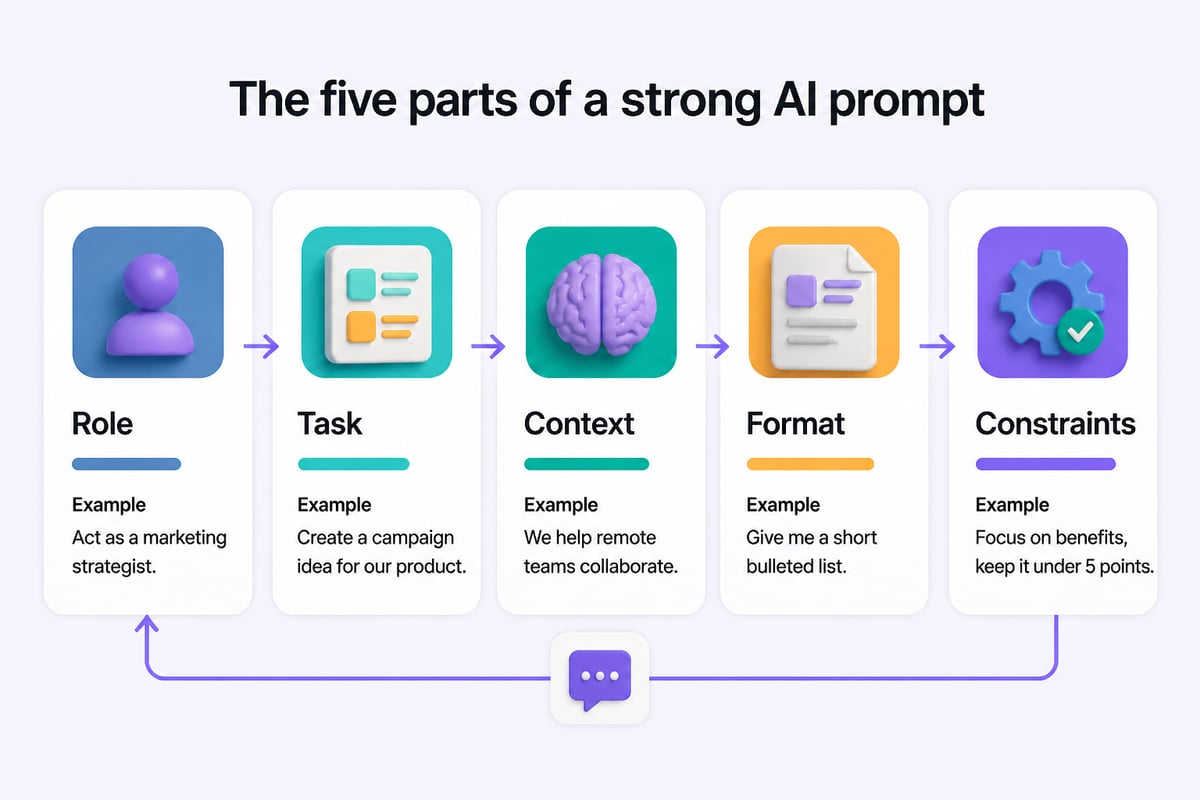
A reliable prompt has five parts: role, task, context, format and constraints. Writing them in that order covers most of what goes wrong with vague requests.
- Role: who the AI should act as ("a senior financial analyst").
- Task: the one specific job to do ("summarize this report for a non-technical board").
- Context: background the AI can't guess (audience, goal, source material).
- Format: the shape of the answer (table, three bullets, 150 words, email).
- Constraints: what to avoid or limit (no jargon, cite only the text provided, plain American English).
Here is the formula as a fill-in-the-blank template:
Act as [role]. Your task is to [task]. Context: [audience, goal, background]. Return the answer as [format]. Constraints: [limits, things to avoid]. If anything is unclear, ask me up to three questions before answering.
That last sentence matters. Letting the model ask clarifying questions often prevents a wrong first draft and saves a round of edits.
2. What are the 5 P's of prompting?
The 5 P's of prompting are commonly given as Purpose, Persona, Parameters, Pattern and Polish, a memory aid for the same ideas as the formula above. There is no single official version, so treat it as a mnemonic rather than a standard.
| P | What it means | Example |
|---|---|---|
| Purpose | The outcome you want | "Draft a renewal email that keeps the client" |
| Persona | The role the AI plays | "Act as an account manager" |
| Parameters | Length, tone, audience, limits | "Under 120 words, warm but direct" |
| Pattern | The structure or examples to follow | "Use the format of the sample below" |
| Polish | Review and refinement | "Critique your draft, then rewrite it" |
If you prefer one formula, use role, task, context, format, constraints. If a mnemonic sticks better, use the 5 P's. They lead to the same habits.
3. What is a prompt example? Weak versus strong
A prompt example shows the exact text you send to the AI, and the gap between a weak and a strong one is mostly specificity.
Weak: "Write a follow-up email."
Strong: "Act as a B2B sales rep. Write a follow-up email to a procurement manager who attended our demo last Tuesday but hasn't replied. Goal: book a 20-minute pricing call. Tone: confident, not pushy. Under 110 words. End with two proposed time slots."
The strong version names the audience, the trigger, the goal, the tone, the length and the call to action. The model no longer has to guess any of them. For more worked comparisons, see these AI prompting examples.
4. Copy-paste prompts for everyday professional work
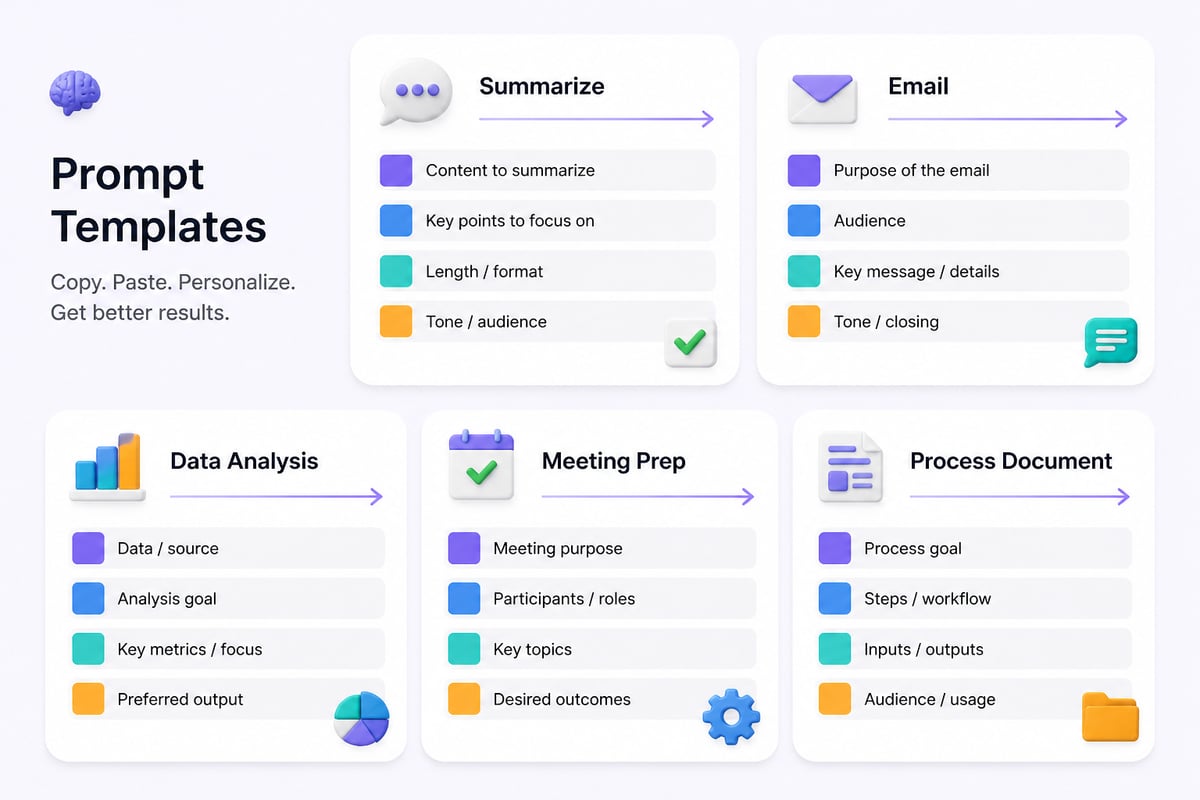
These templates are ready to paste. Replace the bracketed parts and keep the structure.
Summarize a long document
Summarize the text below for [audience]. Give me: (1) a three-sentence overview, (2) five key points as bullets, (3) any decisions or deadlines mentioned, (4) open questions. Use only the text provided and say "not stated" if something is missing.
Draft a professional email
Write an email to [recipient and role]. Purpose: [goal]. Key facts to include: [facts]. Tone: [tone]. Maximum [number] words. Give me two subject line options.
Analyze a spreadsheet or dataset (paste data)
You are a data analyst. Review the data below and identify the three most important trends, one anomaly worth checking, and two questions a manager should ask next. Present findings in a table with columns: Finding, Evidence, Suggested action.
Prepare for a meeting
I'm meeting [person/role] about [topic]. Based on the notes below, list likely objections, the strongest counterpoints, and five questions I should ask. Keep each item to one sentence.
Turn rough notes into a process document
Convert these notes into a numbered standard operating procedure. Include purpose, prerequisites, steps, common mistakes and a final checklist. Flag any step that sounds ambiguous so I can clarify it.
Hypothetical example: a manager could paste raw meeting notes into the SOP prompt and ask the model to flag ambiguous steps, turning the flagged items into an agenda for a short follow-up with the team.
5. Techniques worth memorizing
Six techniques cover most professional use, and each fits in a single line you can add to any prompt.
- Zero-shot: ask directly with clear instructions and no examples. Fine for simple tasks.
- Few-shot: show examples of the output you want. Anthropic's Claude prompting best practices recommend using a few relevant, diverse, structured examples when examples help.
- Chain of thought: ask the model to reason step by step before answering. Useful for math, logic and multi-factor decisions. A walkthrough is available in this guide to chain-of-thought prompting.
- Self-critique: "Review your answer for errors and gaps, then give a corrected version."
- Prompt chaining: split a big job into a sequence of smaller prompts, feeding each output into the next.
- Meta-prompting: ask the AI to write or improve the prompt for you ("Ask me five questions, then write the best possible prompt for this task").
A broader survey of these methods, including self-consistency and retrieval-augmented generation, appears in TechRepublic’s prompt engineering cheat sheet. A catalog of reusable prompt patterns, spanning zero-shot and few-shot prompting through self-critique and meta-prompting, is also published at Best-AI.org.
6. Structure tricks for long or complex prompts
When a prompt contains documents, instructions and examples together, structure keeps the model from mixing them up.
- Use delimiters. Claude's guidance recommends XML-style tags to separate instructions, context, examples and input in complex prompts. For example:
<document>...</document>,<instructions>...</instructions>. - Put long material first. The same guide recommends placing long-form data near the top of the prompt, before the query, instructions and examples.
- Number your requirements. A numbered list is easier for the model to follow, and easier for you to check afterward.
- Ask for the format explicitly. If you need a table, JSON or a memo, say so.
A skeleton you can reuse:
<document>[paste text]</document>
<instructions>[what to do, numbered]</instructions>
<format>[output shape]</format>
7. How can I get AI prompts? Four libraries compared
You can get AI prompts by writing your own with the formula above, adapting templates, or using a prompt library; the four below are the most common paid and free options. Prices are approximate and the spec details come from each product's published description; check each site for current pricing.
PromptBase
A marketplace with 240,000+ verified prompts, sold individually at roughly $2.99 to $19.99 each. It suits readers who need one prompt for a specific niche task and would rather pay a few dollars than build it from scratch. Verdict: best for single, specialized prompts.
AIPRM
A browser extension that works inside ChatGPT, with 5,400+ public prompts and a focus on SEO and marketing. Plans run roughly $20 to $79 per month. It suits SEO and marketing professionals who want prompts available inside the ChatGPT window. Verdict: strong for marketing teams, narrower elsewhere.
FlowGPT
A community-driven prompt library with a free tier and paid options; paid plan prices aren't listed here. It suits readers who want to explore prompts others have created without paying. Verdict: a good free place to browse and borrow ideas, with quality that varies by contributor.
God of Prompt
A bundle of 30,000+ prompts covering multiple industries, with lifetime updates, priced at roughly $37 to $150. It suits professionals who want a broad library and ongoing access without a subscription. Verdict: best for breadth and one-time pricing.
Mammoth Club – AI Certification & Training
Mammoth Club is a training subscription rather than a prompt pack: it offers 3,000+ courses and over 1 million practice questions, built by a team that has sold more than 9 million online courses. It teaches you to use tools like ChatGPT and Claude to automate tasks and build job-ready skills, so it suits people who want structured learning and a certificate instead of a library of templates. Verdict: best when you want to build the skill, not just collect prompts.

| Option | Format | Approx. price (Nov 2026) | Best for |
|---|---|---|---|
| PromptBase | Individual prompt marketplace, 240,000+ prompts | $2.99–$19.99 per prompt | A specific niche task |
| AIPRM | Browser extension, 5,400+ public prompts | $20–$79/month | SEO and marketing inside ChatGPT |
| FlowGPT | Community prompt library | Free tier; paid prices not listed | Browsing community prompts at no cost |
| God of Prompt | 30,000+ prompts, lifetime updates | $37–$150 | Broad library, one-time access |
| Mammoth Club | 3,000+ courses, 1M+ practice questions | See product page | Structured AI training and certification |
8. What are some good ChatGPT prompts? Starter set by function
Good ChatGPT prompts share one trait: they give the model a job, the material and a target format. These starters work in Claude as well.
- Marketing: "Write three LinkedIn post drafts about [topic] for [audience]. Each should open with a specific claim, not a question, and stay under 120 words."
- Operations: "Turn this checklist into a weekly review template with owners, due dates and a red/amber/green status column."
- Finance: "Explain the variance between budget and actual in the table below in plain English, and list the two lines most worth investigating."
- HR: "Rewrite this job description to remove jargon and unnecessary requirements. Keep the responsibilities section to six bullets."
- Customer support: "Draft a reply to this complaint that acknowledges the problem, states what we will do, and gives a clear timeline. Do not promise anything not listed in the policy below."
For a wider set of ready examples, the prompting guide goes through more task types.
9. A repair kit for weak outputs
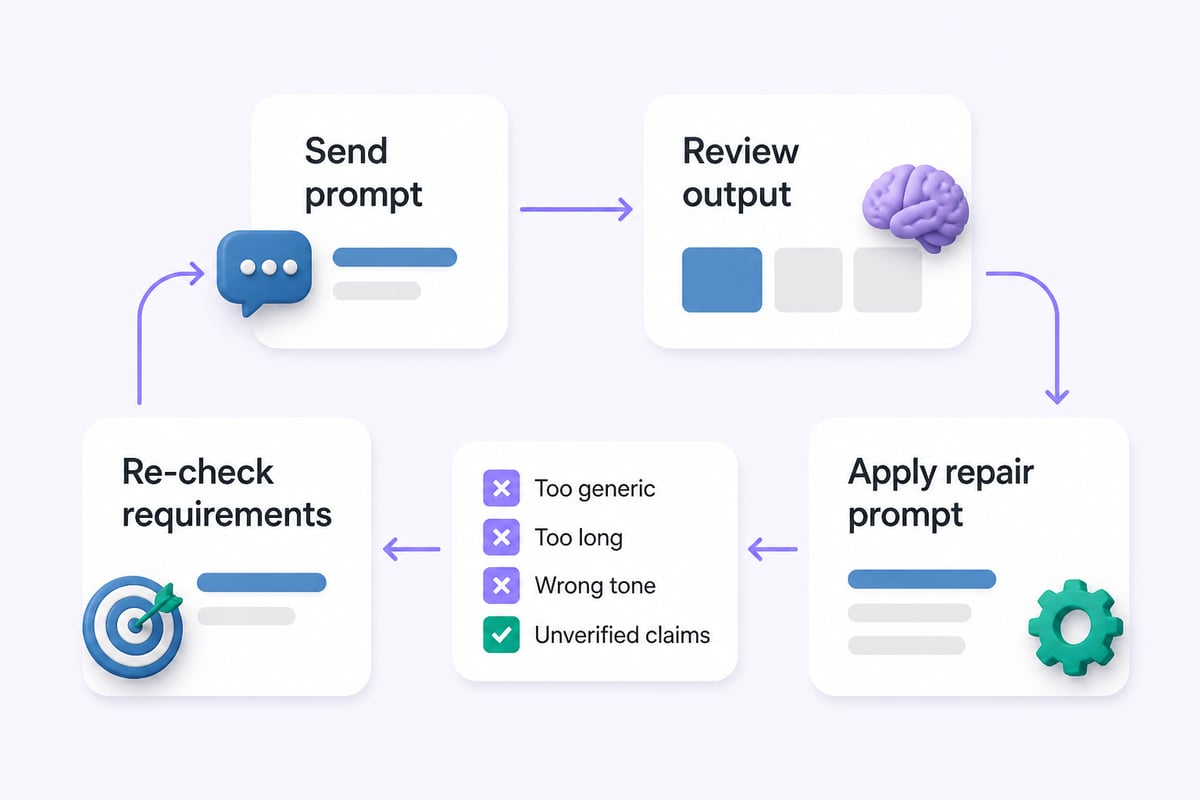
When an answer comes back wrong, a short follow-up prompt usually fixes it faster than starting over. Keep these on hand:
- Too generic: "Make this specific to [industry/company]. Replace every general statement with a concrete example."
- Too long: "Cut this to half the length. Keep the numbers and the recommendation."
- Wrong tone: "Rewrite in a [tone] voice. Remove filler phrases and exclamation marks."
- Possible errors: "List every factual claim in your answer and mark which ones come from the text I provided and which you inferred."
- Missed instructions: "Check your answer against my original requirements one by one and fix anything that doesn't match."
Treat the model's first output as a draft. Two or three targeted corrections usually beat a long rewrite of the original prompt.
10. Mistakes that quietly lower quality
Most poor results trace back to a few habits you can correct in one sitting.
- Stuffing several jobs into one prompt. Split them and chain the outputs.
- Leaving out the audience. The same content reads differently for executives and for new hires.
- Pasting confidential data. Check your company's AI policy before sharing client or financial details.
- Trusting facts without checking. Verify names, figures and citations before they leave your desk.
- Never saving what works. Keep a personal swipe file of prompts that gave good results, labeled by task.
If you want structured practice instead of trial and error, an AI prompting course can take you from these habits to repeatable workflows.
11. Frequently asked questions
Is one AI prompting cheat sheet enough for every tool?
The core formula of role, task, context, format and constraints works across ChatGPT, Claude and most other assistants. Details differ by tool, such as how each handles long documents or tags, so test your best prompts in the tool you use daily.
How long should a prompt be?
As long as it needs to be to remove guesswork, and no longer. A three-line prompt with a clear task and format often beats a page of loosely related instructions.
Should I use examples in every prompt?
Not always. Simple requests work without them. For output that must match a style or structure, add a few examples; the Claude guidance cited above suggests 3 to 5.
Can the AI write my prompts for me?
Yes. Ask it to interview you with a few questions and then draft the prompt. Review the result and trim anything you don't need.
Do I need a paid prompt library?
No. The templates in this article cover common professional tasks. A library helps when you want niche prompts quickly or a large collection to browse.
Pick one task you repeat every week, rewrite its prompt with the five-part formula, and save the version that works as your first template. If you want more step-by-step tutorials and copy-and-paste prompts built for professional use, Prompt Hero.Ai covers how to automate tasks and solve business problems with tools like ChatGPT and Claude. For structured training with certification, you can also look at Mammoth Club – AI Certification & Training.